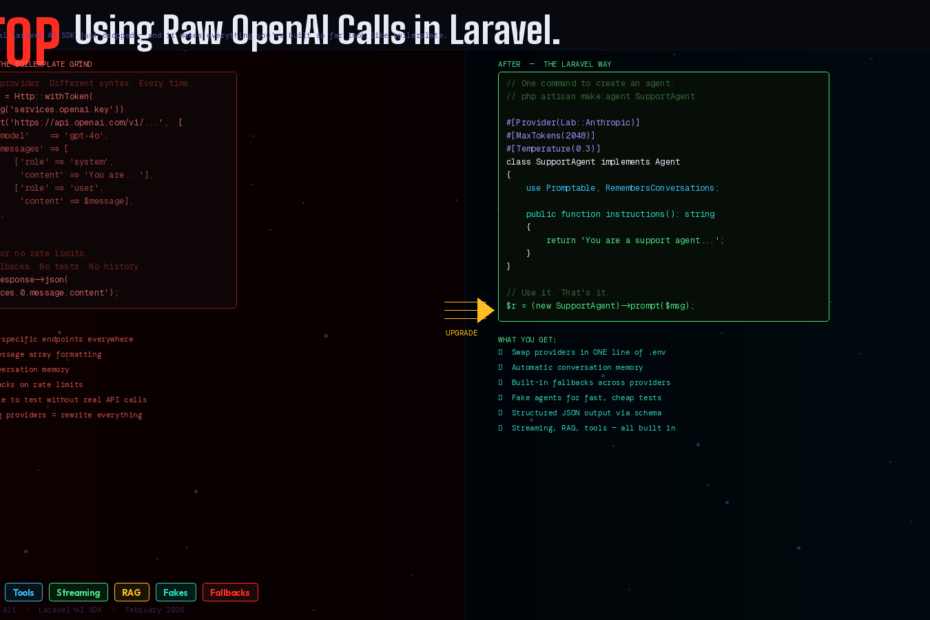
The official Laravel AI SDK just dropped — and it makes everything you’ve built so far look like boilerplate.
Be honest. Your current AI integration in Laravel looks something like this:
$response = Http::withToken(config('services.openai.key'))
    ->post('https://api.openai.com/v1/chat/completions', [
        'model'    => 'gpt-4o',
        'messages' => [
            ['role' => 'system', 'content' => 'You are a helpful assistant.'],
            ['role' => 'user',   'content' => $userMessage],
        ],
    ]);

return $response->json('choices.0.message.content');
Raw HTTP calls. Provider-specific endpoints. Manual message formatting. No conversation history. No testing. No fallbacks. No structure.
For a long time, building AI-powered features in Laravel meant stitching together community packages, manually handling requests to OpenAI, and writing complex logic to persist conversation history.
That just changed. On February 5th, 2026, Laravel introduced a new official AI SDK, now documented in the Laravel 12.x docs, aimed at making it easier to build AI-powered features directly into Laravel applications.
Here’s everything you need to know — and how to migrate your first feature today.
What the Laravel AI SDK Actually Is
The Laravel AI SDK provides a unified, expressive API for interacting with AI providers such as OpenAI, Anthropic, Gemini, and more. With the AI SDK, you can build intelligent agents with tools and structured output, generate images, synthesize and transcribe audio, create vector embeddings, and much more — all using a consistent, Laravel-friendly interface.
The key word is unified. Rather than tying your application to a single vendor, the SDK supports multiple AI providers behind a consistent interface — Anthropic, Gemini, OpenAI, ElevenLabs, and more — and you can swap models in a single line of code.
But more importantly, it’s not just a thin wrapper around HTTP calls. It brings the Laravel way to AI — Artisan commands, facades, queues, testable fakes, conversation storage via database migrations, and provider fallbacks that handle rate limits automatically.
Installation: Two Commands
composer require laravel/ai

php artisan vendor:publish --provider="Laravel\Ai\AiServiceProvider"
php artisan migrate
The migration creates agent_conversations and agent_conversation_messages tables — the foundation for persistent, stateful AI interactions.
Then add your API keys to .env:
ANTHROPIC_API_KEY=sk-ant-...
OPENAI_API_KEY=sk-...
GEMINI_API_KEY=...
Configure your default provider in config/ai.php:
'default' => env('AI_PROVIDER', 'anthropic'),
Done. Every agent you create from this point forward will use Anthropic by default — or whichever provider you configure. Switching providers across your entire app is one .env change.
The Core Concept: Agents
Each agent is a dedicated PHP class that encapsulates the instructions, conversation context, tools, and output schema needed to interact with a large language model. Think of an agent as a specialized assistant — a sales coach, a document analyzer, a support bot — that you configure once and prompt as needed throughout your application.
Generate your first agent:
php artisan make:agent SupportAgent
This creates app/Ai/Agents/SupportAgent.php:
<?php

namespace App\Ai\Agents;

use Laravel\Ai\Contracts\Agent;
use Laravel\Ai\Promptable;

class SupportAgent implements Agent
{
    use Promptable;

    public function instructions(): string
    {
        return 'You are a friendly support agent for our SaaS product.
                Always be concise, helpful, and refer users to docs when appropriate.
                Never promise features that do not exist.';
    }
}
Use it anywhere in your application:
use App\Ai\Agents\SupportAgent;

$response = (new SupportAgent)->prompt($request->input('message'));

return response()->json(['reply' => (string) $response]);
That’s it. No HTTP calls. No API key management. No message formatting. The agent handles everything.
PHP Attributes for Agent Configuration
Agent middleware lets you intercept and modify prompts, and PHP attributes let you configure the provider, token limits, and temperature directly on the class:
use Laravel\Ai\Attributes\Provider;
use Laravel\Ai\Attributes\MaxTokens;
use Laravel\Ai\Attributes\Temperature;
use Laravel\Ai\Providers\Lab;

#[Provider(Lab::Anthropic)]
#[MaxTokens(2048)]
#[Temperature(0.3)]
class SupportAgent implements Agent
{
    use Promptable;

    public function instructions(): string
    {
        return 'You are a precise, factual support agent...';
    }
}
For a creative writing agent you’d set Temperature(0.9). For a data extraction agent, Temperature(0.1). Provider, tokens, and temperature — all declared on the class, not buried in a config file.
Conversation Memory: Two Approaches
Manual Memory (You Control History)
Implement the Conversational interface and return whatever messages you want from your database:
use Laravel\Ai\Contracts\Conversational;
use Laravel\Ai\Messages\Message;

class SupportAgent implements Agent, Conversational
{
    use Promptable;

    public function __construct(private readonly User $user) {}

    public function instructions(): string
    {
        return 'You are a support agent...';
    }

    public function messages(): iterable
    {
        return $this->user->supportMessages()
            ->latest()
            ->limit(20)
            ->get()
            ->reverse()
            ->map(fn($m) => new Message($m->role, $m->content))
            ->all();
    }
}
Automatic Memory (Laravel Handles It)
If you would like Laravel to automatically store and retrieve conversation history for your agent, you may use the RemembersConversations trait:
use Laravel\Ai\Concerns\RemembersConversations;
use Laravel\Ai\Contracts\Conversational;

class SupportAgent implements Agent, Conversational
{
    use Promptable, RemembersConversations;

    public function instructions(): string
    {
        return 'You are a support agent...';
    }
}
Laravel stores every exchange in the agent_conversations tables automatically. Your chatbot has persistent memory with zero extra code.
Tools: Give Your Agent Real Superpowers
Tools transform an agent from a text generator into something that can actually act inside your application. Create a tool with:
php artisan make:tool GetOrderStatus
<?php

namespace App\Ai\Tools;

use App\Models\Order;
use Laravel\Ai\Contracts\Tool;

class GetOrderStatus implements Tool
{
    public function __construct(private readonly int $orderId) {}

    public function description(): string
    {
        return 'Retrieves the current status of a customer order by order ID.';
    }

    public function handle(): string
    {
        $order = Order::find($this->orderId);

        if (! $order) {
            return "Order #{$this->orderId} not found.";
        }

        return "Order #{$this->orderId} is currently: {$order->status}.
                Last updated: {$order->updated_at->diffForHumans()}.";
    }
}
Register it on your agent:
public function tools(): iterable
{
    return [
        new GetOrderStatus($this->orderId),
        new GetCustomerHistory($this->user->id),
    ];
}
Now when a user asks “what’s the status of my order?”, the agent calls your tool, gets real data from your database, and responds with accurate, live information — not hallucinated guesses.
Provider tools like WebSearch, WebFetch, and FileSearch let agents access real-time information and stored documents. These tools are executed by the provider itself, enabling powerful capabilities like searching the web for current events or fetching content from URLs.
Structured Output: Predictable, Parseable Responses
Free-form text is fine for chat. But for data extraction, lead scoring, or document analysis, you need structured JSON. When you need more than free-form text, agents support structured output using JSON schemas — perfect for building features like lead qualification systems, data extraction pipelines, or any workflow that needs predictable, parseable responses:
use Illuminate\Contracts\JsonSchema\JsonSchema;
use Laravel\Ai\Contracts\HasStructuredOutput;

class LeadQualifier implements Agent, HasStructuredOutput
{
    use Promptable;

    public function instructions(): string
    {
        return 'You are a B2B lead qualification specialist.
                Analyze the provided company information and score the lead.';
    }

    public function schema(JsonSchema $schema): array
    {
        return [
            'score'          => $schema->integer()->min(1)->max(10)->required(),
            'tier'           => $schema->string()->enum(['hot', 'warm', 'cold'])->required(),
            'reasoning'      => $schema->string()->required(),
            'follow_up_days' => $schema->integer()->min(1)->max(30)->required(),
        ];
    }
}

// Usage — response is array-accessible, not a string
$result = (new LeadQualifier)->prompt($companyData);

$score      = $result['score'];       // int: 8
$tier       = $result['tier'];        // string: 'hot'
$followUp   = $result['follow_up_days']; // int: 2
No JSON parsing. No json_decode(). No hoping the model formats it correctly. The schema enforces structure at the provider level.
Streaming: AI That Feels Instant
Nobody wants to stare at a loading spinner while the model thinks. Stream the response word-by-word:
// In your controller
Route::get('/chat', function (Request $request) {
    return (new SupportAgent)->stream($request->input('message'));
});
<!-- In your Vue component -->
<script setup>
const reply = ref('')

async function sendMessage(message) {
    const response = await fetch(`/chat?message=${encodeURIComponent(message)}`)
    const reader = response.body.getReader()
    const decoder = new TextDecoder()

    while (true) {
        const { done, value } = await reader.read()
        if (done) break
        reply.value += decoder.decode(value)
    }
}
</script>
The response streams token-by-token. Users see words appearing in real time — the same experience as ChatGPT, built entirely with Laravel.
Provider Fallbacks: Never Go Down
When prompting or generating media, you may provide an array of providers and models to automatically failover to a backup provider or model if a service interruption or rate limit is encountered:
use Laravel\Ai\Providers\Lab;

$response = (new SupportAgent)->prompt(
    $message,
    provider: [Lab::Anthropic, Lab::OpenAI, Lab::Gemini],
);
Anthropic down? Falls back to OpenAI. OpenAI rate-limited? Falls back to Gemini. Your users experience zero downtime — all handled by one line of configuration.
Testing: First-Class Fakes
This is the feature that separates a professional AI integration from a hobby project. The SDK lets you fake agents, images, audio, transcriptions, embeddings, reranking, and file stores — so you can ship AI features with real test coverage.
use App\Ai\Agents\SupportAgent;

it('returns a helpful response to a support query', function () {
    SupportAgent::fake([
        'How do I reset my password?' => 'You can reset your password from the login page.',
    ]);

    $response = (new SupportAgent)->prompt('How do I reset my password?');

    expect((string) $response)
        ->toBe('You can reset your password from the login page.');
});
No real API calls in tests. No flaky tests that fail when OpenAI is slow. No test bills accumulating on your API account. Deterministic, fast, reliable.
RAG: Your Own Knowledge Base
The AI SDK includes a SimilaritySearch tool that searches vector embeddings in your database — meaning you can build knowledge bases and let agents answer questions using your own data with retrieval-augmented generation (RAG):
use Laravel\Ai\Tools\SimilaritySearch;
use App\Models\Document;

class KnowledgeBaseAgent implements Agent
{
    use Promptable;

    public function instructions(): string
    {
        return 'Answer questions using only the documents provided.
                If the answer is not in the documents, say so clearly.';
    }

    public function tools(): iterable
    {
        return [
            SimilaritySearch::usingModel(Document::class, 'embedding'),
        ];
    }
}
Feed your documentation, product specs, or knowledge base into the vector store. Your agent answers questions from your own data — not from general training data.
The Migration Path
If you have existing raw HTTP AI calls in your Laravel app, here’s how to migrate:
composer require laravel/aiand run migrations- Create an agent for each AI interaction:
php artisan make:agent - Move your system prompt into
instructions() - Replace
Http::post(...)with(new YourAgent)->prompt($message) - Add
RemembersConversationsif you need history - Write tests using
YourAgent::fake()
You don’t need to migrate everything at once. Start with one feature, see how clean the code becomes, and work through the rest.
This Is Laravel at Its Best
The Laravel AI SDK isn’t just a convenience package. It’s a statement about how AI integration should work in a PHP application — the same way queues, mail, notifications, and storage work in Laravel: behind a consistent, testable, provider-agnostic interface.
Raw HTTP calls to OpenAI were the stopgap. This is the real solution.
Follow me for daily deep-dives on Laravel, PHP, Vue.js, and AI integrations. New article every day.