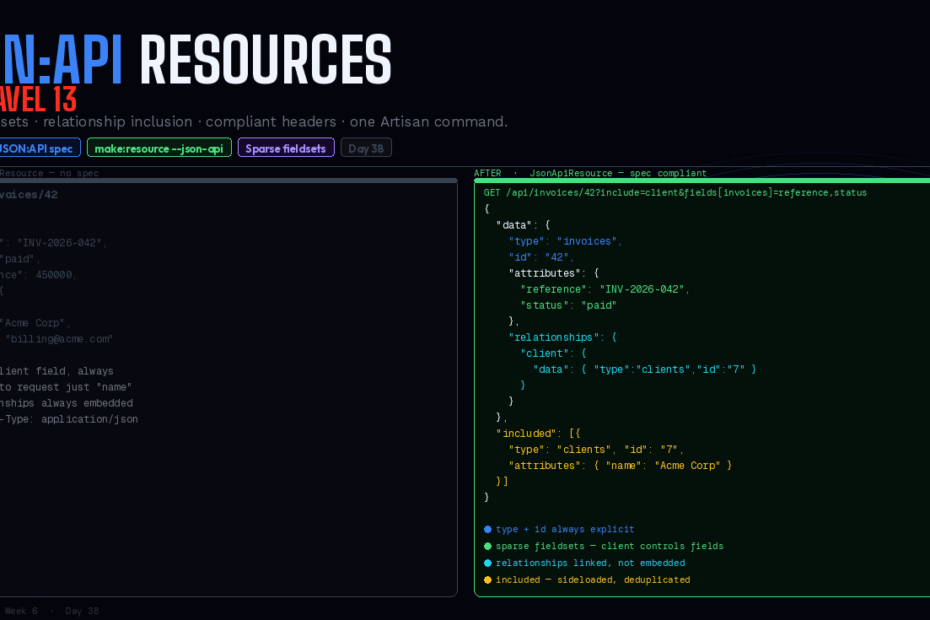
JsonApiResource handles resource serialization, relationship inclusion, sparse fieldsets, links, meta, and the correct Content-Type header — automatically. No package. No spec-juggling. One Artisan command.
Every team building a serious API eventually hits the same problem: everyone makes different decisions about how to structure responses, and those decisions pile up until your API is a collection of inconsistencies that clients have to special-case.
Should relationships be embedded or linked? Should IDs be strings or integers? What does a paginated collection look like? How do clients request only the fields they need? How do errors get formatted? These aren’t hard questions in isolation. They’re hard because teams answer them differently, per endpoint, as the need arises — and the drift compounds over months.
The JSON:API specification solves this by answering every one of those questions with a widely-adopted, client-agnostic standard. Laravel 13 ships first-party support for it.
JsonApiResource is a new resource class that produces responses compliant with the JSON:API specification. It extends the standard JsonResource class and automatically handles resource object structure, relationships, sparse fieldsets, includes, and sets the Content-Type header to application/vnd.api+json.
What JSON:API Actually Specifies
Before the code, the contract. A JSON:API response for a single resource looks like this:
GET /api/posts/1

{
    "data": {
        "type": "posts",
        "id": "1",
        "attributes": {
            "title": "Laravel 13 Ships JSON:API Resources",
            "excerpt": "Your API just got a spec.",
            "published_at": "2026-03-27T10:00:00Z"
        },
        "relationships": {
            "author": {
                "data": { "type": "users", "id": "42" }
            }
        },
        "links": {
            "self": "https://api.example.com/posts/1"
        }
    },
    "included": [
        {
            "type": "users",
            "id": "42",
            "attributes": {
                "name": "Sadique Ali"
            }
        }
    ]
}
Three things make this different from a standard JsonResource response:
- Resource identity is explicit — every resource has a
typeand anid, separate from itsattributes - Relationships are structured, not embedded — related resources appear in
included, not nested inside the resource - The client controls what it gets — sparse fieldsets (
?fields[posts]=title) and relationship inclusion (?include=author) are built into the spec
Generating a JSON:API Resource
Use the make:resource Artisan command with the --json-api flag:
php artisan make:resource PostResource --json-api
The generated class extends Illuminate\Http\Resources\JsonApi\JsonApiResource and includes $attributes and $relationships properties for you to define:
<?php

namespace App\Http\Resources;

use Illuminate\Http\Request;
use Illuminate\Http\Resources\JsonApi\JsonApiResource;

class PostResource extends JsonApiResource
{
    /**
     * The resource's attributes.
     *
     * @var array<string>
     */
    public $attributes = [
        'title',
        'excerpt',
        'content',
        'published_at',
        'slug',
    ];

    /**
     * The resource's relationships.
     *
     * @var array<string, class-string<JsonApiResource>>
     */
    public $relationships = [
        'author'   => UserResource::class,
        'comments' => CommentResource::class,
        'tags'     => TagResource::class,
    ];
}
Use it in controllers exactly like a standard JsonResource:
// PostController.php
public function show(Post $post): PostResource
{
    return PostResource::make($post);
}

public function index(): PostResourceCollection
{
    return PostResource::collection(Post::paginate(20));
}
The response automatically includes the Content-Type: application/vnd.api+json header, wraps the data in the correct {"data": {...}} envelope, and uses type and id from the resource class name and model primary key.
Type and ID Customisation
By default, the resource’s type is derived from the resource class name. PostResource produces the type posts and BlogPostResource produces blog-posts. The resource’s ID is resolved from the model’s primary key. If you need to customize these values, you may override the toType and toId methods on your resource:
class AuthorResource extends JsonApiResource
{
    // AuthorResource wraps a User model — type should be "authors" not "users"
    public function toType(Request $request): string
    {
        return 'authors';
    }

    // Use UUID instead of integer primary key
    public function toId(Request $request): string
    {
        return (string) $this->uuid;
    }
}
Sparse Fieldsets — Clients Request Only What They Need
Sparse fieldsets work out of the box. Clients can use the fields parameter to request only the attributes they need, with no additional controller logic required.
GET /api/posts?fields[posts]=title,excerpt,published_at

{
    "data": {
        "type": "posts",
        "id": "1",
        "attributes": {
            "title": "Laravel 13 Ships JSON:API Resources",
            "excerpt": "Your API just got a spec.",
            "published_at": "2026-03-27T10:00:00Z"
        }
        // content and slug omitted — client didn't ask for them
    }
}
No code changes. No controller logic. The framework reads the fields query parameter and filters the response automatically. Clients building list views can request only title,slug,published_at and omit content — smaller payloads, faster responses, zero server-side configuration per client.
Sparse fieldsets apply per resource type, so multi-resource responses are precise too:
GET /api/posts/1?include=author&fields[posts]=title,excerpt&fields[users]=name
The post gets title and excerpt. The included author gets only name. Both filtered without any controller intervention.
Expensive attributes with lazy closures
For attributes that are costly to compute (database queries, HTTP calls), wrap them in a closure — they’re only evaluated when the client actually requests them:
public $attributes = [
    'title',
    'excerpt',
    // Only evaluated when fields[posts] includes 'engagement_stats'
    'engagement_stats' => fn () => $this->loadEngagementData(),
];
Relationship Inclusion
Relationships are opt-in by default. Clients must use the include query parameter to request relationship data. This prevents over-fetching and keeps responses lean.
# Load the post with its author included
GET /api/posts/1?include=author

# Load with author and comments
GET /api/posts/1?include=author,comments

# Deep nesting — author's profile
GET /api/posts/1?include=author.profile
Included relationships appear in the top-level included array, deduplicated. If three posts include the same author, that author appears once:
{
    "data": [ ... ],
    "included": [
        {
            "type": "users",
            "id": "42",
            "attributes": { "name": "Sadique Ali" }
        }
    ]
}
Configure the maximum depth to prevent abuse:
// AppServiceProvider.php
JsonApiResource::maxRelationshipDepth(3);
Including all eager-loaded relationships
If you would like to include all previously eager-loaded relationships regardless of the query string, you may call the includePreviouslyLoadedRelationships method:
// Include all relationships loaded via ->load(), regardless of ?include= parameter
return $post->load('author', 'comments')
    ->toResource()
    ->includePreviouslyLoadedRelationships();
Links and Meta
You may add links and meta information to your JSON:API resource objects by overriding the toLinks and toMeta methods on the resource:
class PostResource extends JsonApiResource
{
    public $attributes = ['title', 'excerpt', 'published_at'];

    public $relationships = ['author' => UserResource::class];

    public function toLinks(Request $request): array
    {
        return [
            'self' => route('api.posts.show', $this->resource),
        ];
    }

    public function toMeta(Request $request): array
    {
        return [
            'readable_date'  => $this->published_at->diffForHumans(),
            'reading_time'   => ceil(str_word_count($this->content) / 200) . ' min',
        ];
    }
}
Output:
{
    "data": {
        "type": "posts",
        "id": "1",
        "attributes": { ... },
        "links": {
            "self": "https://api.example.com/posts/1"
        },
        "meta": {
            "readable_date": "2 days ago",
            "reading_time": "5 min"
        }
    }
}
A Complete Working Example
An InvoiceResource for a billing API — the kind you’d actually build:
<?php

namespace App\Http\Resources;

use Illuminate\Http\Request;
use Illuminate\Http\Resources\JsonApi\JsonApiResource;

class InvoiceResource extends JsonApiResource
{
    public $attributes = [
        'reference',
        'status',
        'due_date',
        'paid_at',
        // Lazy — only computed when requested
        'formatted_amount' => fn () => '$' . number_format($this->amount_pence / 100, 2),
        'is_overdue'       => fn () => $this->isOverdue(),
    ];

    public $relationships = [
        'client'    => ClientResource::class,
        'lineItems' => LineItemResource::class,
    ];

    public function toLinks(Request $request): array
    {
        return [
            'self' => route('api.invoices.show', $this->resource),
            'pdf'  => route('api.invoices.pdf', $this->resource),
        ];
    }

    public function toMeta(Request $request): array
    {
        return [
            'line_item_count' => $this->line_items_count ?? null,
        ];
    }
}
// InvoiceController.php
public function index(): JsonResponse
{
    $invoices = Invoice::withCount('lineItems')
        ->paginate(20);

    return InvoiceResource::collection($invoices)
        ->response();
}

public function show(Invoice $invoice): InvoiceResource
{
    return InvoiceResource::make($invoice->load('client', 'lineItems'));
}
# Mobile app — list view, minimal payload
GET /api/invoices?fields[invoices]=reference,status,formatted_amount,due_date

# Dashboard — full invoice with client
GET /api/invoices/42?include=client,lineItems&fields[invoices]=reference,status&fields[clients]=name

# All fields, all relationships
GET /api/invoices/42?include=client,lineItems
Disabling Sparse Fieldsets
For internal APIs or specific endpoints where you always want the full response:
return $invoice->toResource()->ignoreFieldsAndIncludesInQueryString();
Companion: Spatie Laravel Query Builder
Laravel’s JSON:API resources handle the serialization of your responses. If you also need to parse incoming JSON:API query parameters such as filters and sorts, Spatie’s Laravel Query Builder is a great companion package.
composer require spatie/laravel-query-builder
use Spatie\QueryBuilder\QueryBuilder;

public function index(): AnonymousResourceCollection
{
    $invoices = QueryBuilder::for(Invoice::class)
        ->allowedFilters(['status', 'client.name'])
        ->allowedSorts(['due_date', 'amount_pence', 'created_at'])
        ->allowedIncludes(['client', 'lineItems'])
        ->paginate(20);

    return InvoiceResource::collection($invoices);
}
Now ?filter[status]=overdue&sort=-due_date&include=client works without any controller plumbing.
Testing JSON:API Responses
public function test_invoice_resource_returns_json_api_structure(): void
{
    $invoice = Invoice::factory()->create();

    $this->getJson("/api/invoices/{$invoice->id}")
         ->assertOk()
         ->assertHeader('Content-Type', 'application/vnd.api+json')
         ->assertJsonStructure([
             'data' => [
                 'type',
                 'id',
                 'attributes' => ['reference', 'status', 'formatted_amount'],
                 'links'      => ['self'],
             ]
         ])
         ->assertJsonPath('data.type', 'invoices')
         ->assertJsonPath('data.id', (string) $invoice->id);
}

public function test_sparse_fieldsets_filter_response(): void
{
    $invoice = Invoice::factory()->create();

    $response = $this->getJson("/api/invoices/{$invoice->id}?fields[invoices]=reference");

    $attributes = $response->json('data.attributes');

    $this->assertArrayHasKey('reference', $attributes);
    $this->assertArrayNotHasKey('status', $attributes);
    $this->assertArrayNotHasKey('formatted_amount', $attributes);
}
When to Use JSON:API (and When Not To)
Reach for JsonApiResource when:
- You’re building a public or partner-facing API with multiple clients
- Mobile and web clients have different field requirements — sparse fieldsets pay off immediately
- Your API will be consumed by AI agents or MCP tools that benefit from a consistent, predictable structure
- You’re building an API-first product where the response contract is long-lived
Stick with plain JsonResource when:
- It’s an internal BFF (Backend for Frontend) serving one Inertia or Livewire app
- Your API is simple, stable, and under your full control
- You don’t have multiple clients with different field requirements
The Bigger Picture
The JSON:API spec has been around since 2015. What made it impractical for many Laravel teams wasn’t the spec itself — it was the implementation overhead. Before Laravel 13, building spec-compliant responses meant either a third-party package with its own learning curve or writing the serialisation by hand.
JSON:API resources handle resource object serialization, relationship inclusion, sparse fieldsets, links, and JSON:API-compliant response headers. The --json-api flag on make:resource is all it takes to start. The spec handles the decisions you used to make inconsistently. Your clients get predictable responses and the tools to ask for exactly what they need.
That’s the deal.
Follow for weekly deep-dives on Laravel, PHP, Vue.js, and the agentic stack.