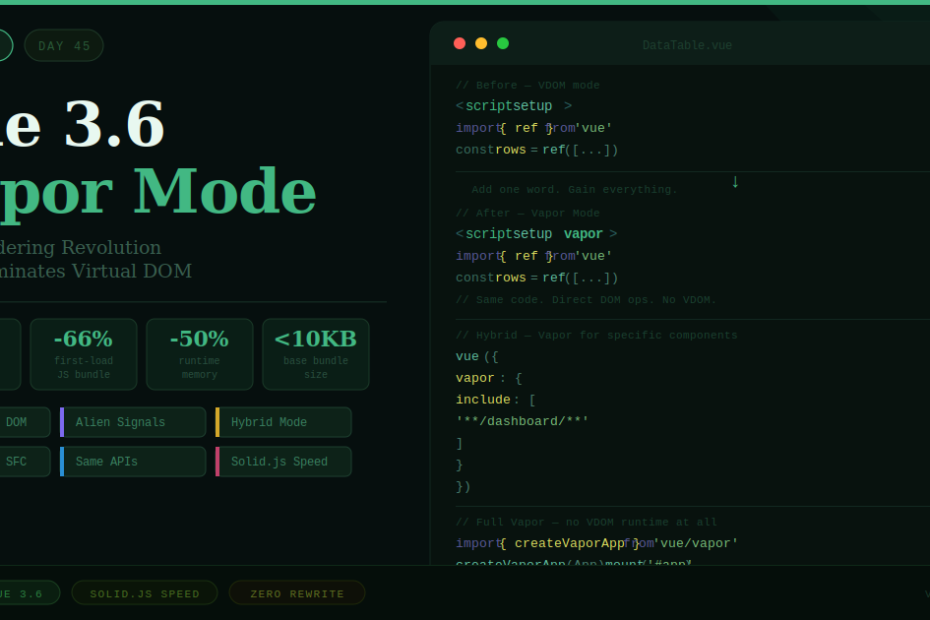
The virtual DOM served Vue well for a decade. Vue 3.6 just made it optional — and the benchmarks are jaw-dropping.
The virtual DOM has been Vue’s backbone since version 2. It’s elegant, predictable, and abstracted away the messy business of directly touching the DOM. But elegance has a cost: creating and diffing virtual DOM trees takes CPU cycles and memory, even when Vue’s compiler already does a brilliant job cutting wasted work.
Vue 3.6 introduces Vapor Mode — a new compilation strategy that eliminates the virtual DOM entirely for components that opt in. The result is performance on par with Solid.js and Svelte 5, without rewriting a single line of your component logic.
This is the biggest technical evolution Vue has shipped since version 3.0. Here’s everything you need to know.
Why the Virtual DOM Exists (And Why It Has a Cost)
Before understanding Vapor Mode, it helps to understand what it replaces.
When data changes in a traditional Vue component, the framework:
- Runs your render function to produce a new virtual DOM tree (a lightweight JS object representing the UI)
- Diffs the new tree against the previous one to find what changed
- Patches only the changed parts into the real DOM
This is the “reconciliation” model. It’s powerful because you write declarative templates and Vue handles all the DOM surgery. Vue 3 already made this significantly faster with static hoisting, patch flags, and block tree optimization.
But there’s an inherent ceiling. No matter how smart the compiler gets, the runtime still has to create VNode objects and run the diffing algorithm on every update. For most apps, this is imperceptible. For performance-sensitive UIs — dashboards with thousands of rows, data-heavy components, or apps targeting low-powered devices — it adds up.
What Vapor Mode Does Differently
Vapor Mode moves all the diffing work from runtime to compile time.
Instead of generating render functions that return virtual DOM nodes, the Vapor compiler generates direct DOM manipulation code. Your reactive state connects directly to DOM update functions — no VNode objects created, no diffing algorithm run, no reconciliation overhead.
Traditional Vue compilation output (simplified):
// What the compiler generates today
function render() {
  return createVNode('div', null, [
    createVNode('p', null, ctx.message),  // VNode created on every render
    createVNode('button', { onClick: ctx.handleClick }, 'Click me')
  ])
}
// Then Vue diffs this against the previous VNode tree at runtime
Vapor Mode compilation output (simplified):
// What Vapor generates
const p = document.createElement('p')
const button = document.createElement('button')
button.textContent = 'Click me'
button.addEventListener('click', ctx.handleClick)

// Fine-grained reactive effect — only runs when ctx.message changes
watchEffect(() => {
  p.textContent = ctx.message  // Direct DOM update, no diffing
})
The runtime becomes dramatically simpler. Vue’s reactive system (Proxy + effect tracking) knows exactly which DOM node depends on which piece of state, and updates only that node — nothing more.
The Numbers: What the Benchmarks Show
Vue 3.6 can mount 100,000 components in just 100 milliseconds, placing it in the same league as ultra-optimized frameworks like SolidJS.
In official tests, Vapor Mode shows dramatic wins — first-load JS drops by two-thirds, and runtime memory is nearly halved.
Benchmarks show up to 97% improvement in extreme cases, with Vapor Mode demonstrating the same level of performance as Solid and Svelte 5 in third-party benchmarks.
For the average CRUD app, you may not notice the difference. But for data tables, real-time dashboards, animation-heavy UIs, or apps targeting mid-range Android devices — this is a meaningful win.
Alien Signals: The Reactivity Upgrade Underneath
Vapor Mode gets most of the headlines, but Vue 3.6 also includes a major refactor of @vue/reactivity based on Alien Signals — a new low-level reactive primitive developed by Johnson Chu.
This major refactor of @vue/reactivity based on alien-signals significantly improves the reactivity system’s performance and memory usage.
Alien Signals enable ultra-precise updates: only the specific DOM nodes linked to a state property are re-rendered. Even in non-Vapor components, your app’s reactivity is faster and uses less memory in Vue 3.6 than in 3.5.
How to Enable Vapor Mode
This is the part that surprises most developers: you opt in per component with a single attribute.
<script setup vapor>
import { ref } from 'vue'

const count = ref(0)

function increment() {
  count.value++
}
</script>

<template>
  <div>
    <p>Count: {{ count }}</p>
    <button @click="increment">Increment</button>
  </div>
</template>
That’s it. Add vapor to <script setup>. Your template and setup logic stay identical. The compiler handles the rest.
Enabling Vapor Mode in Vite
To enable Vapor Mode globally or for specific component paths, configure it in vite.config.ts:
import { defineConfig } from 'vite'
import vue from '@vitejs/plugin-vue'

export default defineConfig({
  plugins: [
    vue({
      vapor: true, // Enable for ALL components
    })
  ]
})
Or use hybrid mode — Vapor only for performance-sensitive parts of your app:
export default defineConfig({
  plugins: [
    vue({
      vapor: {
        include: ['**/components/dashboard/**', '**/components/tables/**'],
      }
    })
  ]
})
Hybrid mode is the recommended approach for existing applications. You can migrate component-by-component, starting with the heaviest parts of your UI.
Creating a Full Vapor App
For new projects where you want to go all-in on Vapor and eliminate the virtual DOM runtime entirely:
import { createVaporApp } from 'vue/vapor'
import App from './App.vue'

// No VDOM runtime pulled in — smallest possible bundle
createVaporApp(App).mount('#app')
Apps created this way avoid pulling in the Virtual DOM runtime code and allow bundle baseline size to be drastically reduced. Vue 3.6 now weighs less than 10 KB in its base version when using Vapor Mode.
What’s Different in Vapor Components
For the most part, your component logic stays identical. There are a few things to be aware of:
Custom directives have a new signature:
// Old directive API
const MyDirective = {
  mounted(el, binding) {
    el.textContent = binding.value
  },
  updated(el, binding) {
    el.textContent = binding.value
  }
}

// Vapor directive API — reactive getter, optional cleanup
const MyDirective = (el, valueGetter) => {
  watchEffect(() => {
    el.textContent = valueGetter()  // Reactive getter instead of static value
  })
  return () => console.log('cleanup on unmount')
}
A codemod is available to migrate existing directives automatically:
npx vue-codemod migrate-vapor-directives ./src
Options API is not supported in Vapor Mode. Components must use <script setup>. If your codebase still uses Options API, you can mix — keep those components in VDOM mode, and opt Vapor into <script setup> components only.
Suspense in Vapor-only mode is not supported, but you can render Vapor components inside a VDOM Suspense boundary. The two modes interop seamlessly.
Using Vapor with UI Libraries
If you use Element Plus, Ant Design Vue, Naive UI or similar libraries, they don’t need to be rewritten. The vaporInteropPlugin handles the bridge:
import { defineConfig } from 'vite'
import vue from '@vitejs/plugin-vue'
import { vaporInteropPlugin } from '@vue/vapor-interop'

export default defineConfig({
  plugins: [
    vue({ vapor: true }),
    vaporInteropPlugin(),  // Enables VDOM components inside Vapor apps
  ]
})
Standard props, events, and slots work across the boundary. Complex components with slots and scoped slots need testing, but basic usage works out of the box.
The Vue 3.6 Vapor Roadmap
Vapor Mode is currently in beta in Vue 3.6, with a predicted stable release in Q4 2026, and Vapor Mode as the recommended default mode by 2027. Nuxt 4.x is already preparing support for Vapor Mode integration.
The current recommendation from the Vue team:
- ✅ Use Vapor for performance-sensitive sub-pages in existing apps
- ✅ Build small new apps entirely in Vapor Mode
- ⚠️ Test complex library components carefully in hybrid setups
- ❌ Don’t use Options API components in Vapor Mode
Should You Use It Today?
Yes, experimentally — with clear eyes about what “beta” means.
For new greenfield projects using <script setup> throughout, Vapor is a genuinely exciting option worth exploring. The API is stable enough to build with, the performance gains are real, and the migration path for directives is automated.
For existing large applications, the hybrid approach is ideal. Pick your most performance-critical component — a data table, a dashboard panel, a real-time chart — and opt it into Vapor. Measure the before and after. Let the benchmarks justify the broader rollout.
For Options API codebases, there’s no rush. Vue 3.5 is still rock-solid and fully supported. The Vapor migration path will be clearer once stable.
Final Thoughts
Vapor Mode is Vue answering the question that Solid.js and Svelte have been asking for years: why carry the virtual DOM at runtime if the compiler can figure everything out at build time?
The answer Vue’s team landed on is characteristically pragmatic — don’t force anyone to choose. Make Vapor opt-in, make it interoperable with existing VDOM components, keep the same APIs developers already know, and let the compiler do the heavy lifting.
With the introduction of Vapor Mode, developers can achieve unparalleled rendering efficiency without altering their existing codebases. This mode, alongside the significant reactivity performance improvements, positions Vue.js as a leader in modern front-end development.
One flag. Same templates. Same <script setup>. Dramatically better performance.
That’s the Vue way — and it’s why Vapor Mode might just be the most important thing to happen to the framework since Composition API.