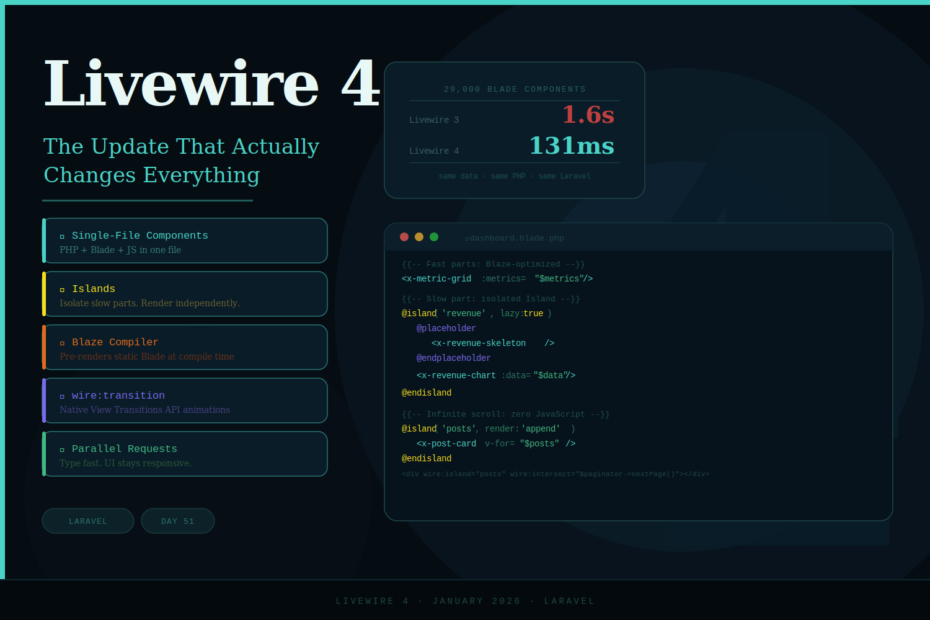
Single-file components, Islands, the Blaze compiler, and wire:transition — Livewire 4 makes the fast way the easy way.
Caleb Porzio opened his Laracon US talk by acknowledging the elephant in the room: Livewire had become “completely and totally forked” with three different ways to make components. His solution? A fourth way — one that becomes the new default and brings the whole ecosystem into alignment.
Livewire 4 launched in January 2026, and it’s the biggest release since the framework’s inception. It doesn’t add complexity — it removes friction. Better defaults, less boilerplate, and a set of performance features that make dashboards that once took 2.5 seconds load nearly instantly.
As Caleb put it: “The fast way should be the easy way.” Livewire 4 delivers on that.
Here’s everything that changed.
Feature 1: Single-File Components — Everything in One Place
In Livewire 3, building a component meant juggling three separate files: a PHP class in app/Livewire/, a Blade view in resources/views/livewire/, and if you needed JavaScript, a third file. Context switching was constant.
Livewire 4 introduces Single-File Components (SFCs) as the new default. Your class, template, and JavaScript live together in one file.
{{-- resources/views/components/⚡counter.blade.php --}}

@php
new class extends Livewire\Component {
    public int $count = 0;

    public function increment(): void
    {
        $this->count++;
    }

    public function decrement(): void
    {
        $this->count = max(0, $this->count - 1);
    }
}
@endphp

<div class="flex items-center gap-4">
    <button wire:click="decrement" class="px-4 py-2 bg-gray-200 rounded">-</button>
    <span class="text-2xl font-bold">{{ $count }}</span>
    <button wire:click="increment" class="px-4 py-2 bg-blue-500 text-white rounded">+</button>
</div>

<script>
    // Optional: component-scoped JavaScript
    // 'this' is an alias for $wire
    console.log('Counter initialized with value:', this.count)
</script>
Generate one with:
php artisan make:livewire counter
The ⚡ emoji prefix in the filename is real — it’s valid Unicode, it works everywhere, and it makes Livewire components instantly distinguishable from regular Blade components in your file tree. (You can disable it in config if you prefer.)
For larger components that need more organization, the multi-file component (MFC) format keeps everything together in a single directory:
resources/views/components/⚡user-profile/
    ├── index.blade.php    # Template
    ├── index.php          # Class
    ├── index.js           # JavaScript
    └── index.css          # Styles
php artisan make:livewire user-profile --mfc
Feature 2: Islands — The Performance Game-Changer
Islands are the game-changer in Livewire 4. Wrap expensive parts of your component in island tags and they render independently. Slow database queries no longer block your entire page.
The problem Islands solve is fundamental: traditional Livewire components re-render completely on any update. If your dashboard has one slow query, every action — even clicking an unrelated button — triggers that slow query again.
Before Islands — everything re-renders together:
class Dashboard extends Component
{
    public function render()
    {
        return view('dashboard', [
            'metrics'  => $this->getMetrics(),      // Fast: 10ms
            'revenue'  => $this->getRevenue(),      // SLOW: 1 second
            'activity' => $this->getActivity(),     // Fast: 20ms
        ]);
    }

    public function refreshMetrics(): void
    {
        // This action forces EVERYTHING to re-render
        // Including the slow revenue query — every single time
    }
}
After Islands — expensive parts render independently:
<div class="dashboard">
    {{-- Fast parts render immediately with Blaze --}}
    <x-metric-grid :metrics="$metrics" />
    <x-activity-feed :activity="$activity" />

    {{-- Revenue island: lazy-loaded, won't block the rest --}}
    @island('revenue', lazy: true)
        @placeholder
            <x-revenue-skeleton />  {{-- Shows while loading --}}
        @endplaceholder

        <x-revenue-chart :data="$expensiveRevenueData" />
    @endisland

    {{-- Reports island: infinite scroll with zero JavaScript --}}
    @island('reports', render: 'append')
        @foreach($reports as $report)
            <x-report-card :report="$report" />
        @endforeach
    @endisland

    {{-- Trigger next page when this div scrolls into view --}}
    <div wire:island="reports" wire:intersect="$paginator->nextPage()"></div>
</div>
A demo shown at Laracon had a page that took 2.5 seconds become nearly instant. A data table with 29,000 Blade components dropped from 1.6 seconds to 131 milliseconds.
Islands can also poll independently — keep a live data section refreshing without affecting the rest of the page:
@island('live-stats', poll: '3s')
    <x-live-visitor-count :count="$visitorCount" />
@endisland
Feature 3: The Blaze Compiler — 20× Faster Blade Rendering
Blaze is a new optimization layer that makes Blade components render 20x faster by “code folding”, pre-rendering static parts at compile time.
The idea is elegant: instead of re-evaluating every Blade component on every request, Blaze analyzes your templates at compile time and pre-renders the static portions. Only the dynamic parts get evaluated at runtime.
Enable it with a single directive:
{{-- button.blade.php --}}
@blaze
@props(['variant' => 'primary', 'size' => 'md'])

<button type="button" class="btn btn-{{ $variant }} btn-{{ $size }}">
    {{ $slot }}
</button>
That’s it. Blaze works transparently with your existing Blade templates. If a component can’t be optimized, it automatically falls back to normal rendering — no breaking changes, just graceful degradation.
Benchmark results shown at Laracon:
- Before Blaze: 29,000 views rendered in 1.6 seconds
- After Blaze: same views rendered in 131 milliseconds
Feature 4: wire:transition — Native Browser Animations
Animations in Livewire 3 required Alpine.js wrappers and careful coordination. Livewire 4 replaces all of that with the browser’s native View Transitions API.
{{-- Elements smoothly fade in/out when they appear/disappear --}}
@if($showNotification)
    <div wire:transition>
        <x-notification :message="$message" />
    </div>
@endif
That single wire:transition directive is all you need. No CSS, no JavaScript, no configuration. Hardware-accelerated animations, built in.
For custom transitions, give it a name and target it in CSS:
<div wire:transition="slide-panel">
    <x-side-panel :user="$selectedUser" />
</div>
::view-transition-old(slide-panel) {
    animation: slide-out-right 300ms ease;
}
::view-transition-new(slide-panel) {
    animation: slide-in-left 300ms ease;
}
Users who prefer reduced motion automatically skip transitions — respect for accessibility is built into the API.
Feature 5: PHP 8.4 Property Hooks Integration
Livewire 4 fully embraces PHP 8.4 property hooks — native getters and setters that replace Livewire’s updating hooks.
// Before — Livewire-specific lifecycle hooks
public function updatingCount($value): void
{
    if ($value < 0) {
        $this->count = 0;
    }
}

// After — native PHP 8.4 property hooks
public int $count = 0 {
    set(int $value) => max(0, $value);
}
Cleaner, more idiomatic, and your IDE fully understands it.
You can also use property hooks for computed caching:
public string $expensiveData {
    get => cache()->remember(
        "data-{$this->id}",
        3600,
        fn() => $this->fetchFromApi()
    );
}
Feature 6: Slots & Attribute Forwarding
One of the most-requested features since Livewire’s inception. Livewire 4 components now support full Blade-style slots and $attributes forwarding.
{{-- modal.blade.php --}}
@php
new class extends Livewire\Component {
    public bool $isOpen = false;

    public function open(): void  { $this->isOpen = true; }
    public function close(): void { $this->isOpen = false; }
}
@endphp

<div>
    @if($isOpen)
        <div class="modal" wire:transition>
            <div class="modal-header">
                {{ $title ?? 'Dialog' }}
            </div>
            <div class="modal-body">
                {{ $slot }}
            </div>
            <div class="modal-footer">
                {{ $footer ?? '' }}
                <button wire:click="close">Close</button>
            </div>
        </div>
    @endif
</div>
Usage — named slots work exactly like Blade components:
<wire:modal>
    <x-slot:title>Confirm Deletion</x-slot:title>

    Are you sure you want to delete this record?

    <x-slot:footer>
        <button wire:click="$parent.deleteRecord()" class="btn-danger">
            Delete
        </button>
    </x-slot:footer>
</wire:modal>
Attribute forwarding also works — pass classes, data attributes, and IDs directly to components:
<wire:alert type="error" class="mb-4" data-testid="error-alert">
    Something went wrong!
</wire:alert>
Feature 7: Smarter Loading States
Livewire 4 automatically adds a data-loading attribute to any element that triggers a network request. No more complex wire:loading configurations — just use CSS or Tailwind’s data attribute selectors.
{{-- Tailwind 4 integration is seamless --}}
<button wire:click="save" class="data-[loading]:opacity-50 data-[loading]:cursor-wait">
    Save
    <svg class="not-data-[loading]:hidden animate-spin">...</svg>
</button>

{{-- Or for sibling/parent elements --}}
<div class="data-[loading]:block hidden">
    <x-loading-spinner />
</div>
For Islands and lazy components, the @placeholder directive defines skeleton loaders right next to the content they replace:
@island('data-table', lazy: true)
    @placeholder
        <x-table-skeleton rows="10" />
    @endplaceholder

    <livewire:data-table :query="$query" />
@endisland
Feature 8: Parallel Requests
In Livewire 3, typing in a wire:model.live input queued requests sequentially. Type fast, and you’d see lag as requests piled up. Livewire 4 runs these requests in parallel. Type as fast as you want — the UI stays responsive.
Additionally, background polls no longer block user interactions. Previously, if you had a component polling every 5 seconds and the user clicked a button at the wrong moment, they’d have to wait for the poll to complete. In Livewire 4, human-initiated actions always take priority.
Upgrading from Livewire 3
Most applications can upgrade to v4 with minimal changes. The breaking changes are primarily configuration updates and method signature changes that only affect advanced usage.
The main things to check:
1. wire:model modifier behavior changed
{{-- v3: .blur only controlled network timing; state still synced immediately --}}
<input wire:model.blur="search">

{{-- v4: .blur controls when client-side state syncs too --}}
{{-- If you want the old v3 behavior, add .live: --}}
<input wire:model.live.blur="search">
2. Inertia::lazy() renamed
// v3
'users' => Inertia::lazy(fn() => User::all()),

// v4
'users' => Inertia::optional(fn() => User::all()),
3. Configuration keys reorganized — re-publish the config:
php artisan vendor:publish --tag=livewire-config --force
Using Laravel Shift automates most of the mechanical migration work.
Quick Install
composer require livewire/livewire:^4.0

php artisan livewire:upgrade  # Automated migration assistant
When to Use Livewire 4 vs Inertia.js 3
Both are excellent choices in 2026. Here’s a practical guide:
Choose Livewire 4 if:
- You’re building a SaaS dashboard, admin panel, or data-heavy internal tool
- Your team is PHP-first and wants to minimize context switching
- You’re using Filament (v5 runs on Livewire 4 natively)
- SEO matters and you want server-rendered content by default
Choose Inertia.js 3 if:
- You’re building a consumer-facing SPA where your team thinks in Vue or React
- You need deep JavaScript ecosystem integrations (complex state management, third-party JS libraries)
- You’re building a mobile app alongside the web app
For most Laravel SaaS products, Livewire 4 ships faster in the early stages. Islands specifically address Livewire’s old performance ceiling — the one that used to push teams toward Inertia for complex dashboards.
Final Thoughts
Livewire 4 is the framework maturing into its final form. Single-file components unify years of fragmentation. Islands solve the performance problem that plagued complex dashboards. Blaze makes Blade 20× faster without touching your templates. And wire:transition gives you native browser animations with a single HTML attribute.
The benchmark that sums it up: a data table with 29,000 Blade components. Before Livewire 4: 1.6 seconds. After: 131 milliseconds. Same data. Same PHP. Same Laravel. Just a better version of the framework.
If you’re on Livewire 3, the upgrade is smooth and the gains are real. Start with a staging environment, run the upgrade assistant, and let the benchmarks sell it to your team.
Livewire keeps raising the bar for what PHP-first development can do.