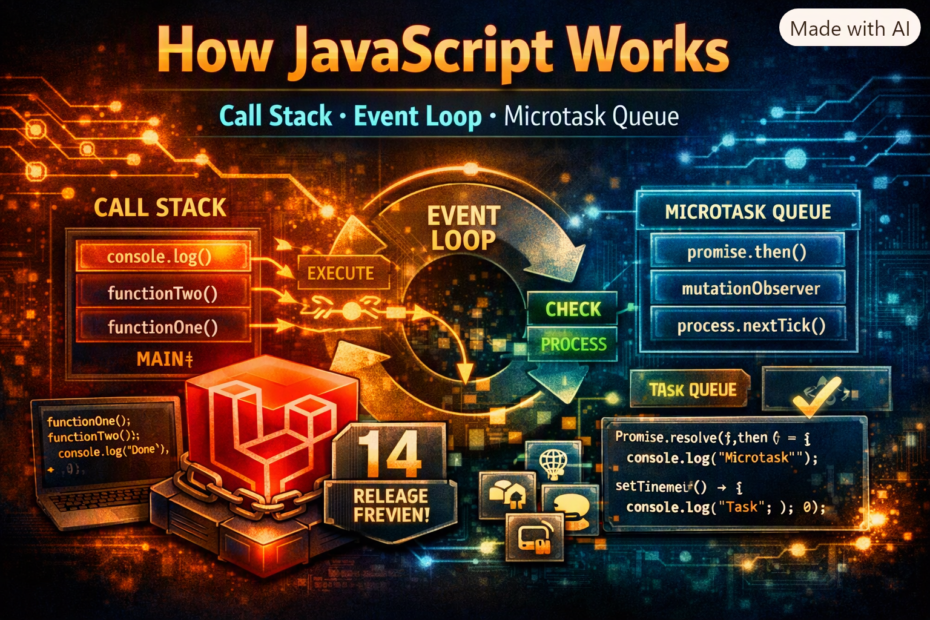
The question every senior JavaScript interview asks and half the answers get wrong. Stack frames, Web APIs, the task queue, the microtask queue, why Promises resolve before setTimeout, requestAnimationFrame timing, and the exact execution order that surprises even experienced developers — with runnable examples for every concept.
Paste this into a browser console or a Node REPL and predict the output before you press enter:
console.log('1');
setTimeout(() => console.log('2'), 0);
Promise.resolve().then(() => console.log('3'));
queueMicrotask(() => console.log('4'));
(async () => { console.log('5'); await null; console.log('6'); })();
console.log('7');
The answer most developers give is some flavor of 1, 5, 7, 2, 3, 4, 6 or 1, 2, 3, 4, 5, 6, 7, because “setTimeout with 0 means run right away” and “async stuff happens in the order it’s written” both feel true. The actual output is 1, 5, 7, 3, 4, 6, 2. Every one of those seven lines follows one rule, and the rule fits in a paragraph: run the current script to completion, then drain every microtask, then let the browser paint if it’s time, then take exactly one task from the task queue and repeat. That loop is the whole engine. This post builds it up one piece at a time, with a snippet for each piece you can run yourself, until the output above stops being surprising.
All of the examples run in a browser DevTools console unless noted. Where Node behaves differently, the Node section says so explicitly, because the differences are exactly where most confident-but-wrong answers come from.
The Call Stack: One Thing at a Time, Run to Completion
JavaScript has a single call stack. A function call pushes a frame; a return pops it; the engine only ever executes the frame on top. There is no preemption: once a function starts, nothing else in your program runs until it returns.
function c() { console.log('c'); }
function b() { c(); console.log('b'); }
function a() { b(); console.log('a'); }
a();
// c, b, a
The stack has a finite size, which is why unbounded recursion has a specific, catchable failure:
function recurse(n) { return recurse(n + 1); }

try {
  recurse(0);
} catch (e) {
  console.log(e instanceof RangeError, e.message);
  // true "Maximum call stack size exceeded"
}
The property that matters for everything below is run-to-completion. Because nothing can interrupt a running frame, a long synchronous task doesn’t just slow itself down. It freezes everything that was waiting behind it:
const start = performance.now();

setTimeout(() => {
  console.log(`timer fired after ${Math.round(performance.now() - start)}ms`);
}, 0);

while (performance.now() - start < 1000) {} // block the stack for one second

// timer fired after ~1000ms — asked for 0ms, got a full second
The timer was ready to fire at 0ms. It couldn’t, because the stack was busy, and a callback can only run when the stack is empty. Keep that sentence in mind; the rest of the event loop is elaboration on it.
Web APIs: setTimeout Isn’t JavaScript
setTimeout, fetch, DOM events, and requestAnimationFrame are not part of the JavaScript language. They’re provided by the host environment (the browser, or Node’s runtime), which does the actual waiting on its own threads, outside your call stack.
console.log('before');

setTimeout(() => console.log('timer callback'), 0);

console.log('after');
// before
// after
// timer callback
When setTimeout is called, the engine hands the timer to the host and immediately returns, popping the setTimeout frame off the stack. The host counts down, and when the timer expires it doesn’t run your callback. It places the callback in a queue, where it waits for the stack to be empty. That queue is the next piece.
Two Queues, and the Rule That Decides Everything
There isn’t one queue. There are two that matter, with different priorities.
Task queue (macrotasks)          Microtask queue
─────────────────────────        ──────────────────────────────
setTimeout / setInterval         Promise .then / .catch / .finally
DOM events (click, input)        queueMicrotask()
MessageChannel, postMessage      code after `await`
I/O callbacks                    MutationObserver callbacks
And the loop that services them, simplified from the HTML specification:
┌─► 1. Run the current script / one task from the task queue
│   2. Call stack empties → drain the ENTIRE microtask queue
│      (microtasks queued by microtasks run in this same drain)
│   3. If it's time to render: run requestAnimationFrame callbacks,
│      recalculate style and layout, paint
│   4. Go to 1 and take the next single task
└───────────────────────────────────────────────────────────
Two details in that diagram cause almost all of the wrong answers. First, the microtask queue is drained completely after every task, including microtasks that get added while draining. Second, only one task is taken per loop iteration, and rendering gets a chance to happen between tasks but never in the middle of a microtask drain.
Why Promises Resolve Before setTimeout
With the loop above, the classic ordering question answers itself:
console.log('A');

setTimeout(() => console.log('B'), 0);

Promise.resolve().then(() => console.log('C'));

console.log('D');

// A, D, C, B
The script itself is the first task. It runs A and D synchronously, schedules a timer (task queue) and a promise callback (microtask queue), then finishes. The stack is empty, so the microtask queue drains: C runs. Only then does the loop come back around for the next task, and B runs. The 0 in setTimeout(…, 0) was never a promise that the callback would run soon. It’s a minimum delay before the callback becomes eligible to be queued as a task, and a task always waits its turn behind every pending microtask.
This is also why the opening puzzle resolves the way it does: 3 and 4 are microtasks queued during the script, 6 is the continuation after await null (also a microtask), and 2 is a task, so it runs last.
await Is Just .then() in a Trench Coat
Code after an await doesn’t run synchronously and doesn’t run as a task. It runs as a microtask, exactly like a .then() callback:
async function f() {
  console.log('a');
  await null;
  console.log('b');
}

// Roughly equivalent to:
function f() {
  console.log('a');
  return Promise.resolve(null).then(() => {
    console.log('b');
  });
}
That equivalence is what makes the famous async-ordering interview question tractable. Run it, then trace it with the two queues:
async function async1() {
  console.log('async1 start');
  await async2();
  console.log('async1 end');
}

async function async2() {
  console.log('async2');
}

console.log('script start');

setTimeout(() => console.log('setTimeout'), 0);

async1();

new Promise((resolve) => {
  console.log('promise1');
  resolve();
}).then(() => console.log('promise2'));

console.log('script end');
script start     ← sync
async1 start     ← sync (async functions run synchronously until the first await)
async2           ← sync (async2 is called before the await pauses async1)
promise1         ← sync (the Promise executor runs synchronously)
script end       ← sync
async1 end       ← microtask #1 (queued when await hit an already-resolved promise)
promise2         ← microtask #2 (queued when .then attached to a resolved promise)
setTimeout       ← task
The detail worth internalizing: an async function runs synchronously up to its first await. Only what comes after the await is deferred. Older articles show promise2 printing before async1 end; that was true before an engine optimization to await (V8 shipped it in 2019) that made awaiting a native promise cost a single microtask tick. On any current engine, the order above is what you’ll see.
The Promise chain puzzle that still catches people
Promise.resolve()
  .then(() => {
    console.log(0);
    return Promise.resolve(4);
  })
  .then((res) => console.log(res));

Promise.resolve()
  .then(() => console.log(1))
  .then(() => console.log(2))
  .then(() => console.log(3))
  .then(() => console.log(5))
  .then(() => console.log(6));

// 0, 1, 2, 3, 4, 5, 6
Returning a promise from a .then() callback isn’t free. The engine has to unwrap it, which costs extra microtask ticks, so the first chain’s 4 arrives only after the second chain has already advanced through 1, 2, 3. Change return Promise.resolve(4) to return 4 and the output becomes 0, 1, 4, 2, 3, 5, 6. If a chain of .then() calls interleaves with another in a way that looks wrong, count the ticks; the loop is deterministic, just not intuitive.
When Microtasks Are a Bug: Starvation
Because the microtask queue drains completely before anything else, a microtask that keeps scheduling more microtasks can starve the entire rest of the loop, including rendering, input, and timers.
// Bounded so it's safe to run. Remove the cap and the tab freezes for good.
let count = 0;

function loop() {
  if (++count < 1_000_000) queueMicrotask(loop);
}

setTimeout(() => console.log('timer fired, count =', count), 0);
loop();

// timer fired, count = 1000000
// The timer had to wait for all one million microtasks to drain first
The task-queue version of the same loop behaves completely differently, because each iteration gives the loop a chance to run something else in between:
let n = 0;

function tick() {
  if (++n < 50) setTimeout(tick, 0);
}

setTimeout(() => console.log('other timer fired, n =', n), 0);
tick();

// other timer fired, n = 1
// The other timer slipped in after a single iteration, not after all 50
// ❌ Recursive microtasks: the page cannot paint or respond until this drains
function processAll(items) {
  if (items.length === 0) return;
  handle(items.shift());
  queueMicrotask(() => processAll(items));
}

// ✅ Yield to the task queue between batches: rendering and input get a turn
function processAll(items) {
  if (items.length === 0) return;
  for (let i = 0; i < 100 && items.length; i++) handle(items.shift());
  setTimeout(() => processAll(items), 0);
}
Neither version is “async” in a way that helps if the work itself is heavy. The difference is only where the loop is allowed to breathe. Microtasks never let it; tasks always do.
A Timing Surprise: Microtasks Between Event Listeners
The “drain microtasks when the stack is empty” rule has a subtle consequence that trips up experienced developers. The stack can be empty between event listeners, but only if the event came from the user rather than from your own code.
<div class="outer"><div class="inner">click me</div></div>

<script>
  const outer = document.querySelector('.outer');
  const inner = document.querySelector('.inner');

  function onClick(label) {
    console.log(label, 'click');
    Promise.resolve().then(() => console.log(label, 'microtask'));
  }

  inner.addEventListener('click', () => onClick('inner'));
  outer.addEventListener('click', () => onClick('outer'));
</script>
Real user click on .inner:
  inner click
  inner microtask      ← stack emptied after the inner listener, microtasks drain
  outer click
  outer microtask

Programmatic inner.click() from the console:
  inner click
  outer click          ← the stack is still occupied by the click() call itself
  inner microtask
  outer microtask
Same listeners, same DOM, different output, because with inner.click() the dispatch happens inside a running script, so the stack never empties between listeners. This is a real source of “works when I click, breaks in my test” bugs, since tests almost always trigger events programmatically.
requestAnimationFrame: Rendering Has Its Own Slot in the Loop
requestAnimationFrame callbacks are neither tasks nor microtasks. They run in step 3 of the loop, the rendering opportunity, just before the browser paints, and only when the browser decides a frame is due (typically 60 times a second, or whatever the display’s refresh rate is).
const t0 = performance.now();

requestAnimationFrame(() => console.log('rAF', (performance.now() - t0).toFixed(1) + 'ms'));
setTimeout(() => console.log('setTimeout 0'), 0);
Promise.resolve().then(() => console.log('microtask'));

// microtask        ← always first, guaranteed
// setTimeout 0     ← usually next
// rAF 8.3ms        ← next frame boundary
//
// The relative order of setTimeout and rAF is NOT guaranteed. If a frame
// is due imminently, rAF can fire first. Never build logic on that order.
The reason to care isn’t ordering trivia. It’s that setTimeout and requestAnimationFrame are scheduled by completely different clocks, which you can see directly by counting how often each one gets to run in one second:
let timeouts = 0;
let frames = 0;
let running = true;

function t() { if (!running) return; timeouts++; setTimeout(t, 0); }
function f() { if (!running) return; frames++; requestAnimationFrame(f); }

t();
f();

setTimeout(() => {
  running = false;
  console.log({ timeouts, frames });
  // typical on a 60Hz display: { timeouts: ~200-250, frames: ~60 }
}, 1000);
The timeout count is far higher than the frame count, and both numbers vary by browser and machine, but the shape is consistent: nested setTimeout calls are clamped to a minimum of about 4ms per call after five levels of nesting, while requestAnimationFrame fires once per display refresh. That’s the practical reason animation code uses requestAnimationFrame: a setTimeout-driven animation runs at an arbitrary rate that has nothing to do with when the screen actually updates, so it does work that never gets painted and can still miss frames. requestAnimationFrame also pauses in background tabs, which timers do not, though those are throttled hard (often to once per second or slower).
// ❌ Animation on a timer: runs at whatever rate, unsynchronized with paints
function animate() {
  el.style.left = (parseFloat(el.style.left) || 0) + 2 + 'px';
  setTimeout(animate, 16);
}

// ✅ Animation on rAF: one update per frame, right before the paint
function animate() {
  el.style.left = (parseFloat(el.style.left) || 0) + 2 + 'px';
  requestAnimationFrame(animate);
}
Node.js: Same Idea, Extra Queues
Node’s event loop has the same shape with more phases, and one queue with no browser equivalent: process.nextTick. In a CommonJS script:
setTimeout(() => console.log('timeout'), 0);
setImmediate(() => console.log('immediate'));
process.nextTick(() => console.log('nextTick'));
Promise.resolve().then(() => console.log('promise'));
console.log('sync');

// sync
// nextTick     ← the nextTick queue drains before promise microtasks
// promise
// timeout      ← timeout vs immediate order is not guaranteed from the main module
// immediate
process.nextTick callbacks run before the promise microtask queue, which makes it even easier to starve the loop than with queueMicrotask, since a recursive nextTick blocks Promises too. Two caveats worth knowing: inside an I/O callback, setImmediate is guaranteed to run before a setTimeout(…, 0), but from the main module the order depends on process timing; and in ES modules, top-level code itself runs as part of promise processing, which can shift where nextTick lands relative to a .then() callback. When ordering between these matters, don’t rely on it. Restructure so it doesn’t.
Where Does This Callback Go? A Decision Tree
A callback is ready to run. What happens?

Is the call stack empty?
 ├─ No  → It waits. Nothing preempts running code.
 └─ Yes → Is the microtask queue non-empty?
           ├─ Yes → Run ALL microtasks first, including any they queue.
           └─ No  → Is a render due?
                     ├─ Yes → Run rAF callbacks, then style/layout/paint.
                     └─ No/Done → Take ONE task from the task queue. Repeat.

Which queue does my callback land in?
 ├─ .then / .catch / .finally / await continuation / queueMicrotask → microtask
 ├─ setTimeout / setInterval / DOM event / postMessage              → task
 ├─ requestAnimationFrame                                           → render step
 └─ process.nextTick (Node only)                                    → runs before microtasks
The Verdict
Every ordering question about async JavaScript reduces to three facts: the stack runs to completion, the microtask queue drains completely after every task, and rendering only happens between tasks. The reason so many confident answers are wrong isn’t that the rules are complicated. It’s that people reason from the order the code is written in, when the only thing that determines execution order is which queue each callback went into and when the stack became empty. Learn to label each line as synchronous, microtask, task, or render step, and the output of even the nastiest interview snippet becomes a matter of reading straight down the labels. And when you find yourself relying on the relative order of two async mechanisms the spec doesn’t order for you, setTimeout against requestAnimationFrame, or setTimeout against setImmediate, that’s the signal to change the code rather than memorize the answer.