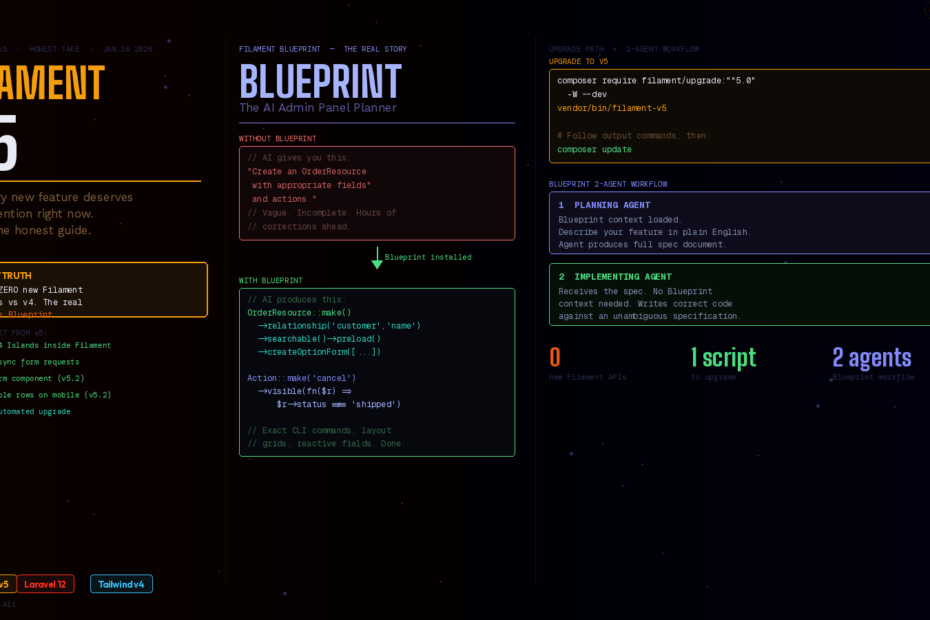
Not every new feature deserves your attention right now. Here’s the honest prioritisation guide for teams upgrading from v3 or v4.
Let’s cut straight to the truth that the announcement headlines buried: Filament v5 has zero new Filament features compared to v4.
Not a single new component. Not a new API. No breaking changes to your forms, tables, actions, or resources.
The entire reason v5 exists as a major version bump is Livewire v4 support — and the team made the right call by bumping major instead of minor. If they’d shipped Livewire v4 support as a Filament v4 patch, every project that depends on Livewire internally would have had unexpected breakage during routine composer update runs. A semver-respecting major version was the honourable move.
So before you feel short-changed — understand what you’re actually getting when you upgrade to v5. And then understand the thing launched alongside v5 that nobody’s talking about enough: Filament Blueprint.
What You Actually Get With Filament v5
When you run composer require filament/filament:"^5.0", here’s what you’re unlocking:
Livewire v4’s Islands Inside Filament
Every Filament component that relies on Livewire now benefits from v4’s Islands feature — independent, isolated re-renders. In practical terms, refreshing a stats widget on your dashboard no longer triggers a re-render of the rest of the page. In the live Laracon demo, Islands dropped rendering time from 329ms to 19ms.
For Filament specifically, this means your heavy chart widgets, large resource tables, and live stats panels can all update independently without causing a full page re-render waterfall.
Parallel Async Requests
Filament v5 ships with async requests by default — one of the direct changelog entries for v5.0.0. In v4, interactions like opening a select dropdown with a relationship, loading deferred content, or submitting a form action would block subsequent requests. In v5, these run in parallel.
The most noticeable difference: forms with multiple relationship selects that fetch options asynchronously now load all dropdowns simultaneously instead of sequentially. Dense admin forms feel dramatically more responsive.
Scoped Component Styles
Filament’s internal components now leverage Livewire v4’s scoped styles, which means better style isolation and more reliable rendering in complex nested panel layouts.
Filament v5.2 Bonus Features (Feb 2026)
Filament v5.2.0 ships five new features, including a Callout component for highlighting important information in forms, stacked table rows for better mobile readability, and stacked action modals that keep parent modals visible.
The Callout component is immediately useful for any admin panel that needs to surface warnings or notices inline with form fields:
use Filament\Forms\Components\Callout;

Callout::make()
    ->color('warning')
    ->icon('heroicon-o-exclamation-triangle')
    ->body('This action will notify all customers in this segment.'),
Tables now support stacking cells vertically on mobile screens instead of requiring horizontal scrolling. This CSS-first approach improves readability on small viewports while maintaining the standard horizontal layout on larger screens.
The Upgrade: Genuinely Painless
The upgrade is straightforward. Filament provides an automated script that handles most of the work.
# Step 1: Run the upgrade script
composer require filament/upgrade:"^5.0" -W --dev
vendor/bin/filament-v5

# Step 2: Run the specific commands the script outputs for your project
composer require filament/filament:"^5.0" -W --no-update
composer update
The script analyses your project and outputs the exact composer require commands tailored to your specific Filament packages. You’re not guessing.
The one real prerequisite: Tailwind v4. That Tailwind v4 requirement might be the biggest hurdle for some projects. If you’re still on Tailwind v3 with a custom theme, you’ll need to upgrade Tailwind first.
If you have custom Livewire components inside your Filament panel, also follow the Livewire v4 upgrade guide and check for the wire:model event bubbling change covered in yesterday’s article. For standard Filament usage with no custom Livewire components, the upgrade is one script and one composer update.
Should you upgrade now? Yes, for new projects. For existing projects: if you’re on v4 and have no custom Livewire components, upgrade this week. Filament v4 will continue receiving features, and the upgrade path will only get smoother as more plugins update. If you rely on third-party Filament plugins, check their changelogs for v5 compatibility before upgrading.
The Real Story: Filament Blueprint
Here’s where it gets genuinely interesting. Launched alongside v5, Filament Blueprint is the most significant productivity improvement for Filament developers since the admin panel itself — and it’s not getting nearly enough attention.
The Problem It Solves
If you’ve tried using Claude Code, Cursor, or GitHub Copilot to build Filament panels, you’ve felt the pain: the AI gets the broad strokes right but constantly trips over specifics. It uses the wrong component names. It guesses at configuration chain syntax. It creates layouts that don’t account for Filament’s grid column system. It misses the exact method calls needed for reactive fields.
The quality of AI-generated code depends heavily on the quality of the plan. When an implementing agent has a clear, detailed specification, it can focus entirely on writing correct code rather than guessing at requirements or making assumptions about your intent.
Blueprint focuses on producing clear, implementation-ready plans for Filament projects, reducing common issues such as incorrect component usage, missing configuration details, or vague layout instructions.
How Blueprint Actually Works
Blueprint bridges the gap between what you want and what AI agents build. Instead of hoping an agent understands Filament’s conventions, Blueprint provides structured planning guidelines that produce unambiguous specification documents.
The key architectural insight is a two-agent workflow:
Planning agent (with Blueprint context loaded): Takes your feature description and produces a detailed specification document — exact Resources, Relation Managers, Actions, state transitions, reactive field configurations, CLI commands, and layout decisions.
Implementing agent (receives the specification): Writes the actual code against a clear, unambiguous spec. The planning guidelines are designed for planning agents only, they shouldn’t consume the implementing agent’s context window. The planning agent copies all necessary details into the blueprint itself, so the implementing agent has everything it needs without loading the guidelines.
Installing Blueprint
# Blueprint is a premium Laravel Boost extension
composer config repositories.filament composer https://packages.filamentphp.com/composer
composer config --auth http-basic.packages.filamentphp.com "YOUR_EMAIL" "YOUR_LICENSE_KEY"
composer require filament/blueprint --dev

# Then run the Boost installer
php artisan boost:install
# Select "Filament" and "Filament Blueprint" when prompted
To verify installation, check your AGENTS.md or CLAUDE.md file — you’ll see a new Filament Blueprint section added automatically.
Using Blueprint in Practice
Enable planning mode in Claude Code and give it a feature description:
Using Filament Blueprint, produce an implementation plan for a Filament v5 application.

The application is a SaaS order management system with the following capabilities:
- Manage customers with contact details and order history
- Manage products with SKUs, pricing tiers, and inventory
- Create and manage orders with line items
- Track order status (pending → confirmed → shipped → delivered → cancelled)
- Send order confirmation emails
- Record and reconcile payments

The plan should:
- Map each domain concept to concrete Filament primitives (Resources, Relation Managers, Pages, Actions)
- Identify state transitions and the Actions that trigger them
- Specify reactive field behaviour for line item totals
- Include exact CLI commands to generate each file
- Define authorization rules (only admins can cancel shipped orders)
Without Blueprint, you get a vague plan: “Create an OrderResource with appropriate fields and actions.” With Blueprint, you get a specification document that includes the exact ->relationship('customer', 'name')->searchable()->preload()->createOptionForm([...]) chains, the specific Action::make('cancel')->visible(fn($record) => $record->status !== 'shipped') authorization logic, and the exact php artisan make:filament-resource Order --generate commands.
Instead of vague implementation plans, you get detailed specifications with exact component references, CLI commands, and configuration chains.
The difference isn’t just convenience — it’s the difference between an AI that writes code you need to heavily correct and an AI that writes code you can ship with minimal review.
What Filament v4 Users Should Do Right Now
If you’re currently on Filament v4, here’s the prioritised action list:
This week:
- Run
vendor/bin/filament-v5on a staging branch to check compatibility - Note any third-party plugin versions that need updating
- Check if you have custom Livewire components that need the
.deepfix
Before upgrading to v5:
- Upgrade Tailwind to v4 if you haven’t already
- Ensure all Filament plugins you depend on have v5-compatible releases
After upgrading:
- Evaluate Filament Blueprint if you use AI coding agents regularly
- Use the new
Calloutcomponent anywhere you currently use custom alert implementations - Enable stacked table rows for any tables that serve mobile users
The Bigger Picture
Filament v5 is a conservative, smart release. The team didn’t pad it with features to justify the major version bump — they did the semver-respecting thing and drew a clean line between “with Livewire v3” and “with Livewire v4.”
But Blueprint is the real story. It’s the first tool in the Laravel ecosystem that specifically addresses the quality gap between “AI-assisted code” and “production-ready code” for a complex, convention-heavy framework. Every Filament developer who regularly uses AI coding agents should evaluate it.
The v5 upgrade takes an afternoon. Blueprint might save you days on your next feature.
Follow me for daily deep-dives on Laravel, PHP, Vue.js, and AI integrations. New article every day.