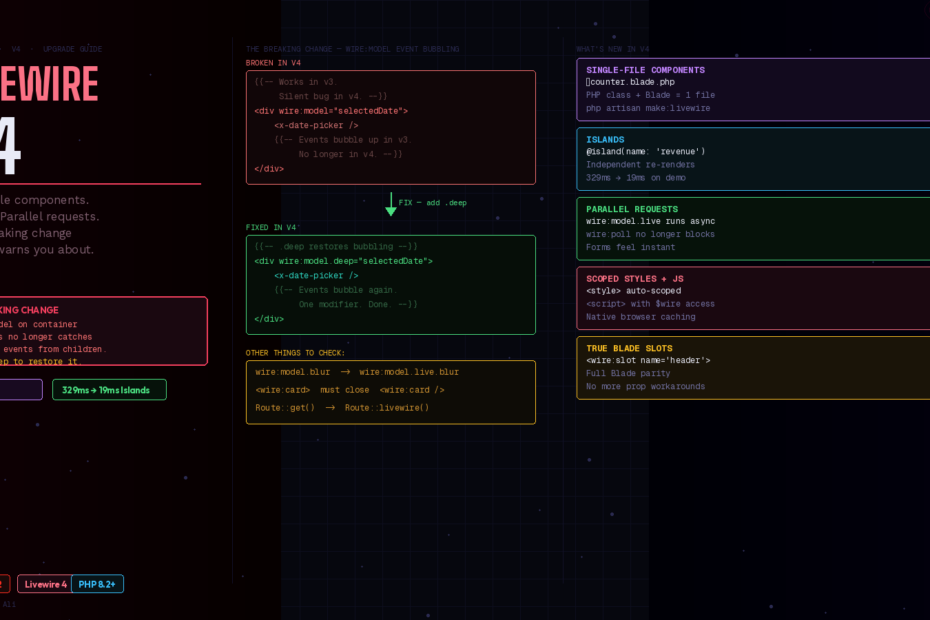
Single-file components, Islands, parallel requests — Livewire v4 is a serious upgrade. But there’s one thing nobody’s warning you about.
Livewire 4 is finally here, and it’s the biggest release yet. If you’ve been building with Livewire v3, you already know the fundamentals are solid. What v4 does is remove every remaining friction point — the two-file dance, the clunky slot workarounds, the blocking requests — and replace them with something that actually feels modern.
But buried inside the upgrade guide is a change to wire:model that will silently break a pattern most developers use without thinking about it. We’ll get to that. First, let’s cover everything that’s genuinely exciting.
The Biggest New Feature: Single-File Components
The most visible change in Livewire 4 is how you write components. Instead of bouncing between a PHP class and a Blade file, you can now put everything in a single file.
This is now the default when you run php artisan make:livewire. The lightning bolt emoji in the filename makes Livewire components instantly recognizable in your file tree.
Here’s what a counter component looks like in v4:
<?php
// resources/views/components/⚡counter.blade.php

new class extends Livewire\Component {
    public int $count = 0;

    public function increment(): void
    {
        $this->count++;
    }
}
?>

<div>
    <p>Count: {{ $count }}</p>
    <button wire:click="increment">+</button>
</div>
One file. PHP class at the top, Blade template below. No app/Livewire/ class file. No resources/views/livewire/ template file. No mental context-switching between two editors.
For larger components, there’s also a multi-file format that keeps everything together in a single directory. And you can convert between formats anytime:
php artisan livewire:convert Counter --to=single-file
php artisan livewire:convert Counter --to=multi-file
Your existing v3 class-based components work without modification in v4. The migration is entirely opt-in.
Scoped Styles and Colocated JavaScript
Add <script> and <style> tags directly in your templates. Styles are automatically scoped to your component, and scripts have access to this for component context. Both are served as native .js/.css files with browser caching.
<?php
new class extends Livewire\Component {
    public string $query = '';
    public array $results = [];

    public function search(): void
    {
        $this->results = Product::search($this->query)->get()->toArray();
    }
}
?>

<div>
    <input wire:model.live="query" placeholder="Search...">
    <ul>
        @foreach($results as $result)
            <li>{{ $result['name'] }}</li>
        @endforeach
    </ul>
</div>

<style>
    /* Automatically scoped — won't leak outside this component */
    input { border: 1px solid #e2e8f0; border-radius: 6px; }
    ul    { margin-top: 8px; list-style: none; padding: 0; }
</style>

<script>
    // `this` gives you access to the component's $wire object
    this.addEventListener('livewire:initialized', () => {
        this.$wire.on('search-complete', () => {
            console.log('Search finished:', this.$wire.results)
        })
    })
</script>
No separate CSS file. No Alpine.js workarounds for simple JS interactions. Everything lives with the component that needs it.
Islands: The Performance Feature That Changes Everything
Islands are the headline feature of Livewire 4. They let you create isolated regions within a component that update independently.
Before Islands, if you had a dashboard component with a heavy revenue chart and a simple counter, updating the counter would re-render the entire component — including all the revenue chart’s database queries. Islands fix this:
<?php
new class extends Livewire\Component {
    public int $notifications = 0;

    public function markAllRead(): void
    {
        auth()->user()->notifications()->update(['read' => true]);
        $this->notifications = 0;
    }

    #[Computed]
    public function revenueData(): array
    {
        // Expensive query — only runs when the revenue island refreshes
        return Order::revenue()->lastThirtyDays()->get()->toArray();
    }

    #[Computed]
    public function notificationCount(): int
    {
        return auth()->user()->unreadNotifications()->count();
    }
}
?>

<div>
    <!-- This island refreshes independently -->
    @island(name: 'notifications')
        <div class="notification-bell">
            {{ $this->notificationCount }} unread
            <button wire:click="markAllRead">Clear all</button>
        </div>
    @endisland

    <!-- This island only re-runs its own queries when refreshed -->
    @island(name: 'revenue', lazy: true)
        <canvas id="revenue-chart"
                data-values="{{ json_encode($this->revenueData) }}">
        </canvas>
    @endisland
</div>
When combined with computed properties, only the data needed by that island gets fetched. If your component has three islands each referencing different computed properties, refreshing one island only runs that island’s queries. You’re isolating overhead from the database all the way to the rendered HTML.
In the demo done by Caleb at Laracon US 2025, rendering time went from 329ms down to 19ms using Islands with Blade precompilation.
Parallel Requests: Forms Feel Instant Now
Livewire 4 brings massive performance improvements, especially in request handling. Imagine typing in a form with wire:model.live — now all requests run in parallel without blocking each other. More responsive typing, faster results, and a dramatically better user experience.
The same goes for wire:poll. In v3, polling would block other requests — meaning if you had a live search and a polling dashboard counter, typing in the search would pause the counter. In v4 they run independently.
True Blade-Style Slots
One of the most-requested v3 features is finally here. Livewire components now support full Blade slot parity:
{{-- resources/views/components/⚡modal.blade.php --}}
<?php
new class extends Livewire\Component {
    public bool $isOpen = false;

    public function open(): void  { $this->isOpen = true; }
    public function close(): void { $this->isOpen = false; }
}
?>

<div>
    @if($isOpen)
        <div class="modal-overlay" wire:click="close">
            <div class="modal-panel" @click.stop>
                @if(isset($header))
                    <div class="modal-header">{{ $header }}</div>
                @endif
                <div class="modal-body">{{ $slot }}</div>
                @if(isset($footer))
                    <div class="modal-footer">{{ $footer }}</div>
                @endif
            </div>
        </div>
    @endif
</div>
<wire:modal>
    <wire:slot name="header">
        <h2>Delete Order #{{ $order->id }}</h2>
    </wire:slot>

    <p>This action cannot be undone. Are you sure?</p>

    <wire:slot name="footer">
        <button wire:click="close">Cancel</button>
        <button wire:click="confirmDelete">Delete</button>
    </wire:slot>
</wire:modal>
No more passing content as props. No more workarounds with @entangle. Slots work exactly like Blade components.
⚠️ The Breaking Change That Will Catch You Off Guard
Here it is. In v3, wire:model would respond to input/change events that bubbled up from child elements. In v4, wire:model now only listens for events originating directly on the element itself.
This means if you’ve ever done something like this — a wire:model on a container element with child inputs inside it — it silently stops working in v4:
{{-- This WORKED in v3. Silently BROKEN in v4. --}}
<div wire:model="selectedDate">
    <x-date-picker /> {{-- Events from this no longer bubble to the outer wire:model --}}
</div>
Why does this matter? Because this pattern is extremely common with third-party components, custom form inputs, Alpine.js-powered widgets, and datepicker/multiselect libraries. You may not even realize you’re relying on event bubbling until your form stops syncing data after the upgrade.
The fix is simple — add .deep:
{{-- v4 fix: add .deep to restore bubbling behavior --}}
<div wire:model.deep="selectedDate">
    <x-date-picker />
</div>
This change primarily affects non-standard uses of wire:model on container elements. Standard form input bindings on inputs, selects, and textareas are unaffected.
Go search your codebase for wire:model on non-input elements before upgrading. That’s your checklist.
The Other Breaking Changes (Smaller but Worth Knowing)
1. wire:model modifier behavior changed
Modifiers like .blur and .change now control when client-side state syncs, not just network timing. If you’re using these modifiers and want the previous behavior, add .live before them: wire:model.live.blur.
2. Component tags must be properly closed
In v3, Livewire component tags would render even without being properly closed. In v4, component tags must be properly closed — otherwise Livewire interprets subsequent content as slot content and the component won’t render.
{{-- BROKEN in v4 --}}
<wire:user-card :user="$user">

{{-- CORRECT in v4 --}}
<wire:user-card :user="$user" />
3. Full-page components need Route::livewire()
Using Route::livewire() is now the preferred method and is required for single-file and multi-file components to work correctly as full-page components.
// v3 — still works for class-based components
Route::get('/dashboard', Dashboard::class);

// v4 — required for single-file components, recommended for all
Route::livewire('/dashboard', 'pages::dashboard');
The Upgrade Path
For most v3 applications, the upgrade is straightforward:
composer require livewire/livewire:^4.0
php artisan livewire:upgrade  # Runs automated migrations
The livewire:upgrade command handles most of the config file changes automatically. After running it:
- Search for
wire:modelon non-input elements — add.deepwhere needed - Check for unclosed component tags — add self-closing slashes
- Update full-page routes to
Route::livewire() - Test
wire:model.blurand.change— add.liveif behavior changed
Most applications can upgrade with minimal changes. The main breaking changes are only in configuration and some method signatures for advanced usage.
Consider using Laravel Shift to automate the mechanical parts of the upgrade.
Should You Upgrade Today?
Yes, for new projects — use v4 from day one. Single-file components, Islands, and parallel requests are all production-ready.
Yes, for active projects — the upgrade is genuinely low-risk for most apps. Run livewire:upgrade, fix the wire:model container patterns, and you’re done in an afternoon.
The one reason to wait — if you’re using a lot of third-party Livewire component packages, wait until those packages have published v4-compatible releases. Some community packages still pin to v3.
Livewire v4 is not a rewrite. Projects built with Livewire 3 can continue seamlessly, and you can adopt the new features gradually. No migration trauma, just progress. That’s exactly the right way to ship a major version.
Follow me for daily deep-dives on Laravel, PHP, Vue.js, and AI integrations. New article every day.