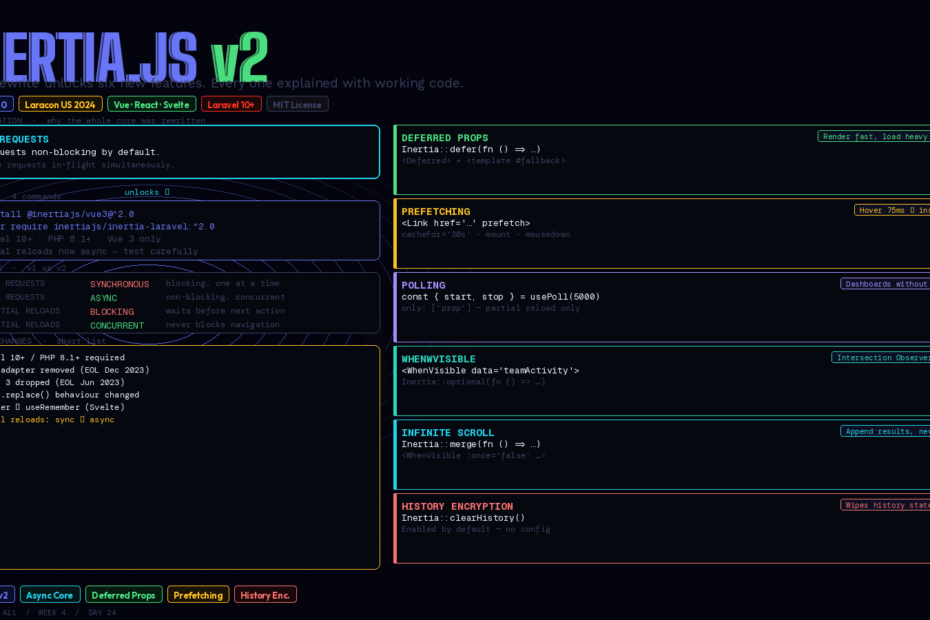
The core was rewritten from scratch to enable asynchronous requests. Here’s every new feature, how each one works, and how to upgrade without breaking your app.
The original version of Inertia.js had a fundamental architectural limitation: every request was synchronous. Full page visit, partial reload, form submission — they all blocked. One request at a time, in sequence, waiting for the server before proceeding.
That was fine for most things. But it made a whole category of performance patterns impossible: prefetching data before the user clicks, loading secondary data after the primary content renders, polling a dashboard without blocking navigation, infinite scroll without pagination UI. None of these could exist in v1 without hacks.
Inertia.js v2.0 — announced at Laracon US 2024 and released alongside the v2 Laravel adapter — is a complete rewrite of the request handling layer. Async requests are now the foundation, and six new features are built directly on top of that foundation.
This is the complete guide to every one of them.
Upgrading First: It’s Four Commands
The breaking changes list is short. Here’s the full upgrade:
# Client-side (choose your adapter)
npm install @inertiajs/vue3@^2.0
# or: npm install @inertiajs/react@^2.0
# or: npm install @inertiajs/svelte@^2.0

# Server-side
composer require inertiajs/inertia-laravel:^2.0
Breaking changes you need to know:
- Laravel 8 and 9 dropped — v2 requires Laravel 10+ and PHP 8.1+
- Vue 2 adapter removed — Vue 2 reached EOL December 2023
- Svelte 3 dropped — reached EOL June 2023
- Partial reloads are now async — if you were relying on them being synchronous, test carefully
router.replacebehaviour changed — now makes client-side visits; for server-side history replacement use{ replace: true }optionrememberrenamed touseRememberin the Svelte adapter
That’s the entire breaking changes list. If you’re on Laravel 10+, Vue 3, and Svelte 4+, upgrading is low-risk.
1. Async Requests: The Architectural Foundation
Every new feature in v2 is enabled by this one change. In v1, every Inertia request blocked. In v2, all requests — including partial reloads — are non-blocking by default.
What this means practically: multiple Inertia requests can be in-flight simultaneously. A background deferred prop load doesn’t block the user from clicking a link. A polling request doesn’t freeze the page. Prefetching happens in parallel with the user’s current interaction.
You don’t write code to use async requests — it’s automatic. Your existing router.visit(), <Link>, and form submissions all benefit immediately after upgrading.
2. Deferred Props: Render Now, Load Data Later
Deferred props are the most impactful new feature for page load performance. They let you split a controller response into: data that loads immediately, and data that loads in the background after the page renders.
The problem they solve: You have a dashboard page. The main content loads fast. But there’s a sidebar showing “Recent Activity” that requires an expensive database query — 300ms of joins and aggregations. In v1, every user waits 300ms for data they might not even look at before the page appears.
Backend — mark the slow prop as deferred:
// DashboardController.php
public function index(): Response
{
    return Inertia::render('Dashboard', [
        // Critical data — loads immediately
        'user'          => auth()->user(),
        'invoiceCount'  => Invoice::where('user_id', auth()->id())->count(),

        // Expensive data — deferred
        'recentActivity' => Inertia::defer(
            fn () => ActivityLog::for(auth()->user())
                        ->latest()
                        ->limit(20)
                        ->get()
        ),

        // Grouped deferral — load these together in one request
        'topClients'    => Inertia::defer(fn () => Client::topByRevenue(5), group: 'analytics'),
        'revenueChart'  => Inertia::defer(fn () => Invoice::revenueByMonth(), group: 'analytics'),
    ]);
}
Frontend — use the <Deferred> component:
<!-- Dashboard.vue -->
<script setup>
defineProps(['user', 'invoiceCount', 'recentActivity', 'topClients', 'revenueChart'])
</script>

<template>
  <div>
    <!-- Renders immediately -->
    <h1>Welcome, {{ user.name }}</h1>
    <p>You have {{ invoiceCount }} invoices.</p>

    <!-- Loads in background after page renders -->
    <Deferred data="recentActivity">
      <template #fallback>
        <ActivitySkeleton />
      </template>
      <ActivityFeed :items="recentActivity" />
    </Deferred>

    <!-- Grouped — both load in a single request -->
    <Deferred data="['topClients', 'revenueChart']">
      <template #fallback>
        <AnalyticsSkeleton />
      </template>
      <TopClients :clients="topClients" />
      <RevenueChart :data="revenueChart" />
    </Deferred>
  </div>
</template>
The initial page response returns instantly with the critical data. The deferred props are fetched in a single background request immediately after. Grouped props share one request. The fallback slot shows while loading.
Core Web Vitals impact: LCP improves because the visible content renders without waiting for background queries. Time to interactive improves because JavaScript isn’t blocked waiting for data.
3. Prefetching: Instant Page Transitions
Prefetching loads the data for a page before the user clicks the link — eliminating the navigation delay entirely.
Hover prefetching (the default): data fetches when the user hovers a link for more than 75ms.
<!-- Link with hover prefetch — Vue -->
<Link href="/invoices" prefetch>Invoices</Link>

<!-- Custom cache duration -->
<Link href="/invoices" prefetch :cache-for="60000">Invoices</Link>
<!-- or: cache-for="1m", "30s", "5000" (ms) -->
Mount prefetching: fetches immediately when the page loads. Use for links the user is very likely to click next:
<Link href="/dashboard" prefetch="mount">Back to Dashboard</Link>
Mousedown prefetching: starts fetching when the user presses the mouse button but hasn’t released yet — gives a head start even on fast clicks:
<Link href="/invoices" prefetch="mousedown">Invoices</Link>
Stale-while-revalidate: serve cached data immediately but refresh in background:
<Link href="/invoices" prefetch :cache-for="['30s', '1m']">Invoices</Link>
The first value is the “fresh” TTL. After that, the cached data is served immediately (feels instant) but a background revalidation request fires automatically. After the second TTL, the cache is evicted entirely.
Manual prefetching from JavaScript:
import { router } from '@inertiajs/vue3'

// Trigger prefetch programmatically
router.prefetch('/invoices')

// In an onMounted hook
onMounted(() => {
  router.prefetch('/invoices', { method: 'get' }, { cacheFor: 30000 })
})
Cache is stored in memory for the session. The default TTL is 30 seconds.
4. Polling: Live Data Without WebSockets
usePoll lets a page automatically reload props at a set interval — perfect for dashboards, job status pages, notification counters:
<script setup>
import { usePoll } from '@inertiajs/vue3'

const props = defineProps(['notifications', 'queueStats'])

// Poll every 5 seconds
const { start, stop } = usePoll(5000)

// Poll every 3 seconds but only reload specific props
const { start, stop } = usePoll(3000, {
  only: ['notifications'],
})

// Start paused, start on user action
const poller = usePoll(5000, {}, { autoStart: false })
</script>
Polling respects the async architecture — polling requests don’t block user navigation or other Inertia requests. The start() and stop() handles let you pause polling when the user is inactive (combine with visibility API for battery efficiency).
The polling request is a partial reload — it only fetches the specified props, not the entire page. Server load stays minimal.
5. WhenVisible + Infinite Scroll: True Lazy Loading
<WhenVisible> loads a prop only when its element enters the viewport — using the browser’s Intersection Observer API under the hood.
Basic WhenVisible:
<!-- Backend: mark prop as optional so it's not loaded initially -->
<!-- InvoiceController.php -->
public function index(): Response
{
    return Inertia::render('Invoices/Index', [
        'invoices'    => Invoice::paginate(20),
        'teamActivity' => Inertia::optional(
            fn () => ActivityLog::forTeam()->latest()->limit(10)->get()
        ),
    ]);
}
<!-- Invoices/Index.vue -->
<WhenVisible data="teamActivity">
  <template #fallback>
    <Spinner />
  </template>
  <TeamActivityFeed :items="teamActivity" />
</WhenVisible>
The teamActivity query never runs unless the user scrolls to that section. For pages with below-the-fold content, this can dramatically reduce median server response time.
Infinite scroll with Inertia::merge():
// UsersController.php — merge new results into existing list
public function index(Request $request): Response
{
    return Inertia::render('Users/Index', [
        'users' => Inertia::merge(fn () => User::paginate(50)),
        'page'  => $request->integer('page', 1),
    ]);
}
<script setup>
const props = defineProps(['users', 'page'])
</script>

<template>
  <UserCard v-for="user in users" :key="user.id" :user="user" />

  <!-- When this becomes visible, load the next page -->
  <WhenVisible
    :once="false"
    :params="{
      data: { page: page + 1 },
      only: ['users', 'page'],
      preserveUrl: true,
    }"
  >
    <Spinner />
  </WhenVisible>
</template>
Inertia::merge() on the server tells Inertia to append new results to the existing users array instead of replacing it. :once="false" keeps triggering as the user scrolls through all results. preserveUrl: true means the URL updates to reflect the current page without a full navigation.
Threshold control — start loading before the element is fully visible:
<!-- Start loading when user is within 300px of the element -->
<WhenVisible :threshold="300">
  <ExpensiveSection />
</WhenVisible>
6. History Encryption: Security on Logout
When users log out of your application, sensitive data from their session can remain in browser history state. If they press the back button on a shared computer, that data is visible.
History encryption is enabled by default in v2. Inertia encrypts the history state stored in window.history using the session’s encryption key. On logout, call Inertia::clearHistory() to wipe the encrypted state:
// AuthenticatedSessionController.php
public function destroy(Request $request): Response
{
    Auth::guard('web')->logout();
    $request->session()->invalidate();
    $request->session()->regenerateToken();

    return Inertia::location(route('login'))
        ->clearHistory();  // ← wipes encrypted history state
}
No configuration required. Sensitive props (user data, financial information) stored in history are encrypted at rest and wiped on logout. This is especially important for applications used on shared or corporate devices.
Once Props: Shared Data That Loads Once
Sometimes you share data globally (via HandleInertiaRequests) but certain props don’t need to update on every partial reload. The once() directive prevents a prop from being re-evaluated on subsequent visits:
// HandleInertiaRequests.php
public function share(Request $request): array
{
    return [
        'auth' => Inertia::always(fn () => [
            'user' => $request->user(),
        ]),

        // Only evaluate on full page loads, not partial reloads
        'appConfig' => Inertia::once(fn () => [
            'features' => Feature::allEnabled(),
            'timezone' => config('app.timezone'),
        ]),
    ];
}
Feature flags and configuration that don’t change mid-session load once and are served from cache on all subsequent requests. Reduces server load on partial reload-heavy pages.
The Upgrade in Practice
The two things most likely to catch you during upgrade:
1. Partial reload race conditions. In v1, if you had code like:
router.reload({ only: ['users'] })
// code here assumed the reload was complete
doSomethingWith(page.props.users)
…that assumed synchronous behaviour. In v2, use callbacks:
router.reload({
  only: ['users'],
  onSuccess: () => doSomethingWith(page.props.users),
})
2. The setup callback in app.js. v2 requires you to pass props explicitly when initialising:
// v1
createInertiaApp({
  setup({ el, App, props, plugin }) {
    createApp({ render: () => h(App, props) })
      .use(plugin)
      .mount(el)
  },
})

// v2 — same, but now required (was optional before)
createInertiaApp({
  setup({ el, App, props, plugin }) {
    createApp({ render: () => h(App, props) })
      .use(plugin)
      .mount(el)
  },
})
If you already have props in your setup callback, nothing changes. If you were omitting it, add it.
The Net Result
Six features, one architectural change underneath all of them. The async rewrite wasn’t done to check a feature box — it was done to make an entire class of performance patterns possible.
Before v2: Inertia was a clean way to build monolithic Laravel + Vue/React apps without a separate API. After v2: it’s that, plus the data loading patterns you’d previously only get by building a SPA with a separate JSON API and a client-side data fetching layer.
Deferred props eliminate the trade-off between fast initial loads and rich data. Prefetching makes page transitions feel instant. WhenVisible means users only wait for data they’ll actually see. History encryption closes the logout security gap.
The upgrade is low-risk. The performance gains are real. If you’re on a Inertia v1 project and haven’t upgraded yet, this is the week.
Follow me for daily deep-dives on Laravel, PHP, Vue.js, and AI integrations. New article every day.