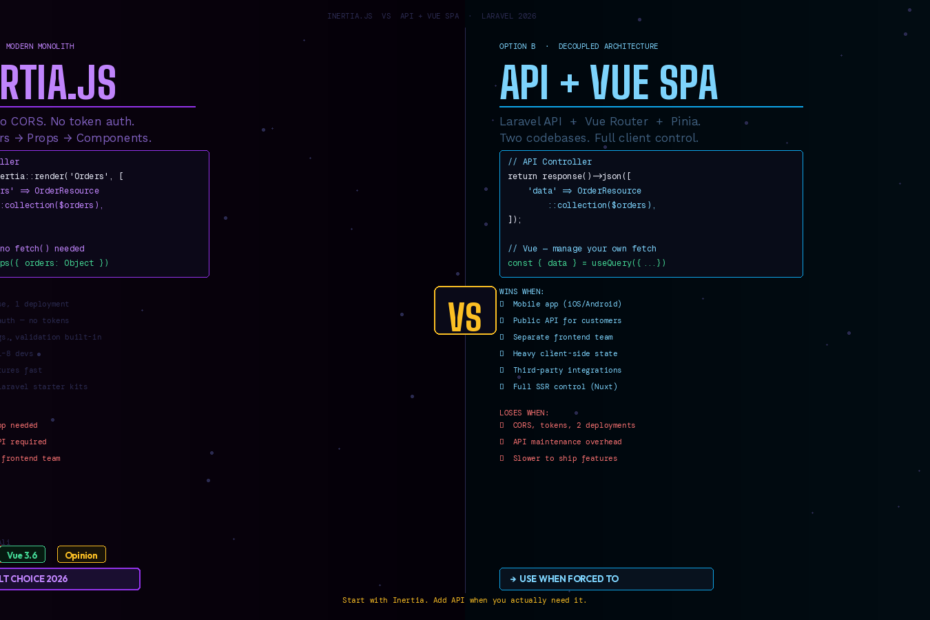
This debate is as old as Inertia itself. In 2026, there’s finally a clear answer — it just depends on which question you’re actually asking.
Every Laravel developer building with Vue has faced this decision. Do you go Inertia — keep everything in Laravel, no API layer, props flow straight from controllers to components? Or do you go full SPA — Laravel serves JSON, Vue handles routing, you maintain two separate codebases?
Both approaches work. Both ship production apps every day. The mistake is treating this as a religious debate rather than an engineering trade-off. Here’s the honest breakdown.
What You’re Actually Choosing Between
Before comparing, let’s be precise about what each approach actually means in 2026.
Inertia.js is not a framework — it’s a routing protocol. It sits between Laravel and Vue, intercepting navigation events, making XHR requests to your Laravel controllers, and swapping page components without full reloads. You never write API endpoints. Your controllers return props directly to Vue components:
// Laravel controller — Inertia style
public function index(): Response
{
    return Inertia::render('Orders/Index', [
        'orders'  => OrderResource::collection(Order::with('customer')->paginate(20)),
        'filters' => request()->only(['status', 'date_from', 'date_to']),
    ]);
}
<!-- Vue component receives props directly — no fetch(), no axios -->
<script setup>
defineProps({ orders: Object, filters: Object })
</script>
API + Vue SPA means Laravel serves pure JSON from dedicated API controllers, and your Vue app — running on its own domain or as a separate build — consumes that API using axios, fetch, or a query library like TanStack Query:
// Laravel controller — API style
public function index(): JsonResponse
{
    return response()->json([
        'data' => OrderResource::collection(Order::with('customer')->paginate(20)),
        'meta' => ['filters' => request()->only(['status', 'date_from', 'date_to'])],
    ]);
}
<!-- Vue component manages its own data fetching -->
<script setup>
import { useQuery } from '@tanstack/vue-query'
const { data, isLoading } = useQuery({
    queryKey: ['orders', filters],
    queryFn: () => axios.get('/api/orders', { params: filters }).then(r => r.data)
})
</script>
The difference isn’t just syntax — it’s an entirely different mental model for where data lives and how it flows.
The Case for Inertia.js
1. One Codebase. One Deployment. One Mental Model.
With Inertia, you have one Laravel app. One composer install. One .env. One deployment pipeline. One set of logs. Authentication is Laravel sessions — no token management, no CORS, no Authorization headers. Your middleware, policies, and guards apply automatically to every page.
This is the single biggest advantage and it compounds over time. Every new developer who joins your team knows where everything lives. There’s no “oh, that’s in the API repo” confusion.
2. Zero API Surface to Maintain
With a traditional SPA, every piece of data your Vue app needs requires a corresponding API endpoint, a resource transformer, documentation, versioning considerations, and test coverage. With Inertia, the controller is the API. You’re not maintaining a contract between two systems — you’re just passing props.
When you rename a field in your database, you update one place: the controller. The Vue component reflects it immediately. In an API + SPA setup, that same change requires updating the API, the resource, any API documentation, and the Vue component separately.
3. Seamless Laravel Superpowers
Inertia gets full access to everything Laravel does well:
- Authentication: Breeze and Jetstream scaffold full auth out of the box, session-based, no tokens
- Authorization:
$this->authorize()and Gates work exactly as expected - Flash messages:
session()->flash()arrives in the Vue component as a shared prop - Form validation: Laravel’s validation errors are automatically passed back to the component via
useForm() - Shared data: Global data (user, notifications, permissions) is shared once, available everywhere
// Sharing global data with every Inertia page — zero extra API calls
class HandleInertiaRequests extends Middleware
{
    public function share(Request $request): array
    {
        return [
            ...parent::share($request),
            'auth' => [
                'user'        => $request->user()?->only('id','name','email','avatar'),
                'permissions' => $request->user()?->getAllPermissions()->pluck('name'),
            ],
            'flash' => [
                'success' => session('success'),
                'error'   => session('error'),
            ],
        ];
    }
}
4. Speed for Smaller Teams
For a team of 1–5 developers building a SaaS product, Inertia’s productivity advantage is decisive. You’re not context-switching between two mental models, two authentication systems, and two routing layers. You ship features at Laravel speed.
The Case for API + Vue SPA
Inertia doesn’t win everything. There are real scenarios where a decoupled API is clearly the right call.
1. You Need Multiple Clients
This is the clearest signal. If your data needs to be consumed by:
- A web app and a mobile app (iOS/Android)
- A web app and third-party integrations
- A web app and a public API for your customers
Then you need a proper API. Inertia is tightly coupled to the server-rendered HTML document — it can’t serve a mobile app. Build the API once, and every client benefits.
2. Separate Frontend and Backend Teams
Inertia requires backend developers to understand component props and frontend structure. The controller return value is the component contract. If your frontend team is entirely separate — different standup, different repo, different deployment cadence — the tight coupling of Inertia creates friction.
With a proper API and an OpenAPI spec, the teams can work independently. The contract is the schema, not the controller return value.
3. Heavy Client-Side State
Inertia works best when most state lives on the server. If your app has complex client-side state — think a drag-and-drop kanban board with optimistic updates, a real-time collaborative editor, or a multi-step wizard that holds complex in-memory state across many steps — managing that state against Inertia’s server-driven navigation model gets awkward.
A dedicated SPA with its own router and Pinia state management handles these cases more naturally. You have full control over when and what you fetch, cache, and invalidate.
4. Full SEO Control + SSR
Inertia does support SSR, but it requires running a Node.js SSR server alongside your Laravel app — extra infrastructure, extra configuration. If you’re building a content-heavy application where SEO is critical and you need sophisticated metadata control per page, a decoupled approach with a Next.js or Nuxt frontend gives you more control over the rendering pipeline.
The Honest Comparison Table
| Factor | Inertia.js | API + Vue SPA |
|---|---|---|
| Setup complexity | Low | High |
| Time to first feature | Fast | Slower |
| Multiple clients (mobile, 3rd party) | ❌ Not suitable | ✅ Built for this |
| Authentication complexity | Simple (sessions) | Complex (tokens, CORS) |
| Team size sweet spot | 1–8 devs | 8+ or separate teams |
| Complex client-side state | Moderate friction | Naturally handled |
| SEO / SSR | Possible, extra setup | Full control |
| API versioning | Not needed | Required long-term |
| Deployment | Single app | Two deployments |
| Learning curve | Low for Laravel devs | Moderate |
My Take: Pick Inertia by Default, Choose API When Forced To
After building production apps with both approaches, here’s my honest recommendation for 2026:
Start with Inertia for any new Laravel + Vue project unless you have a specific, concrete reason not to. The productivity advantage is real and significant. The simplicity of one codebase, one deployment, and session-based auth eliminates entire categories of bugs and operational complexity.
Switch to API + SPA when — and only when — one of these is true:
- You know with certainty you’ll need a mobile app in the next 12 months
- Your frontend and backend teams genuinely cannot work in the same codebase
- You need to expose a public API to external developers
“We might want a mobile app someday” is not a reason to build an API today. Build with Inertia. If you need a mobile app later, you can add an API layer alongside Inertia — they’re not mutually exclusive.
The Hybrid Approach (Best of Both)
Many mature Laravel SaaS apps run both simultaneously. Inertia handles the web application. A separate /api route group serves mobile apps or webhooks. Laravel’s authentication supports both sessions (for Inertia) and token-based API auth (for mobile) via Sanctum:
// routes/web.php — Inertia routes (session auth)
Route::middleware(['auth', 'verified'])->group(function () {
    Route::get('/dashboard', [DashboardController::class, 'index']);
    Route::get('/orders', [OrderController::class, 'index']);
});

// routes/api.php — API routes (token auth via Sanctum)
Route::middleware(['auth:sanctum'])->group(function () {
    Route::apiResource('orders', Api\OrderController::class);
    Route::get('/user', fn(Request $r) => $r->user());
});
One Laravel app. Web interface via Inertia. Mobile API via Sanctum tokens. Each approach optimized for its client. This is the architecture I’d recommend for any SaaS app expecting to add mobile in the future — start with Inertia for the web, add the API layer when you actually need it.
The Framework-Level Signal
The clearest signal that Inertia has won the Laravel default debate? Laravel Breeze and Jetstream — the official scaffolding tools — both ship Inertia + Vue as the recommended starting point. When the framework maintainers choose an approach as the default, that’s a strong endorsement.
Inertia has also reached a level of maturity in 2026 that removes most early objections. SSR works. TypeScript support is solid via @inertiajs/vue3. Scroll restoration, progress bars, and form handling all work out of the box. The “it’s not a real SPA” criticism faded once developers experienced the actual performance in production.
Final Verdict
Inertia.js is the right default for the vast majority of Laravel + Vue projects in 2026. It’s faster to build with, simpler to deploy, and dramatically less complex to maintain for teams of any reasonable size.
API + Vue SPA is the right choice when you have multiple clients, genuinely separate teams, or heavy client-side state requirements that Inertia’s server-driven model can’t accommodate comfortably.
Make the decision based on what your project actually needs today — not what you might hypothetically need in two years. You can always add an API layer later. You can’t easily recover the weeks of complexity you introduced building one before you needed it.
Follow me for daily deep-dives on Laravel, PHP, Vue.js, and AI integrations. Seven days down — this series continues next week.