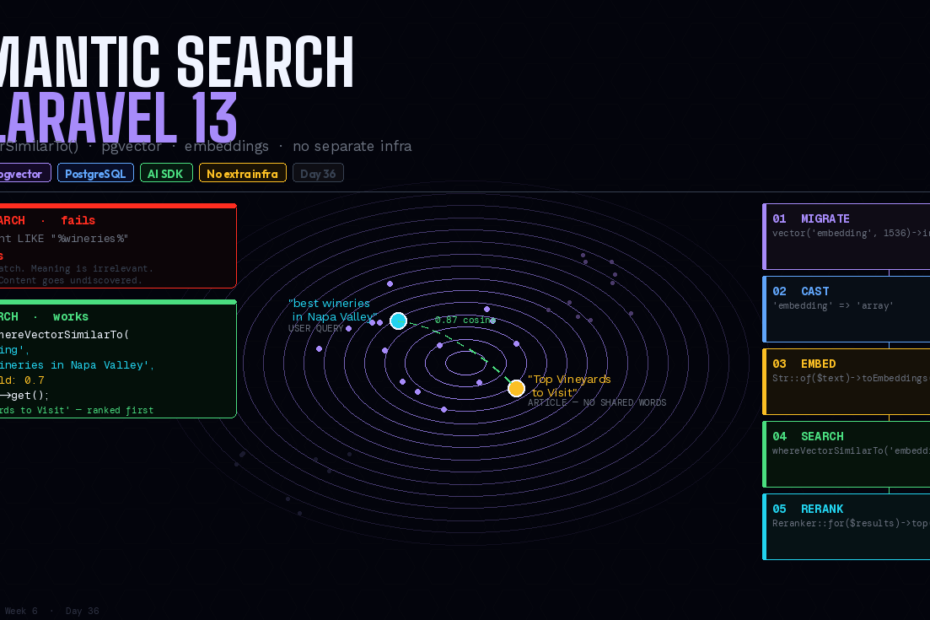
Pass a plain string. Get semantically similar results. No dedicated vector database, no third-party package, no manual embedding pipeline. PostgreSQL + pgvector + the Laravel AI SDK — all first-party.
Here’s the search problem that keyword search can’t solve:
A user searches for “best wineries in Napa Valley.” Your database has an article titled “Top Vineyards to Visit.” Those two strings share no words. A LIKE query returns nothing. whereFullText returns nothing. The article exists. The user wanted it. They get zero results.
This is the semantic gap — the distance between what a user means and the exact words they use. Closing it has historically required dedicated infrastructure: a separate vector database, a custom embedding pipeline, a search service that’s not your PostgreSQL instance, and a handful of community packages to wire it all together.
Laravel 13 closes the gap natively.
whereVectorSimilarTo() is a new query builder method that compares the meaning of text using AI-generated embeddings stored in PostgreSQL with the pgvector extension. Pass a plain string, and Laravel handles embedding generation automatically. No separate service. No third-party package. PostgreSQL and the Laravel AI SDK — both already in your stack if you’re on Laravel 13.
How It Works: The Concept in 60 Seconds
An embedding is a high-dimensional numeric array — typically hundreds or thousands of numbers — that represents the semantic meaning of a piece of text. Two pieces of text that mean similar things will have embeddings that are “close” in vector space, even if they share no words.
The workflow:
- At index time: For each piece of content, generate an embedding and store it alongside the content in your database
- At search time: Generate an embedding for the user’s query, then find the stored embeddings that are closest to it
Laravel handles both the generation and the comparison. You write the migration, cast the column, and call whereVectorSimilarTo(). Everything else is wired for you.
Step 1: Enable pgvector
pgvector is a PostgreSQL extension. It needs to be enabled on your database before you create the table.
// In your migration — use the new helper
Schema::ensureVectorExtensionExists();

Schema::create('documents', function (Blueprint $table) {
    $table->id();
    $table->string('title');
    $table->text('content');

    // Vector column — dimensions must match your embedding model
    // text-embedding-3-small = 1536, text-embedding-3-large = 3072
    $table->vector('embedding', dimensions: 1536);

    $table->timestamps();
});
Schema::ensureVectorExtensionExists() is new in Laravel 13 — it enables the pgvector extension if it isn’t already active, making migrations safe to run on both fresh and existing databases.
All Laravel Cloud Serverless Postgres databases include pgvector out of the box.
Step 2: Add the HNSW Index
Without an index, vector similarity search performs an exact scan over every row — accurate but slow at scale. The HNSW (Hierarchical Navigable Small World) index makes approximate nearest-neighbour search fast enough for production:
Schema::create('documents', function (Blueprint $table) {
    $table->id();
    $table->string('title');
    $table->text('content');
    $table->vector('embedding', dimensions: 1536)->index();  // HNSW index auto-created
    $table->timestamps();
});
The ->index() call on a vector column creates an HNSW index automatically. HNSW has better query performance than the older IVFFlat approach (better speed-recall tradeoff) and can be created on an empty table since there’s no training step.
For an existing table with data:
Schema::table('documents', function (Blueprint $table) {
    $table->vector('embedding', dimensions: 1536)->index();
});
Or in raw SQL for zero-downtime on live tables:
CREATE INDEX CONCURRENTLY ON documents USING hnsw (embedding vector_cosine_ops);
Step 3: The Eloquent Model
Cast the vector column to an array so Laravel handles the conversion between PHP arrays and PostgreSQL’s vector format automatically:
<?php

namespace App\Models;

use Illuminate\Database\Eloquent\Model;

class Document extends Model
{
    protected $fillable = ['title', 'content', 'embedding'];

    protected function casts(): array
    {
        return [
            'embedding' => 'array',
        ];
    }
}
Step 4: Generating and Storing Embeddings
Use the Str::of()->toEmbeddings() method from the Laravel AI SDK to generate an embedding for any string:
use Illuminate\Support\Str;

// Single embedding
$embedding = Str::of($document->title . ' ' . $document->content)->toEmbeddings();

$document->update(['embedding' => $embedding]);
For generating embeddings for many records at once — which uses a single API call rather than one per record, dramatically reducing cost and latency:
use Laravel\Ai\Embeddings;

$documents = Document::whereNull('embedding')->get();

// Batch — one API call for all inputs
$response = Embeddings::for(
    $documents->map(fn ($doc) => $doc->title . ' ' . $doc->content)->toArray()
)->generate();

$documents->each(function ($doc, $index) use ($response) {
    $doc->update(['embedding' => $response->embeddings[$index]]);
});
Auto-generating on save with a model observer
For production, you typically want embeddings to stay in sync automatically:
// app/Observers/DocumentObserver.php
class DocumentObserver
{
    public function saved(Document $document): void
    {
        // Only regenerate if the searchable content changed
        if ($document->wasChanged(['title', 'content'])) {
            GenerateDocumentEmbedding::dispatch($document);
        }
    }
}

// app/Jobs/GenerateDocumentEmbedding.php
class GenerateDocumentEmbedding implements ShouldQueue
{
    public function __construct(public Document $document) {}

    public function handle(): void
    {
        $embedding = Str::of(
            $this->document->title . ' ' . $this->document->content
        )->toEmbeddings();

        $this->document->updateQuietly(['embedding' => $embedding]);
    }
}
Queue the embedding generation — it involves an API call and shouldn’t block your HTTP response.
Step 5: Searching — whereVectorSimilarTo()
Now the payoff. Pass any string directly to whereVectorSimilarTo() and Laravel handles the embedding generation for the query automatically:
// Pass a plain string — embedding is generated automatically
$results = Document::whereVectorSimilarTo(
    column: 'embedding',
    value: 'best wineries in Napa Valley',
    threshold: 0.7,   // minimum cosine similarity (0.0–1.0)
)->take(10)->get();
Results are ordered by similarity — most similar first. The threshold filters out results below the minimum cosine similarity. A value of 1.0 means identical vectors; 0.0 means completely unrelated. For most use cases, 0.7–0.8 is a good starting point.
You can also pass an embedding array directly if you’ve already generated it:
// Pass a pre-generated embedding
$queryEmbedding = Str::of($request->query)->toEmbeddings();

$results = Document::whereVectorSimilarTo('embedding', $queryEmbedding, 0.75)
    ->where('published', true)
    ->take(20)
    ->get();
The query builder form works too:
$documents = DB::table('documents')
    ->whereVectorSimilarTo('embedding', 'Best wineries in Napa Valley')
    ->limit(10)
    ->get();
The Complete Search Controller
<?php

namespace App\Http\Controllers;

use App\Models\Document;
use Illuminate\Http\Request;

class SearchController extends Controller
{
    public function __invoke(Request $request)
    {
        $request->validate(['q' => ['required', 'string', 'min:2', 'max:200']]);

        $results = Document::whereVectorSimilarTo(
            column:    'embedding',
            value:     $request->q,
            threshold: 0.7,
        )
        ->where('published', true)
        ->select(['id', 'title', 'excerpt', 'url', 'published_at'])
        ->take(10)
        ->get();

        return response()->json([
            'query'   => $request->q,
            'results' => $results,
            'total'   => $results->count(),
        ]);
    }
}
Hybrid Search: Vector + Full-Text Together
For the best results, combine vector search with PostgreSQL full-text search. Keyword search finds exact matches fast. Vector search finds semantic matches. Together they cover both cases:
public function search(string $query): Collection
{
    // Stage 1: Cast a wide net — either keyword or semantic match
    $candidates = Document::where(function ($q) use ($query) {
        $q->whereFullText(['title', 'content'], $query)  // exact keyword matches
          ->orWhereVectorSimilarTo('embedding', $query, 0.65);  // semantic matches
    })
    ->where('published', true)
    ->take(50)  // over-fetch for reranking
    ->get();

    // Stage 2: Rerank by semantic relevance
    return $candidates->rerank($query);  // AI SDK reranking
}
Reranking
The Laravel AI SDK provides reranking — using an AI model to reorder a set of already-retrieved results by semantic relevance. It’s more accurate than cosine similarity alone, but slower — ideal as a second stage after fast initial retrieval:
use Laravel\Ai\Reranker;

$candidates = Document::whereVectorSimilarTo('embedding', $query, 0.6)
    ->take(50)
    ->get();

// Rerank the top 50 down to the best 10
$reranked = Reranker::for($candidates)
    ->using($query, field: 'content')
    ->top(10)
    ->rerank();
The two-stage approach — fast vector retrieval followed by AI reranking — gives you both performance and semantic precision.
Vector Search + Scout
Laravel Scout integrates with pgvector, providing automatic embedding sync via model observers, a clean search() interface, and support for all Scout’s existing features (soft deletes, chunked indexing, Artisan commands):
use Laravel\Scout\Searchable;

class Document extends Model
{
    use Searchable;

    public function toSearchableArray(): array
    {
        return [
            'title'   => $this->title,
            'content' => $this->content,
        ];
    }
}
# Index all documents
php artisan scout:import "App\Models\Document"

# Search
Document::search('best wineries in Napa Valley')->get();
Scout with pgvector handles embedding generation and sync automatically — no observer, no job needed.
When to Use Vector Search (and When Not To)
Use vector search when:
- Users search by concept rather than exact keywords (semantic gap is real)
- You have multilingual content (embeddings are language-agnostic)
- You’re building recommendation systems (“more like this”)
- Typo tolerance and synonym handling are important
Don’t use vector search when:
- Your dataset is small (< a few thousand records) —
whereFullTextis simpler and free - Users are searching for specific identifiers (order numbers, usernames, SKUs) — exact match is better
- You’re on MySQL — pgvector requires PostgreSQL
The cost reality: Embedding generation via OpenAI costs roughly $2–3 per 100,000 records using text-embedding-3-small. Every search query also requires an embedding call — factor this into your cost model. For most apps the cost is negligible. For high-volume search on large datasets, model it out first.
The Bigger Picture
whereVectorSimilarTo() is the moment semantic search stops being a specialist infrastructure topic and becomes something you reach for in a migration and a query builder call. No Pinecone, no Weaviate, no custom pgvector package — just PostgreSQL, which you’re already running.
For most Laravel applications, the gap between what users mean and what they type is real. Now closing it is a Tuesday afternoon.
Follow for weekly deep-dives on Laravel, PHP, Vue.js, and the agentic stack.