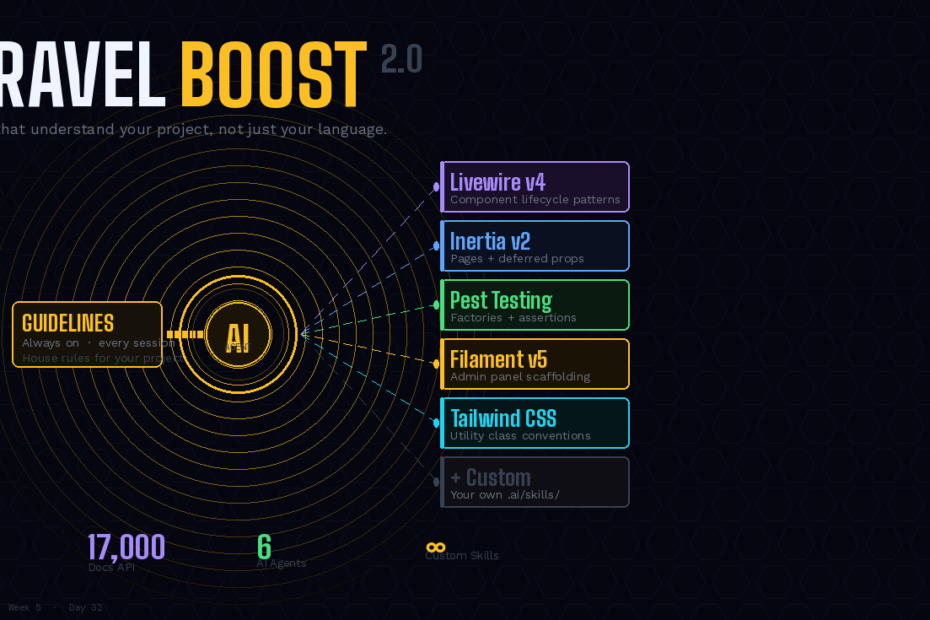
The big change: static guidelines that loaded everything all the time are replaced by on-demand Skills that load only what the current task needs. Plus 15 MCP tools, 17,000-document search API, and custom skill support. This is the most underwritten product in the Laravel ecosystem.
If you’ve used Claude Code, Cursor, or Copilot with a Laravel project and noticed the AI generating generic PHP instead of idiomatic Laravel — putting business logic in controllers, using raw database queries instead of Eloquent, writing tests that don’t use factories — you’ve hit the context problem.
AI coding agents are generalists. They know PHP. They know the concept of MVC. But they don’t know that in your project, business logic belongs in Action classes, not fat controllers. They don’t know that you use Pest for testing with a specific factory pattern. They don’t know that you’re on Livewire v4 and the lifecycle hooks changed. Without that context, they generate code that works but doesn’t fit.
Laravel Boost solves this. It’s an MCP server with two distinct mechanisms for giving AI agents context about your Laravel application: Guidelines (always-on) and Skills (on-demand). Boost 2.0, released January 2026, transitions many static guidelines into modular Skills — the most significant architectural change since Boost launched.
This is the complete guide: what changed in 2.0, how Guidelines and Skills differ, the full MCP tool list, the documentation API, and how to write your own Skills.
The Core Problem Boost 2.0 Solves
In Boost 1.x, context worked like this: you ran boost:install, and it assembled a single AI context file (CLAUDE.md for Claude Code, AGENTS.md for Codex, etc.) containing guidelines for every package your project used. That file was loaded into the agent’s context at the start of every session — before you’d typed a single word.
If your project used Laravel + Livewire + Inertia + Filament + Pest + Tailwind, the agent loaded guidelines for all six packages upfront, every time, regardless of what you were actually doing. Writing a migration? The Livewire guidelines were still in context, eating tokens. Fixing a route? The Filament guidelines were there too.
The AI carried everything, all the time. Think: house rules vs job-specific tool cards. Instead of carrying everything all the time, the AI should carry only what the task needs.
This is exactly what Skills fix.
Guidelines vs Skills: The Mental Model
Boost 2.0 introduces two distinct context mechanisms:
Guidelines are loaded upfront when the AI agent starts, providing essential context about Laravel conventions and best practices that apply broadly across your codebase. Skills are activated on-demand when working on specific tasks, containing detailed patterns for particular domains (like Livewire components or Pest tests). Loading skills only when relevant reduces context bloat and improves the relevance of AI-generated code.
The practical rule: if it always applies, it’s a guideline; if it only matters sometimes, it’s a skill.
Guidelines (always loaded):
- Your project’s architecture conventions (Action classes, not fat controllers)
- Testing patterns (Pest, factories, behaviour not implementation)
- Naming conventions and code style
- Security requirements and authentication approach
- Generic Laravel best practices
Skills (loaded on-demand):
- Livewire v4 component patterns and lifecycle hooks
- Pest testing patterns with specific factories
- Filament v5 admin panel scaffolding
- Inertia.js v2 page components and deferred props
- Tailwind CSS class conventions
When you ask the agent to build a Livewire component, it loads the Livewire skill. When you ask it to write a Pest test, it loads the Pest skill. When you ask it to create a migration, neither fires — only the baseline guidelines apply.
Install and Update
# Fresh install — detects your packages automatically
php artisan boost:install

# Choose your agents: Claude Code, Cursor, Copilot, Codex, Junie, Gemini CLI
# Boost installs the MCP server and generates context files

# Keep skills and guidelines current
php artisan boost:update
The boost:install command will generate the relevant agent guideline and skill files for the coding agents you selected during the installation process. Feel free to add the generated MCP configuration file (.mcp.json), guideline files (CLAUDE.md, AGENTS.md, junie/, etc.), and the boost.json configuration file to your application’s .gitignore, as these files are automatically regenerated when running boost:install and boost:update.
Skills are auto-installed based on your composer.json:
# If livewire/livewire is in composer.json
# → livewire-development skill installed automatically

# If pestphp/pest is in composer.json
# → pest-testing skill installed automatically
The 15 MCP Tools
Beyond context files, Boost exposes an MCP server with tools that let AI agents interact with your actual running application. Boost powers 15 specialized tools to scan your codebase, read logs, run queries, extract configs, perform commands and much more.
The full tool list, organised by what they do:
Application inspection:
- Read PHP and Laravel versions, database engine, installed packages, Eloquent models
- Inspect and read the complete database schema with intelligent analysis
- Inspect and analyse application routes for better navigation
- List and inspect available Artisan commands
Live interaction:
- Execute queries against the database directly from the AI assistant
- Execute suggested PHP code via Laravel Tinker within your application context
- Execute Artisan commands suggested by the agent
Knowledge retrieval:
- Search the Laravel documentation API (17,000+ indexed pieces, semantic search)
- Read specific documentation pages
- Search package-specific guidelines
Log and config inspection:
- Read application logs
- Extract configuration values
What this means practically: when an agent needs to know your database schema before generating an Eloquent model, it calls the schema tool and sees the real thing. When it needs to understand how a specific Laravel feature works, it searches the documentation API rather than guessing from training data. When it generates a query and wants to verify it works, it can run it against your actual database.
The Documentation API: 17,000 Pieces, Semantically Searched
Laravel Boost includes a Documentation API that provides AI agents with access to an extensive knowledge base containing over 17,000 pieces of Laravel-specific information. The API uses semantic search with embeddings to deliver precise, context-aware results.
This is the part that makes Boost meaningfully different from just editing your CLAUDE.md manually. Documentation is:
- Version-aware: results are filtered to match your exact installed package versions
- Semantically searched: embeddings mean “how do I validate a request” finds the right docs even if the exact words don’t match
- Package-scoped: searches against the specific packages in your
composer.json
When Laravel 13 ships a new feature, Boost’s documentation API is updated. Your agent doesn’t need to wait for a training data update — it queries the API at task time and gets current information.
What Changed in Boost 2.0 (vs 1.x)
The transition from 1.x to 2.0 involved analysing which guidelines were always-needed vs task-specific and moving the task-specific ones into Skills. The result:
Guidelines that stayed as guidelines:
- Core Laravel conventions (project structure, naming, Eloquent patterns)
- Security conventions (auth patterns, input validation)
- Generic PHP best practices
Guidelines that became Skills (the big shift in 2.0):
- Livewire component patterns →
livewire-developmentskill - Inertia.js page patterns →
inertia-developmentskill - Pest testing patterns →
pest-testingskill - Filament admin panel patterns →
filament-developmentskill - Tailwind CSS class conventions →
tailwind-developmentskill - And more — the exact list grows with
boost:update
The guideline file shrinks by approximately 40% for a typical full-stack Laravel project. The agent starts sessions leaner and only loads the depth it needs when it needs it.
What Shipped in Boost 2.2.0
The most recent release (v2.2.0) added two things worth knowing about:
Vendor package guideline and skill shipping. Package maintainers can now ship their own Boost guidelines and skills alongside their package:
vendor/spatie/laravel-medialibrary/resources/boost/guidelines/
vendor/spatie/laravel-medialibrary/resources/boost/skills/
Boost automatically discovers and loads these. When you install spatie/laravel-medialibrary, the agent immediately knows how to use it correctly — no manual guideline writing required.
Breaking change: Inertia guidelines restructured. Guidelines previously located at .ai/inertia-laravel/core.blade.php are now organized by version. If you have custom Inertia guidelines, run boost:update and review the new structure.
Writing Your Own Skills
This is where Boost becomes genuinely powerful for teams. You can encode your project’s architectural decisions, testing patterns, and conventions as Skills that the agent loads automatically when relevant.
# Create a custom skill directory
mkdir -p .ai/skills/invoice-domain
touch .ai/skills/invoice-domain/SKILL.md
<!-- .ai/skills/invoice-domain/SKILL.md -->
# Invoice Domain — Patterns and Conventions

## When to use this skill
Load when working with: invoices, payments, billing, clients, line items

## Architecture
- All invoice state transitions go through `App\Actions\Invoices\*` classes
- Never mutate invoice status directly — always use action classes
- InvoiceCreated, InvoicePaid, InvoiceOverdue are the three domain events
- Dispatching events is the action class's responsibility

## Model conventions
- `Invoice::find()` is never used directly in controllers — use `InvoiceRepository`
- `$invoice->markAsPaid()` is a convenience method but still fires the action
- All amounts stored in pence (integer), never float

## Testing patterns
```php
// Always use InvoiceFactory with state methods
$invoice = Invoice::factory()->overdue()->create();

// Test state transitions via actions, not direct mutation
(new MarkInvoicePaid)($invoice, $payment);

// Assert the event fired, not just the status
Event::assertDispatched(InvoicePaid::class);
What NOT to do
- Never
$invoice->update(['status' => 'paid'])directly - Never calculate amounts in controllers
- Never expose internal cost_price field in API resources
Run `boost:update` and this skill is available. When you ask Claude Code to "add a refund feature to invoices", it loads this skill and knows to create a `RefundInvoice` action class that fires `InvoiceRefunded`, stores amounts in pence, and writes the test with the factory state pattern.

Without the skill, the agent might add status mutation in a controller and a test that directly sets the status field. With the skill, it writes code that looks like your senior developer wrote it.

---

## Supported Agents

Boost integrates with popular IDEs and AI tools that support the Model Context Protocol. For detailed setup instructions for Cursor, Claude Code, Codex, Gemini CLI, GitHub Copilot, and Junie, see the Set Up Your Agents section of the Boost documentation.

Six agents, all configured by `boost:install`. You can select multiple — the install command generates the appropriate context file for each (`CLAUDE.md`, `AGENTS.md`, `.cursor/rules/`, `junie/guidelines/`).

---

## The Setup in Under Five Minutes

```bash
# 1. Install
composer require laravel/boost --dev
php artisan boost:install
# Select: Claude Code (or Cursor, Copilot, Codex, etc.)
# Boost detects packages and installs matching skills

# 2. Register the MCP server (Claude Code)
claude mcp add boost -- npx -y @nicoverbruggen/laravel-boost-mcp

# 3. Add generated files to .gitignore
echo ".mcp.json" >> .gitignore
echo "CLAUDE.md" >> .gitignore
echo "boost.json" >> .gitignore

# 4. Add your custom skills
mkdir -p .ai/skills/your-domain
# Write your SKILL.md

# 5. Keep current
php artisan boost:update
From this point, when Claude Code starts a session on your project, it has: your project’s conventions as always-on guidelines, package-specific patterns loaded on demand as skills, 15 MCP tools to inspect your schema/routes/logs, and a 17,000-document API for accurate Laravel documentation. The difference in output quality is significant enough that “install Boost before writing a line of code” is now a reasonable project setup rule.
Why This Is Underwritten
Boost gets less coverage than the Laravel AI SDK, Nightwatch, and MCP because it doesn’t have a visible output. The SDK produces agent classes. Nightwatch shows you an error dashboard. Boost’s output is invisible — it just makes every AI interaction on your project better.
The developers who use it notice immediately. The developers who don’t use it don’t know what they’re missing, because they’ve never seen what the same prompt produces on a Boost-configured project vs a bare one.
The difference: a bare project gets generic PHP that technically works. A Boost-configured project gets idiomatic Laravel code that follows your team’s conventions, uses your packages correctly, and produces tests that pass on the first run.
Install it before you open Claude Code next time. The setup is five minutes. The difference is permanent.
Follow for weekly deep-dives on Laravel, PHP, Vue.js, and the agentic stack.