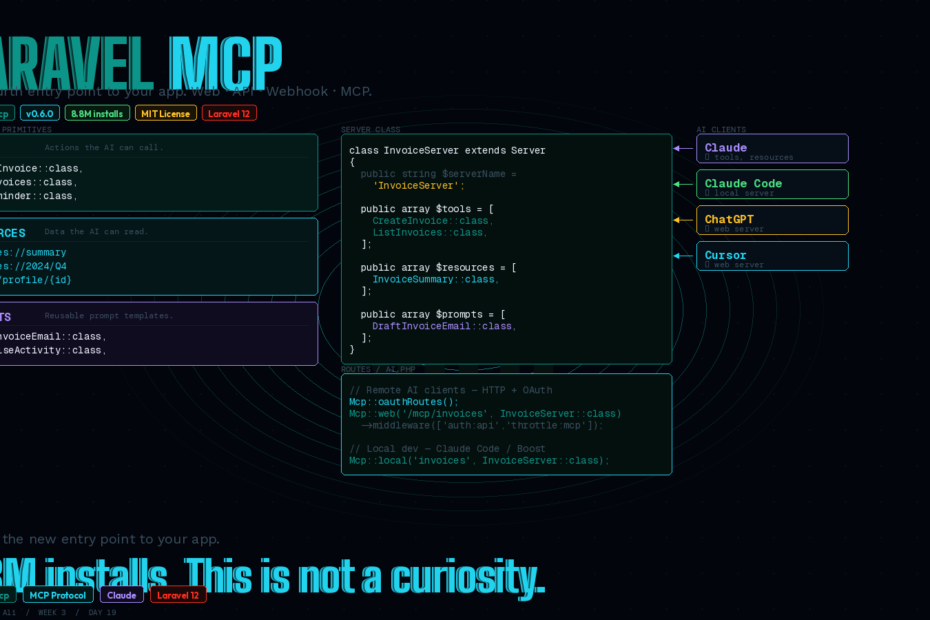
laravel/mcp is in the official docs, MIT licensed, and already has 8.8 million installs. Here’s what it does, why it matters, and how to build one from scratch.
Most Laravel developers are building three entry points into their applications: a web interface, a JSON API, and maybe a webhook handler.
MCP is the fourth. And unlike the first three, this one doesn’t require users to come to you — it brings your application directly into every AI chat tool your users are already running.
MCP servers let your products reach users where they are: AI chats handling over three billion messages daily. With laravel/mcp, adding that entry point takes one Composer install and a single Artisan command.
What MCP Actually Is (One Paragraph)
The Model Context Protocol is a standardised way for AI clients — Claude, ChatGPT, Cursor, Claude Code — to discover and call functionality in external applications. Instead of reading documentation and guessing at your API, the AI client connects to your MCP server, gets a structured list of what your application can do, and calls those capabilities directly with validated inputs.
Tools allow AI agents to act. Anything you can code can be exposed as a tool, from creating an invoice to starting a robot vacuum.
The practical result: a user in Claude says “create an invoice for Acme Corp for $2,400” — and Claude calls your MCP tool, which runs your Laravel code, which creates the actual invoice in your database, and returns the result. No browser. No form. No copy-pasting.
The Three MCP Primitives
Every MCP server exposes three types of capabilities:
Tools — Actions the AI can call. Create an order, send a notification, query a database, fire a job. If you can write PHP code for it, you can expose it as a tool. Tools have typed inputs validated by JSON Schema and return structured responses.
Resources — Data the AI can read. Think of resources like read-only API endpoints with a URI scheme. invoices://2024/Q4 might return all Q4 invoices. user://profile/123 might return a user profile. Resources give the AI passive context to reason about.
Prompts — Reusable prompt templates with arguments. A “generate-email” prompt might accept {recipient} and {subject} arguments and produce a standardised prompt structure the AI uses consistently. Prompts help shape how the AI interacts with your application.
A Server class wires them together and handles the communication.
Install and Setup
composer require laravel/mcp
php artisan vendor:publish --tag=mcp-routes
This creates a routes/ai.php file — think of it like your routes/web.php, but specifically for AI interactions.
Create a server:
php artisan make:mcp-server InvoiceServer
This command will create a new server class in the app/Mcp/Servers directory. The generated server class extends Laravel\Mcp\Server and provides properties for registering tools, resources, and prompts.
Building a Real MCP Server: Invoice Management
Let’s build something practical. An invoice management MCP server that lets any AI client create invoices, list them, and send reminders.
The Server Class
<?php
// app/Mcp/Servers/InvoiceServer.php

namespace App\Mcp\Servers;

use Laravel\Mcp\Server;

class InvoiceServer extends Server
{
    public string $serverName    = 'InvoiceServer';
    public string $serverVersion = '1.0.0';
    public string $instructions  = 'Use to create, list, and manage invoices for authenticated users.';

    public array $tools = [
        \App\Mcp\Tools\CreateInvoice::class,
        \App\Mcp\Tools\ListInvoices::class,
        \App\Mcp\Tools\SendReminder::class,
    ];

    public array $resources = [
        \App\Mcp\Resources\InvoiceSummary::class,
    ];

    public array $prompts = [
        \App\Mcp\Prompts\DraftInvoiceEmail::class,
    ];
}
A Tool: CreateInvoice
Tools use JsonSchema for typed input definitions and $request->validate() for validation — familiar patterns if you’ve written form requests:
<?php
// app/Mcp/Tools/CreateInvoice.php

namespace App\Mcp\Tools;

use App\Models\Invoice;
use Illuminate\Contracts\JsonSchema\JsonSchema;
use Laravel\Mcp\Request;
use Laravel\Mcp\Response;
use Laravel\Mcp\Server\Tool;
use Laravel\Mcp\Server\Attributes\Description;

#[Description('Creates a new invoice for the authenticated user.')]
class CreateInvoice extends Tool
{
    public function schema(JsonSchema $schema): array
    {
        return [
            'client_name' => $schema->string()
                ->description('The full name of the client being invoiced')
                ->required(),
            'amount'      => $schema->number()
                ->description('Invoice amount in USD')
                ->required(),
            'due_days'    => $schema->integer()
                ->description('Number of days until the invoice is due')
                ->default(30),
            'description' => $schema->string()
                ->description('Description of services rendered'),
        ];
    }

    public function handle(Request $request): Response
    {
        if (! $request->user()) {
            return Response::error('Authentication required to create invoices.');
        }

        $validated = $request->validate([
            'client_name' => 'required|string|max:255',
            'amount'      => 'required|numeric|min:0.01',
            'due_days'    => 'integer|min:1|max:365',
            'description' => 'nullable|string',
        ]);

        $invoice = Invoice::create([
            'user_id'     => $request->user()->id,
            'client_name' => $validated['client_name'],
            'amount'      => $validated['amount'],
            'due_date'    => now()->addDays($validated['due_days'] ?? 30),
            'description' => $validated['description'] ?? null,
            'status'      => 'draft',
        ]);

        return Response::text(
            "Invoice #{$invoice->id} created for {$invoice->client_name} — " .
            "\${$invoice->amount} due on {$invoice->due_date->format('M j, Y')}."
        );
    }
}
The AI calls this tool by name, provides the arguments, and gets back the text response. Your actual Laravel application code runs — the Eloquent model, the validation, the database write. MCP is just the transport layer.
A Resource: InvoiceSummary
<?php
// app/Mcp/Resources/InvoiceSummary.php

namespace App\Mcp\Resources;

use App\Models\Invoice;
use Laravel\Mcp\Request;
use Laravel\Mcp\Response;
use Laravel\Mcp\Server\Resource;

class InvoiceSummary extends Resource
{
    protected string $uri      = 'invoices://summary';
    protected string $name     = 'Invoice Summary';
    protected string $mimeType = 'application/json';
    protected string $description = 'Returns totals and counts for the authenticated user\'s invoices.';

    public function handle(Request $request): Response
    {
        $invoices = Invoice::where('user_id', $request->user()->id);

        return Response::text(json_encode([
            'total_invoices'  => $invoices->count(),
            'total_outstanding' => $invoices->where('status', 'sent')->sum('amount'),
            'total_paid'      => $invoices->where('status', 'paid')->sum('amount'),
            'overdue_count'   => $invoices->where('status', 'sent')
                                          ->where('due_date', '<', now())
                                          ->count(),
        ]));
    }
}
A Prompt: DraftInvoiceEmail
<?php
// app/Mcp/Prompts/DraftInvoiceEmail.php

namespace App\Mcp\Prompts;

use Laravel\Mcp\Request;
use Laravel\Mcp\Response;
use Laravel\Mcp\Server\Prompt;

class DraftInvoiceEmail extends Prompt
{
    protected string $name        = 'draft-invoice-email';
    protected string $description = 'Generates a professional invoice reminder email.';

    protected array $arguments = [
        ['name' => 'client_name', 'required' => true],
        ['name' => 'amount',      'required' => true],
        ['name' => 'due_date',    'required' => true],
    ];

    public function handle(Request $request): Response
    {
        $client  = $request->input('client_name');
        $amount  = $request->input('amount');
        $due     = $request->input('due_date');

        return Response::prompt(
            "Draft a professional, friendly invoice reminder email to {$client} " .
            "for \${$amount} due on {$due}. Keep it concise and include payment options."
        );
    }
}
Register the Server
// routes/ai.php

use App\Mcp\Servers\InvoiceServer;
use Laravel\Mcp\Facades\Mcp;

// Web server — accessible via HTTP, for remote AI clients
Mcp::oauthRoutes();
Mcp::web('/mcp/invoices', InvoiceServer::class)
    ->middleware(['auth:api', 'throttle:mcp']);

// Local server — for Claude Code / Laravel Boost integration
Mcp::local('invoices', InvoiceServer::class);
Web vs Local Servers
Laravel MCP has two server modes and the distinction matters:
Web servers (Mcp::web()) are accessible via HTTP. They’re for remote AI clients — Claude.ai, ChatGPT, Cursor — connecting to your deployed application. You protect them with Sanctum or OAuth (Passport), and rate-limiting middleware. Your users authorise their AI client to access your MCP server once, and then their AI assistant can interact with your app from any conversation.
Local servers (Mcp::local()) run as Artisan commands. They’re perfect for local development tooling — Claude Code, Laravel Boost, your own dev scripts. Once registered, you should not typically need to manually run the mcp:start Artisan command yourself. Instead, configure your MCP client to start the server or use the MCP Inspector.
Authentication: Sanctum vs OAuth
For most applications, Sanctum is the right choice to start:
Mcp::web('/mcp/invoices', InvoiceServer::class)
    ->middleware('auth:sanctum');
Users provide a Sanctum token via Authorization: Bearer <token>. Inside your tools, $request->user() returns the authenticated user exactly like in a normal API controller.
For public-facing MCP servers where you want third-party AI clients (not just your own users) to connect via a standard OAuth flow, use Passport:
Mcp::oauthRoutes();   // registers /oauth/authorize, /oauth/token, etc.
Mcp::web('/mcp/invoices', InvoiceServer::class)
    ->middleware('auth:api');
OAuth 2.1 is the documented authentication mechanism in the Model Context Protocol specification, and is the most widely supported among MCP clients. For that reason, we recommend using Passport when possible.
Start with Sanctum if you’re building for your own users. Move to Passport when you need third-party integrations.
Testing
Laravel MCP ships with an MCP Inspector for interactive testing and built-in unit test helpers:
// tests/Feature/InvoiceServerTest.php

use Laravel\Mcp\Testing\McpServerTest;

class InvoiceServerTest extends McpServerTest
{
    public function test_create_invoice_tool_creates_invoice(): void
    {
        $user = User::factory()->create();

        $response = $this->actingAs($user)
            ->callTool('create_invoice', [
                'client_name' => 'Acme Corp',
                'amount'      => 2400,
                'due_days'    => 30,
            ]);

        $response->assertSuccessful();
        $response->assertTextContains('Invoice #');
        $this->assertDatabaseHas('invoices', ['client_name' => 'Acme Corp']);
    }

    public function test_create_invoice_requires_auth(): void
    {
        $response = $this->callTool('create_invoice', [
            'client_name' => 'Acme Corp',
            'amount'      => 2400,
        ]);

        $response->assertError('Authentication required');
    }
}
Why This Is More Than Just Another API
You’ve built JSON APIs. You’ve handled webhooks. You’ve written GraphQL schemas. MCP feels similar at first — it’s just another way to expose functionality. But there are two differences that matter.
Discovery is built in. When an AI client connects to your MCP server, it asks what tools, resources, and prompts exist. Your application describes its own capabilities. The AI doesn’t need documentation it might misinterpret — it gets a structured, machine-readable description of exactly what it can do and what inputs each action requires.
The user experience changes. Right now, if your SaaS user wants to create an invoice, they open a browser tab, navigate to your app, fill a form, click submit. With an MCP server, they type “create an invoice for Acme Corp for $2,400 due in 30 days” in Claude — and it happens. The interface becomes their AI client. Your application becomes a capability that AI can invoke.
With over one billion users sending over 20 billion messages to AI chat apps each week, it’s time to meet them where they are. MCP is the new entry point to your app.
The Numbers
laravel/mcp is at v0.6.0 (released February 24, 2026) with 8.8 million installs and 683 GitHub stars. Those are real adoption numbers — not a curiosity. The package is MIT licensed and part of the official Laravel 12 documentation under the AI section, alongside the AI SDK and Boost.
Getting Started Today
composer require laravel/mcp
php artisan vendor:publish --tag=mcp-routes
php artisan make:mcp-server YourServer
php artisan make:mcp-tool YourFirstTool
Build one tool. Register it. Connect Claude Code to your local server with Mcp::local(). Ask it to call your tool.
That first working interaction — watching Claude call your actual application code through a natural language request — is the moment this clicks.
Follow me for daily deep-dives on Laravel, PHP, Vue.js, and AI integrations. New article every day.