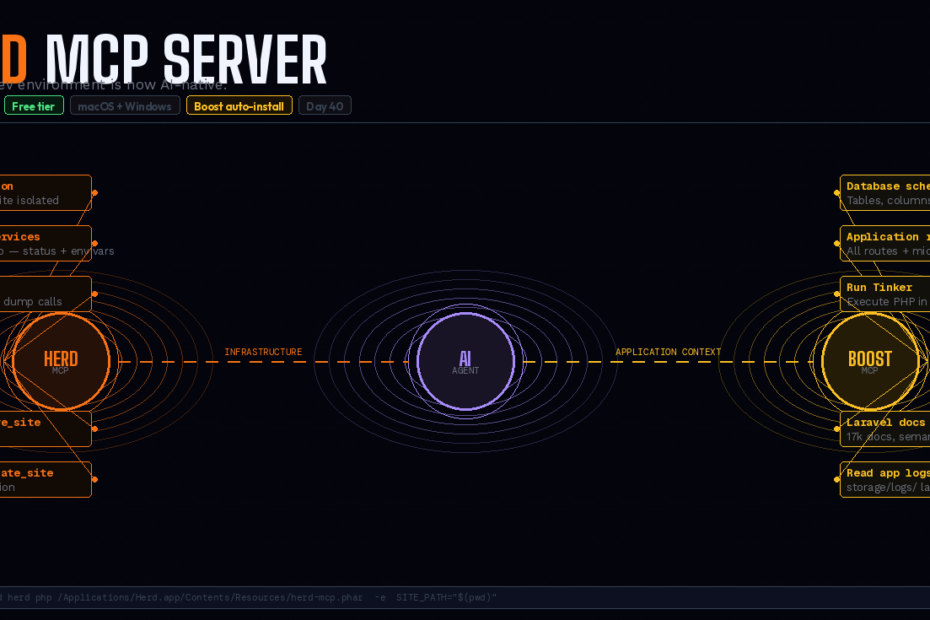
Claude Code and Cursor can now install PHP versions, start services, secure sites, switch per-project PHP, inspect running queries, and read your environment variables — directly from the chat window. The gap between AI and local infrastructure closes.
There’s a gap that every developer who uses AI coding tools eventually hits.
Claude Code can write a migration. It can generate a model. It can build a controller and test it. But when you ask “can you spin up Redis for this project?” or “this site needs PHP 8.3 not 8.1” or “what queries fired during that last request?” — the AI stops. It can tell you what commands to run. It can’t run them against your actual local environment.
Laravel Herd closes that gap with its MCP server.
Herd ships with a powerful MCP server that provides useful tools directly to your AI agents. The free version includes the MCP server. When registered with Claude Code or Cursor, Herd’s MCP tools give AI agents real control over your local development environment — not suggestions, but actual execution.
What the Herd MCP Server Actually Does
The Herd MCP server exposes the following categories of capability to AI agents:
Prompts: debug_site — perform debug operations on a site, including retrieving executed query information, dispatched jobs, logs, dump calls, and outgoing HTTP requests.
Resources: site_information — returns information about the current site, such as the correct local URL, environment variables, used PHP versions, and Node versions.
Tools: find_available_services, install_service, start_or_stop_service, get_all_php_versions, install_php_version, get_all_sites, secure_or_unsecure_site, isolate_or_unisolate_site, get_last_deployment_information.
The distinction between the Herd MCP server and the Boost MCP server (covered in Day 32) is important:
- Boost MCP = application-level intelligence. Knows your codebase, DB schema, routes, config, and how to use your Laravel packages correctly.
- Herd MCP = infrastructure layer. Controls PHP versions, services (MySQL, Redis, Reverb), site security, per-project isolation, and debug data.
Together they give an AI agent complete context — from “how should I structure this Eloquent query” (Boost) to “start MySQL 8 on port 3307 for this project” (Herd).
Installation: Two Ways
The easy way — via Laravel Boost (recommended)
The officially recommended approach is through Laravel Boost. The boost:install command detects that you have Herd installed and automatically registers its MCP server with supported clients like Cursor and Claude Code.
composer require laravel/boost --dev
php artisan boost:install
# Select your agents (Claude Code, Cursor, etc.)
# Boost detects Herd and registers the MCP server automatically
That’s it — no JSON config to write, no path to look up.
The manual way — per project (Claude Code)
Run the following command in your project root. It automatically sets the SITE_PATH to the project root:
# In your project root
claude mcp add herd php /Applications/Herd.app/Contents/Resources/herd-mcp.phar \
    -e SITE_PATH="$(pwd)"
The manual way — Cursor
Go to Cursor Settings → Tools & Integrations → New MCP Server and paste the standard configuration:
{
    "herd": {
        "command": "php",
        "args": [
            "/Applications/Herd.app/Contents/Resources/herd-mcp.phar"
        ],
        "env": {
            "SITE_PATH": "/path/to/your/project"
        }
    }
}
Per-project vs global
While you may install the Herd MCP server globally, the per-project installation with the SITE_PATH environment variable is recommended. This way, you gain access to more fine-grained tools which leads to better AI agent results.
The SITE_PATH is what gives the agent site-specific context — which .env file belongs to this project, which PHP version it’s isolated to, which services it needs. Without it, the agent only gets global Herd state.
The Tools in Practice
PHP version management
An agent can check what PHP versions are installed, install a new one, and isolate a specific site to use it — all without you leaving your editor:
You: "This project requires PHP 8.3. Make sure it's installed and switch the site to use it."

Agent calls: get_all_php_versions
→ Returns: 8.1 (installed, global), 8.2 (installed), 8.3 (not installed)

Agent calls: install_php_version { "version": "8.3" }
→ PHP 8.3 downloaded and installed

Agent calls: isolate_or_unisolate_site {
    "shouldIsolate": true,
    "siteName": "my-app",
    "phpVersion": "8.3"
}
→ Site now isolated to PHP 8.3
Previously: you’d open Herd, click through to PHP versions, install 8.3, come back to the site, set isolation. Four separate UI actions. Now: one prompt.
Service management
You: "I need Redis running for this project. What port should I use and how do I configure it?"

Agent calls: find_available_services
→ Returns: MySQL 8.0 (running, :3306), Redis (not installed)

Agent calls: install_service { "type": "redis", "port": 6379 }
→ Redis installed, started, and environment variables returned

Agent: Redis is now running on port 6379. Add to your .env:
REDIS_HOST=127.0.0.1
REDIS_PORT=6379
REDIS_PASSWORD=null
The find_available_services tool returns the connection environment variables for each service — the agent can tell you exactly what to put in your .env, or write it there directly.
HTTPS with automatic certificate
You: "Secure this site with HTTPS for local testing."

Agent calls: secure_or_unsecure_site {
    "shouldSecure": true,
    "siteName": "my-app"
}
→ Site now available at https://my-app.test
Herd generates and installs the TLS certificate automatically. The agent confirms the new URL.
Debug: queries, jobs, logs, dumps
The debug_site prompt is the most powerful tool for development workflows. It gives the agent access to:
- Executed queries — what SQL ran during the last request, with timing
- Dispatched jobs — what jobs were queued
- Application logs — the last entries from
storage/logs/laravel.log - Dump calls — any
dd()ordump()output - Outgoing HTTP requests — what external calls the app made
You: "The invoice creation is slow. What queries fired on the last POST to /invoices?"

Agent calls: debug_site
→ Returns 23 queries, 8 of which are N+1 patterns on the line_items table

Agent: I can see an N+1 problem. Your InvoiceController is loading
each line item's product separately in the loop. Add ->with('product')
to the line items query on line 47 of InvoiceController.php.

Shall I make that change?
Without the Herd MCP tool, the agent would need you to copy-paste the query log, explain the route, and describe the timing. With it, the agent retrieves the actual data from your running application.
Site information as context
site_information returns the full picture for the current site: the correct local URL, all environment variables, PHP version, Node version. The agent uses this automatically to understand your project’s infrastructure:
You: "Generate the correct database config for this project."

Agent calls: site_information (SITE_PATH set to current project)
→ Returns: URL=https://my-app.test, PHP=8.3, DB_HOST=127.0.0.1,
           DB_PORT=3306, DB_DATABASE=my_app, DB_USERNAME=root...

Agent: Here's your config/database.php connection block, pre-filled
with your actual local credentials.
The Automated Project Onboarding Workflow
This is the workflow that makes the Herd MCP server genuinely valuable as a team tool. When a developer clones a project they’ve never worked on:
You: "I just cloned this project. Set up everything I need to run it locally."

Agent:
1. Reads composer.json → sees laravel/framework:^13.0 → PHP 8.3 required
2. Calls get_all_php_versions → PHP 8.3 not installed
3. Calls install_php_version { "8.3" }
4. Calls isolate_or_unisolate_site → isolates project to 8.3
5. Reads .env.example → sees REDIS_URL and DB_CONNECTION=mysql
6. Calls find_available_services → MySQL running, Redis not installed
7. Calls install_service { "redis", 6379 }
8. Calls secure_or_unsecure_site → enables HTTPS
9. Writes .env from .env.example with actual service credentials
10. Reports: "Your site is ready at https://my-app.test"
What used to be a 30-minute onboarding process — reading the README, installing dependencies, configuring services, fixing PHP version mismatches — becomes a single prompt.
Forge Integration
The get_last_deployment_information tool returns information about the last deployment from Laravel Forge, if the local site is linked with a Forge site.
If you use Herd and Forge together, the agent can see your production deployment status from your local environment — latest commit deployed, deploy time, deploy log — without you opening the Forge dashboard.
Boost + Herd: The Complete Local AI Stack
The two MCP servers complement each other cleanly:
| Layer | Server | What it knows |
|---|---|---|
| Application | Boost MCP | Codebase, schema, routes, packages, Laravel conventions |
| Infrastructure | Herd MCP | PHP versions, services, sites, .env, queries, logs |
When both are registered, an agent session has:
- The right Laravel patterns and idioms (Boost guidelines + skills)
- Live access to your application’s structure (Boost MCP tools)
- Full control over the local infrastructure (Herd MCP tools)
- Debug data from your running app (Herd
debug_siteprompt)
That’s the kind of context that would take a new team member days to accumulate. It’s available to the agent from the first prompt.
The Honest Caveat
The Herd MCP server runs locally and requires Herd to be installed. It’s macOS and Windows only — Linux is not supported by Herd. If your team runs Ubuntu or Arch locally, this isn’t available to you. Sail or Valet+ remain the alternatives.
The debug tools are powerful, but they log data Herd has captured. If a request happened before Herd was watching, the data isn’t there. In practice, this means triggering requests yourself and then asking the agent to debug — not asking it to debug requests that already happened hours ago.
One Command to Start
If you use Herd and haven’t registered the MCP server yet:
# With Boost (recommended — also sets up application context)
php artisan boost:install

# Or directly with Claude Code
claude mcp add herd php /Applications/Herd.app/Contents/Resources/herd-mcp.phar \
    -e SITE_PATH="$(pwd)"
Then verify it’s working:
"Using Herd, list all my local sites."
If the agent responds with your site list, you’re in. Your local development environment is now part of the AI’s context — not just described to it, but directly accessible.
Follow for weekly deep-dives on Laravel, PHP, Vue.js, and the agentic stack.