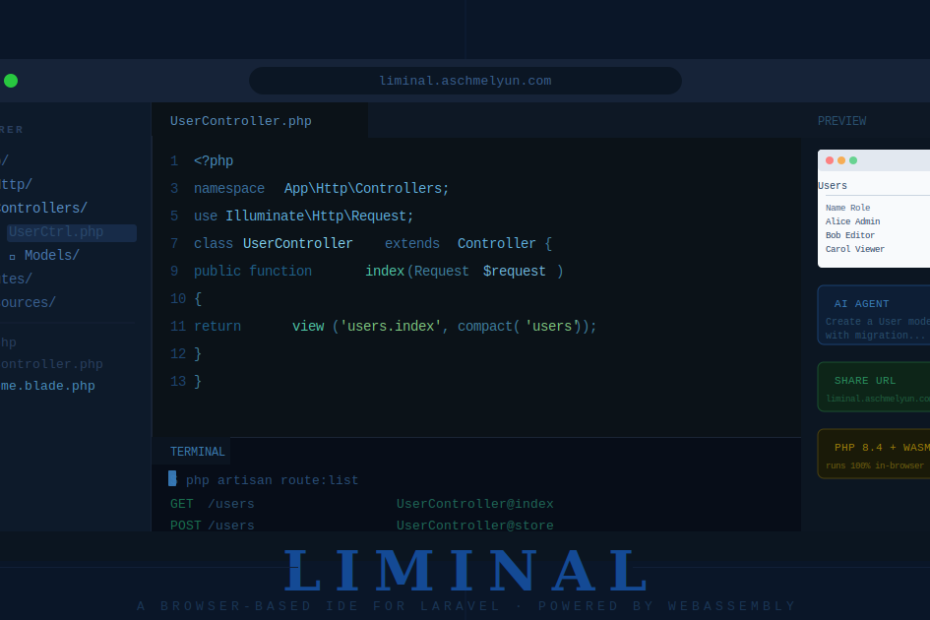
What if you could spin up a full Laravel development environment without installing PHP, Composer, or even a local server — right inside a browser tab?
That’s exactly what Liminal delivers. Built by Andrew Schmelyun, Liminal is a browser-based IDE that lets you write, run, and preview Laravel applications entirely in the browser, with no server setup and no local PHP installation required. It’s one of the more ambitious developer tools to emerge from the Laravel community recently, and it’s worth understanding why it matters.
The Technology Behind It: PHP in WebAssembly
The magic ingredient here is WebAssembly (WASM). Liminal runs PHP 8.4 entirely in the browser via the @php-wasm/web-8.4 package. This means that when you write a Laravel route, execute an Artisan command, or run a database query, all of that PHP execution happens client-side — inside your browser tab — with zero backend involvement.
The production deployment of Liminal at liminal.aschmelyun.com is a purely static site hosted on Cloudflare Pages. There is no server processing your PHP. There is no cloud VM spinning up. It’s just your browser, a WASM runtime, and a virtual filesystem.
On boot, the app downloads app.zip and extracts it into an in-memory virtual filesystem. From that point forward, everything — routing, queries, Artisan commands — runs client-side.
What You Get: A Full Development Environment in One Tab
Liminal isn’t just a code editor. It’s a genuinely full-featured IDE experience, packed into a single browser tab.
Code Editor
The editor is powered by CodeMirror 6 and supports syntax highlighting for PHP, Blade templates, JavaScript, TypeScript, JSON, and CSS. You can browse your project files, open multiple files, and edit them with a clean, distraction-free interface.
Preview Pane
Write a route, hit preview, and see the rendered HTML output immediately. Tailwind CSS v4 is automatically injected, so your Blade views get styling out of the box without any configuration.
Artisan Terminal
You can run Artisan commands directly in the browser, complete with command history. This is a standout feature — running php artisan make:model, php artisan route:list, or custom commands without leaving the browser feels genuinely powerful.
AI Agent
Liminal ships with an OpenAI-powered AI assistant built right in. The agent can read and write files, execute Artisan commands, and help you build features — all within the same IDE. Think of it as a copilot that operates inside the same sandboxed environment you’re working in.
Standout Features That Make Liminal Unique
Shareable URLs
This is the feature that will make Liminal genuinely viral in the Laravel community. File changes are encoded directly into the URL. Share a link, and anyone who opens it gets your exact changes applied automatically — no account, no installation, no sign-up required.
This is enormous for tutorials, bug reports, Stack Overflow answers, and conference demos. Instead of saying “here’s my code, set it up and run it,” you say “here’s a link.”
GitHub Import & ZIP Export
You can import a project directly from a GitHub repository and export your work as a .zip file when you’re done. It’s a clean in/out workflow that bridges the gap between the browser environment and your local machine.
Local Folder Sync
For Chrome and Edge users, Liminal supports folder sync via the File System Access API. This mirrors the virtual in-browser filesystem to a real directory on your local machine — so you can use Liminal as a front-end while keeping your files synced locally.
Dark Mode
Light, dark, or system theme — persisted across sessions. A small detail, but it matters for a tool you’ll spend time in.
The Tech Stack Under the Hood
For developers curious about how Liminal is built:
- Vue 3 — Frontend framework
- TypeScript — Type-safe JavaScript throughout
- Vite — Build tooling
- Tailwind CSS v4 — Styling
- CodeMirror 6 — Code editor
- @php-wasm/web-8.4 — PHP running in WebAssembly
One interesting engineering detail: WASM files exceeding 24 MB are chunked into .wasm.part* files with a manifest using a custom split-wasm.js script. This is required to stay within Cloudflare Pages’ file size limits. The WASM runtime also requires SharedArrayBuffer, which needs specific security headers (Cross-Origin-Opener-Policy: same-origin and Cross-Origin-Embedder-Policy: credentialless).
Limitations Worth Knowing
Running PHP in WebAssembly is a remarkable feat, but it comes with trade-offs that are important to understand before you try to replace your local environment with Liminal.
No network access. The WASM sandbox is isolated, meaning you cannot make outbound HTTP requests. Any Laravel functionality that relies on external APIs, mail services, or third-party integrations won’t work inside Liminal.
In-memory filesystem. The virtual filesystem lives in your browser’s memory. Close the tab without exporting or syncing, and unsaved work is gone.
Single-threaded execution. WebAssembly in browsers is largely single-threaded, which can affect performance on compute-heavy operations.
Not a production-like environment. Liminal is best thought of as a sandbox and learning tool, not a replacement for Docker, Laravel Herd, or Valet for production-grade local development.
Who Is Liminal For?
Liminal shines in specific use cases:
Learners and beginners. The biggest barrier to trying Laravel has always been environment setup — PHP versions, Composer, database drivers, web servers. Liminal eliminates all of that. A new developer can go from “I want to try Laravel” to writing actual Laravel code in seconds.
Tutorial creators and educators. Shareable URLs make Liminal a game-changer for anyone writing Laravel content. Share a working example with a single link.
Quick prototyping. When you have an idea and want to validate a Laravel pattern or test a Blade layout without spinning up a full project, Liminal is the fastest path.
Conference demos and live coding. No WiFi dependency, no “let me pull up my local environment” fumbling — just open a URL and start coding.
Getting Started
You can try Liminal immediately at liminal.aschmelyun.com — no installation needed.
If you want to run it locally or contribute to the project, clone the repository from GitHub and use Bun to build it:
git clone https://github.com/aschmelyun/liminal.git
cd liminal
bun run build      # Bundles the Laravel app, runs type checking, produces static assets
bun run preview    # Starts a local dev server
Note: Use bun run preview instead of bun run dev when you need to test the full built artifact, since WASM chunk reassembly requires the built output.
Final Thoughts
Liminal is a genuinely impressive piece of engineering. Running PHP 8.4 in the browser via WebAssembly and wrapping it in a full IDE experience — complete with an Artisan terminal, AI agent, and shareable URLs — is not a trivial achievement.
It won’t replace your local Laravel development environment for serious work, and it isn’t trying to. But as a learning sandbox, a demo tool, a quick-prototype environment, and a showcase of what WebAssembly can do for the PHP ecosystem, Liminal is exceptional.
The shareable URL feature alone could change how the Laravel community shares code and reproduces bugs. That’s the kind of thoughtful, community-oriented feature design that makes open source tools worth celebrating.
Give it a try at liminal.aschmelyun.com, and explore the source on GitHub.