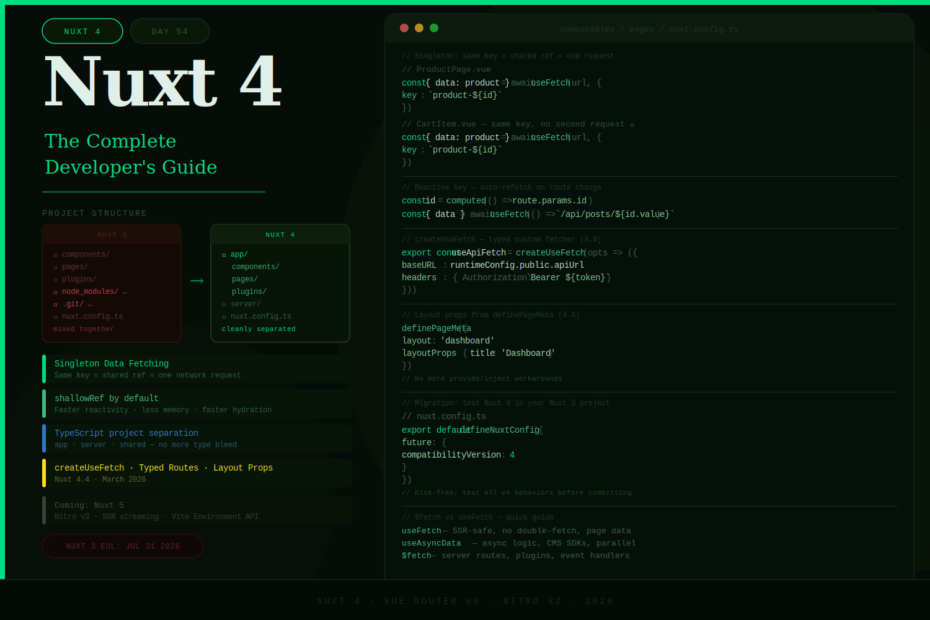
The app/ directory, smarter data fetching, shared payload, typed routes, and everything else that makes Nuxt 4 the best Vue meta-framework release in years.
Nuxt 4 landed in July 2025 — and in the months since, it’s matured significantly. With version 4.4 now out (March 2026), upgraded to Vue Router v5, custom useFetch factories, typed layout props, and better import tracing, Nuxt 4 is exactly what the framework needed to be.
This isn’t a rewrite. It’s an evolution. Evolution focused on three things: cleaner project structure, smarter data fetching, and better TypeScript. Every change has a clear reason behind it, and the migration from Nuxt 3 is genuinely smooth.
Here’s the complete guide to what Nuxt 4 brings and how to use it well.
Feature 1: The app/ Directory — A Cleaner Project Structure
One of the most visible changes in Nuxt 4 is the new app/ directory. In Nuxt 3, all your application files lived at the root level — right next to node_modules/, .git/, nuxt.config.ts, and every other configuration file. In large projects, this became a mess.
Nuxt 3 — everything mixed at root:
my-app/
├── components/
├── composables/
├── layouts/
├── pages/
├── plugins/
├── assets/
├── node_modules/    ← right next to your app code
├── .nuxt/
├── nuxt.config.ts
└── package.json
Nuxt 4 — application code isolated in app/:
my-app/
├── app/
│   ├── components/
│   ├── composables/
│   ├── layouts/
│   ├── pages/
│   ├── plugins/
│   └── assets/
├── server/
│   └── api/
├── shared/
├── node_modules/
├── nuxt.config.ts
└── package.json
Beyond aesthetics, this has a real performance benefit: Vite’s file watcher now focuses on a smaller scope of files, giving you snappier Hot Module Replacement. The improvement is especially noticeable on Windows and Linux where file watching has traditionally been slow.
The flat Nuxt 3 structure still works — Nuxt 4 is backward compatible. The app/ directory is opt-in, not mandatory.
Feature 2: Smarter Data Fetching — The Singleton Layer
This is the most impactful change in Nuxt 4 for day-to-day development. Multiple calls to useFetch or useAsyncData with the same key now share the same data, error, and status refs. No duplicate network requests, no inconsistent state between components.
The old problem — duplicate fetches for the same data:
<!-- ProductPage.vue -->
<script setup>
const { data: product } = await useFetch(`/api/products/${id}`)
</script>

<!-- CartItem.vue — mounted at the same time -->
<script setup>
// Same endpoint, same data — but a separate network request in Nuxt 3
const { data: product } = await useFetch(`/api/products/${id}`)
</script>
Nuxt 4 — same key = shared data, zero duplicate requests:
<!-- ProductPage.vue -->
<script setup>
const { data: product } = await useFetch(`/api/products/${id}`, {
    key: `product-${id}`
})
// Makes one network request
</script>

<!-- CartItem.vue -->
<script setup>
const { data: product } = await useFetch(`/api/products/${id}`, {
    key: `product-${id}` // Same key = same data ref, no second request
})
</script>
Three more improvements to data fetching:
Shallow refs by default — useFetch and useAsyncData now return shallowRef instead of ref. This is dramatically faster for complex API responses — less memory, faster reactivity, faster hydration. Most API data is immutable anyway:
<script setup>
// Nuxt 4 — shallowRef by default (faster)
const { data: users } = await useFetch('/api/users')

// Only when you need deep reactivity (editing nested fields)
const { data: form } = await useFetch('/api/user', { deep: true })
</script>
Automatic cleanup — when the last component using a data key unmounts, Nuxt automatically cleans up the cached data. No memory leaks, no stale data.
Reactive keys — use computed refs or getter functions as keys for automatic refetching:
<script setup>
const route = useRoute()
const id = computed(() => route.params.id)

// Automatically refetches when the route changes
const { data: post } = await useFetch(() => `/api/posts/${id.value}`)
</script>
Feature 3: TypeScript Project Separation
Nuxt 4 creates separate TypeScript projects for your different code contexts: app code, server code, shared/ folder, and builder configuration. This solves a painful problem from Nuxt 3 where type errors would bleed across contexts.
One tsconfig.json in your root is all you need. Nuxt generates the individual project references automatically.
// tsconfig.json — root level, Nuxt handles the rest
{
  "extends": "./.nuxt/tsconfig.json"
}
What this gives you:
- Server-only types (like
H3Event) only appear in server code - Client-only types (like DOM APIs) only appear in app code
- Better autocompletion, more accurate inference, fewer confusing errors
server/context has its own tsconfig with correct types for Nitro APIs
Feature 4: createUseFetch — Custom Fetch Composables (Nuxt 4.4)
One of the most-requested features landed in Nuxt 4.4: the ability to create fully typed custom useFetch instances with your own default options.
// composables/useApiFetch.ts
import { createUseFetch } from '#app'

export const useApiFetch = createUseFetch((currentOptions) => {
    const runtimeConfig = useRuntimeConfig()
    const { token } = useAuth()

    return {
        ...currentOptions,
        baseURL: currentOptions.baseURL ?? runtimeConfig.public.apiUrl,
        headers: {
            Authorization: `Bearer ${token.value}`,
            ...currentOptions.headers,
        },
        onResponseError({ response }) {
            if (response.status === 401) {
                return navigateTo('/login')
            }
        },
    }
})
<!-- Usage — exactly like useFetch, fully typed -->
<script setup lang="ts">
const { data: users } = await useApiFetch('/users')
// baseURL and auth headers applied automatically
// Redirects to /login on 401 responses automatically
</script>
There’s also createUseAsyncData for the same pattern with useAsyncData.
Feature 5: Typed Routes (Experimental but Production-Ready)
Nuxt 4.4 is preparing to take typed routes out of experimental status. When enabled, navigateTo, useRoute, useLink, and <NuxtLink> are all fully typed against your actual route definitions.
Enable it in nuxt.config.ts:
export default defineNuxtConfig({
    experimental: {
        typedPages: true,
    },
})
<script setup lang="ts">
// TypeScript knows the exact shape of params for this route
const route = useRoute('/posts/[id]')
const id = route.params.id // string — typed correctly

// TypeScript catches wrong route names at compile time
await navigateTo('/posts/123')              // ✅ valid
await navigateTo('/posts/[id]', { params: { id: '123' }}) // ✅ valid
await navigateTo('/pots/123')              // ❌ TypeScript error — typo caught
</script>
Feature 6: Layout Props (Nuxt 4.4)
You can now pass props to your layouts directly from definePageMeta — no more provide/inject workarounds:
<!-- pages/dashboard.vue -->
<script setup lang="ts">
definePageMeta({
    layout: 'dashboard',
    layoutProps: {
        title: 'Dashboard',
        showSidebar: true,
    },
})
</script>
<!-- layouts/dashboard.vue -->
<script setup lang="ts">
defineProps<{
    title: string
    showSidebar: boolean
}>()
</script>

<template>
    <div>
        <AppSidebar v-if="showSidebar" />
        <main>
            <h1>{{ title }}</h1>
            <slot />
        </main>
    </div>
</template>
Feature 7: Vue Router v5 (Nuxt 4.4)
Nuxt 4.4 upgraded to Vue Router v5 — the first major Router upgrade since Nuxt 3. For most applications this is transparent. If you were using unplugin-vue-router directly, you can now remove it:
npm uninstall unplugin-vue-router
The upgrade brings improvements under the hood and paves the way for typed routes becoming stable.
Feature 8: Better Import Error Tracing
Nuxt 4.3+ includes significantly improved error messages for import protection violations. When a server-only import accidentally ends up in your client bundle, you now get a full trace of where it came from:
✗ Server-only import detected in client bundle

  Import chain:
  └─ components/UserProfile.vue
     └─ server/utils/database.ts  ← server-only
        └─ Line 3: import { db } from '~/server/db'

  Suggestion: Move database access to a server API route
  and fetch data in your component with useFetch('/api/user').
This makes debugging a category of error that was previously silent and painful into a clear, actionable message.
Understanding $fetch vs useFetch vs useAsyncData
A common confusion in Nuxt. Here’s when to use each:
$fetch       — Direct HTTP calls in server routes, plugins, and event handlers.
               No deduplication. No SSR payload forwarding.

useFetch     — Sugar over useAsyncData for URL-based fetching.
               Handles SSR: fetches on server, forwards data to client (no double fetch).
               Use for: page data, component data that depends on a URL.

useAsyncData — When you need async logic beyond a simple URL fetch.
               Use for: CMS SDKs, computed async values, multiple parallel fetches.
<script setup lang="ts">
// ✅ useFetch — page data, SSR-safe, no double-fetch
const { data: posts } = await useFetch('/api/posts')

// ✅ useAsyncData — wrapping a CMS SDK call
const { data: content } = await useAsyncData('home-content', () =>
    contentful.getEntry('homepage')
)

// ✅ $fetch — inside a server event handler (direct call, no HTTP overhead)
// server/api/user.get.ts
export default defineEventHandler(async (event) => {
    const profile = await $fetch('/api/profile', {
        headers: event.node.req.headers
    })
    return { ...profile, timestamp: Date.now() }
})
</script>
Common mistake to avoid:
<!-- ❌ Wrong — $fetch in setup function causes double fetch (server + client) -->
<script setup>
const data = await $fetch('/api/posts') // fetches twice!
</script>

<!-- ✅ Correct — useFetch handles SSR deduplication -->
<script setup>
const { data } = await useFetch('/api/posts')
</script>
Migrating from Nuxt 3
The migration is genuinely smooth. Here’s the practical path:
Step 1 — Upgrade packages:
npx nuxi upgrade
Step 2 — Enable v4 compatibility (before fully migrating):
// nuxt.config.ts
export default defineNuxtConfig({
    future: {
        compatibilityVersion: 4,
    },
})
This lets you test Nuxt 4 behaviors in your existing Nuxt 3 project. Most teams run this in production for months before the official migration.
Step 3 — Move app files to app/ (optional but recommended):
mkdir app
mv components composables layouts pages plugins assets app/
Step 4 — Add types: ["node"] to your root tsconfig if needed:
{
  "compilerOptions": {
    "types": ["node"]
  }
}
Step 5 — Update data fetching patterns where you need deep reactivity:
<!-- Add deep: true where you mutate nested properties -->
const { data } = await useFetch('/api/user', { deep: true })
What’s Coming in Nuxt 5
Nuxt 5 is in active development and expected to bring:
- Nitro v3 — the biggest update to Nuxt’s server engine, with a new Tasks API, improved WebSocket support, H3 v2 as the HTTP library, and faster startup via JITI v2
- Vite Environment API adoption — a single dev server for both client and server rendering, faster development experience
- SSR streaming — stream HTML to the client as it renders instead of waiting for the full page
- More strongly typed fetch calls — end-to-end type safety from your server routes to your composables
Nuxt 3 support has been extended to July 31, 2026, giving teams more time to migrate. Nuxt 4 will be supported for at least six months after Nuxt 5 ships.
Final Thoughts
Nuxt 4 is the evolution the framework needed. The app/ directory solves a real organizational problem. Shared data fetching eliminates a real performance problem. TypeScript project separation solves a real type safety problem. And custom useFetch factories solve a real DX problem that every production Nuxt app encountered.
The team’s decision to make this an evolution rather than a revolution paid off — the migration is smooth, the improvements are immediate, and the foundation is solid for Nuxt 5.
If you’re still on Nuxt 3, now is the time. The compatibilityVersion: 4 flag makes it risk-free to test in your existing project before committing. The improvements are worth it.
Nuxt keeps getting better, one thoughtful release at a time.