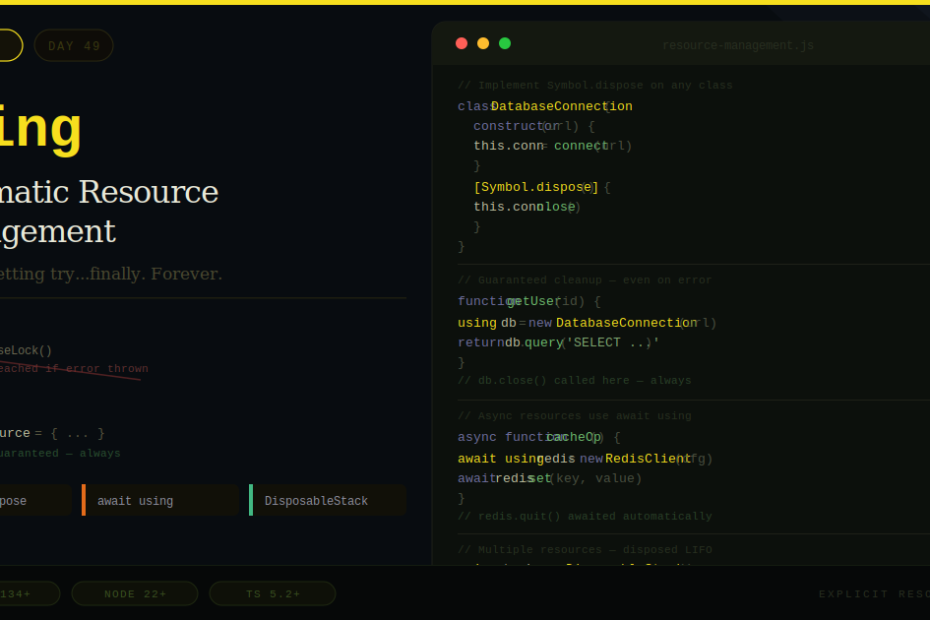
Every JavaScript developer has forgotten to close a file handle, release a stream lock, or disconnect a database connection. ES2026’s using keyword makes that class of bug impossible.
There’s a bug pattern so common in JavaScript that most developers have shipped it to production at least once. It looks like this:
async function processData(response) {
  const reader = response.body.getReader()

  while (true) {
    const { done, value } = await reader.read()
    if (done) break

    processChunk(value) // ← What if this throws?
  }

  reader.releaseLock() // ← Never reached if processChunk throws
}
If processChunk() throws an error, reader.releaseLock() is never called. The stream stays locked. Nothing else can read from it. The fix is a try...finally block — but that’s easy to forget, and it adds noise to every function that touches a resource.
ES2026 introduces the using keyword and Explicit Resource Management to make this entire class of bug impossible. It’s one of the most practically useful additions to JavaScript in years.
What using Does in One Sentence
using declares a block-scoped variable that guarantees its [Symbol.dispose]() method is called automatically when the scope exits — whether the scope exits normally, via return, via break, or via an uncaught error.
It’s the JavaScript equivalent of C#’s using statement, Python’s with statement, and Java’s try-with-resources.
The Problem It Solves
The try...finally pattern is the current solution for guaranteed cleanup:
// The verbose, error-prone way
async function processStream(response) {
  const reader = response.body.getReader()

  try {
    let done = false
    while (!done) {
      const result = await reader.read()
      done = result.done
      if (result.value) {
        processChunk(result.value) // Could throw
      }
    }
  } finally {
    reader.releaseLock() // Always runs — but you have to remember to write this
  }
}
This works, but it has real problems:
- It’s easy to forget the
finallyblock, especially under time pressure - It wraps the meaningful code in ceremony
- In functions with multiple resources, you get deeply nested
try...finallyblocks - There’s no language-level enforcement — it’s all manual discipline
The using way:
// Create a disposable wrapper for the reader
async function processStream(response) {
  using readerResource = {
    reader: response.body.getReader(),
    [Symbol.dispose]() {
      this.reader.releaseLock()
    }
  }

  const { reader } = readerResource

  let done = false
  while (!done) {
    const { done: d, value } = await reader.read()
    done = d
    if (value) processChunk(value) // If this throws, releaseLock() still runs
  }
}
// readerResource[Symbol.dispose]() is called automatically when scope exits
The cleanup is guaranteed by the language runtime — not by developer discipline.
Making Your Own Classes Disposable
Any object that implements [Symbol.dispose]() works with using. This is where the feature becomes genuinely powerful for your own codebases.
Synchronous resource — use [Symbol.dispose]:
class DatabaseConnection {
  constructor(url) {
    this.url = url
    this.connection = createConnection(url)
    console.log(`Connected to ${url}`)
  }

  query(sql, params) {
    return this.connection.execute(sql, params)
  }

  [Symbol.dispose]() {
    this.connection.close()
    console.log(`Disconnected from ${this.url}`)
  }
}

function getUserById(id) {
  using db = new DatabaseConnection('postgres://localhost/mydb')
  // db.close() is guaranteed — even if the query throws
  return db.query('SELECT * FROM users WHERE id = $1', [id])
}
// DatabaseConnection[Symbol.dispose]() called automatically here
Asynchronous resource — use [Symbol.asyncDispose] and await using:
class RedisClient {
  constructor(config) {
    this.client = createRedisClient(config)
  }

  async get(key) {
    return this.client.get(key)
  }

  async set(key, value, ttl) {
    return this.client.set(key, value, { EX: ttl })
  }

  async [Symbol.asyncDispose]() {
    await this.client.quit()
    console.log('Redis client disconnected')
  }
}

async function cacheOperation() {
  await using redis = new RedisClient({ host: 'localhost', port: 6379 })
  await redis.set('session:123', JSON.stringify(sessionData), 3600)
  return await redis.get('session:123')
  // redis.quit() called automatically — even on error
}
The rule is simple: if cleanup is synchronous, use [Symbol.dispose] + using. If cleanup is asynchronous (network connections, file handles with async close), use [Symbol.asyncDispose] + await using.
Real-World Use Cases
File System (Node.js)
import { open } from 'node:fs/promises'

async function writeReport(data) {
  await using fileHandle = await open('report.csv', 'w')
  // fileHandle implements Symbol.asyncDispose in Node.js 22+

  await fileHandle.writeFile(formatAsCsv(data))
  // File is automatically closed when scope exits, even on error
}
Database Transactions
class Transaction {
  constructor(db) {
    this.db = db
    this.committed = false
  }

  async query(sql, params) {
    return this.db.execute(sql, params)
  }

  async commit() {
    await this.db.execute('COMMIT')
    this.committed = true
  }

  async [Symbol.asyncDispose]() {
    if (!this.committed) {
      // Auto-rollback if we exit scope without committing
      await this.db.execute('ROLLBACK')
      console.log('Transaction rolled back')
    }
  }
}

async function transferFunds(fromId, toId, amount) {
  await using tx = new Transaction(db)
  await tx.db.execute('BEGIN')

  await tx.query('UPDATE accounts SET balance = balance - $1 WHERE id = $2', [amount, fromId])
  await tx.query('UPDATE accounts SET balance = balance + $1 WHERE id = $2', [amount, toId])

  await tx.commit() // If this line is never reached, ROLLBACK is automatic
}
WebSocket Connections
class ManagedWebSocket {
  constructor(url) {
    this.ws = new WebSocket(url)
  }

  send(data) {
    this.ws.send(JSON.stringify(data))
  }

  [Symbol.dispose]() {
    if (this.ws.readyState === WebSocket.OPEN) {
      this.ws.close()
    }
  }
}

function sendAnalyticsEvent(event) {
  using socket = new ManagedWebSocket('wss://analytics.example.com')
  socket.send({ type: 'event', ...event })
  // Socket automatically closed when function returns
}
Performance Measurement
class PerfTimer {
  constructor(label) {
    this.label = label
    this.start = performance.now()
  }

  [Symbol.dispose]() {
    const duration = performance.now() - this.start
    console.log(`[${this.label}] took ${duration.toFixed(2)}ms`)
  }
}

async function fetchUserData(userId) {
  using _timer = new PerfTimer('fetchUserData')

  const user = await db.query('SELECT * FROM users WHERE id = $1', [userId])
  const posts = await db.query('SELECT * FROM posts WHERE user_id = $1', [userId])

  return { user, posts }
  // Timer automatically logs duration when function returns
}
Mutex / Locks
class MutexLock {
  constructor(mutex) {
    this.mutex = mutex
  }

  [Symbol.dispose]() {
    this.mutex.release()
  }
}

async function criticalSection() {
  using lock = new MutexLock(await mutex.acquire())
  // Mutex is released automatically — even if an exception is thrown
  await doSensitiveWork()
}
Managing Multiple Resources with DisposableStack
When you need to manage several resources together, DisposableStack provides a container that disposes all of them in reverse order (LIFO) when it goes out of scope.
async function processMultipleStreams(urls) {
  using stack = new DisposableStack()

  // Add resources to the stack
  const connections = urls.map(url => {
    const conn = new DatabaseConnection(url)
    stack.use(conn) // conn[Symbol.dispose]() called when stack disposes
    return conn
  })

  // adopt() for non-disposable objects with a cleanup callback
  const tempDir = stack.adopt(
    await createTempDir(),
    (dir) => fs.rmSync(dir, { recursive: true })
  )

  // defer() for cleanup actions without a resource object
  stack.defer(() => console.log('All resources cleaned up'))

  // Use all resources...
  const results = await Promise.all(connections.map(c => c.query('SELECT 1')))

  return { results, tempDir }
  // When scope exits: defer runs, then adoptions run, then uses run (LIFO order)
}
The LIFO order matters: resources are disposed in the reverse order they were added, which respects dependencies between them.
SuppressedError — When Cleanup Itself Throws
What happens when your disposal code throws an error? Previously there was no good answer — the disposal error would either hide the original error, or vice versa. ES2026 introduces SuppressedError to handle this:
// If both the main code AND the disposal code throw errors,
// JavaScript wraps them in a SuppressedError:
// SuppressedError {
//   error: Error thrown during disposal,
//   suppressed: The original error that triggered disposal
// }

try {
  using resource = new SometimesFailingResource()
  throw new Error('Primary error')
  // If disposal also throws, you get SuppressedError
} catch (e) {
  if (e instanceof SuppressedError) {
    console.error('Disposal error:', e.error)
    console.error('Original error:', e.suppressed)
  } else {
    console.error('Error:', e)
  }
}
This preserves both errors for debugging rather than silently discarding one.
using in for Loops
using works inside for loops too — the resource is disposed at the end of each iteration:
const urls = ['https://api.example.com/1', 'https://api.example.com/2']

for (const url of urls) {
  using conn = new HttpConnection(url)
  const data = await conn.fetch()
  processData(data)
  // conn is disposed at the end of each iteration
}
TypeScript Support
TypeScript has supported using and await using since TypeScript 5.2 (released 2023), making it available to TypeScript developers well before the ES2026 spec was finalized. Set your compiler target to ES2022 or later:
// tsconfig.json
{
  "compilerOptions": {
    "target": "ES2022",
    "lib": ["ES2022"]
  }
}
TypeScript also adds type checking — if you try to use using with an object that doesn’t implement Symbol.dispose, TypeScript will catch it at compile time.
Browser and Runtime Support
| Environment | using support |
|---|---|
| Chrome | 134+ |
| Firefox | 134+ |
| Safari | In progress |
| Node.js | 22+ |
| Deno | 1.40+ |
| Bun | 1.1+ |
| TypeScript | 5.2+ (transpiles down) |
| Babel | Supported via plugin |
For environments without native support, Babel’s @babel/plugin-proposal-explicit-resource-management transpiles using to try...finally blocks automatically.
When Should You Use It?
using is a strong fit for any resource that has an explicit cleanup step:
- Database connections and transactions
- File handles (reading or writing)
- Network connections (HTTP, WebSocket, gRPC)
- Stream readers and writers
- Locks and mutexes
- Timers and performance measurements
- Test fixtures that need teardown
- Any object with a
close(),disconnect(),release(), ordestroy()method
It’s not necessary for plain JavaScript objects managed by garbage collection — you only need it for resources with side effects that need explicit cleanup.
Final Thoughts
The using keyword is the kind of feature that makes you wonder how JavaScript shipped for 30 years without it. The problem it solves — resource leaks caused by missing cleanup code — is not an exotic edge case. It’s a daily occurrence in production codebases.
The Explicit Resource Management proposal introduces a deterministic approach to explicitly manage the lifecycle of resources like file handles, network connections, and more — giving developers fine-grained control over resource disposal without relying on discipline and memory alone.
The design is clean. It integrates with existing patterns. TypeScript has had it for years. Browser and Node.js support is solid in 2026. There’s no good reason not to start using it.
The next time you write try...finally for cleanup code, ask yourself: could this be a [Symbol.dispose] method instead? The answer is usually yes.