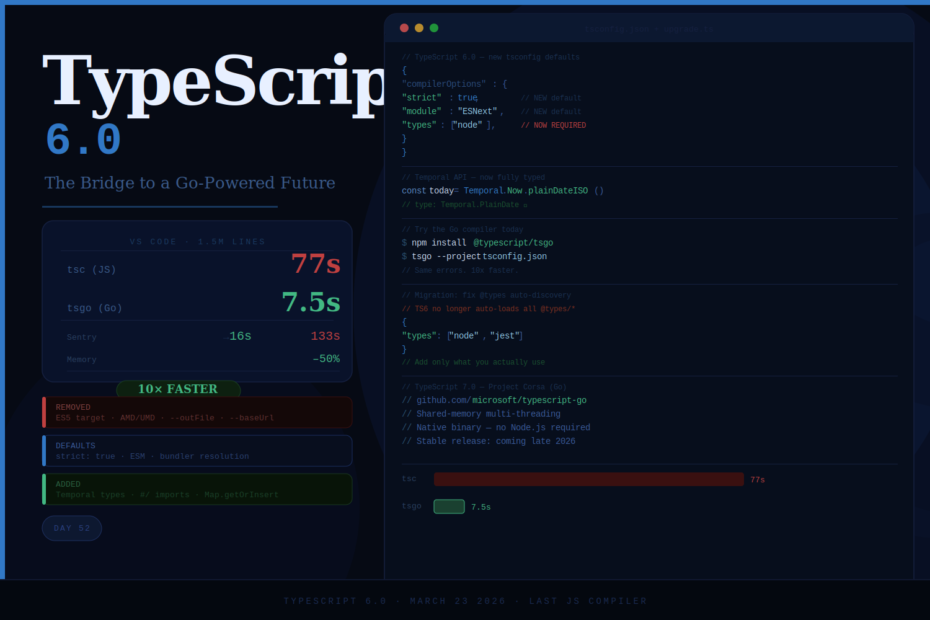
TypeScript 6.0 just shipped — and it’s historic. It’s the final version written in TypeScript itself. Everything after it is rebuilt in Go, and the benchmarks are not subtle.
For over a decade, TypeScript has been written in TypeScript. The compiler compiled itself. It was a beautiful piece of dogfooding — the team used their own tooling every day, and the compiler served as a living test of the language.
On March 23, 2026, that era officially ended.
TypeScript 6.0 is the last major version of the TypeScript compiler written in JavaScript. Everything after it — starting with TypeScript 7.0 currently in preview under the codename Project Corsa — runs on a completely new compiler written in Go.
This isn’t just a version bump. It’s a transition milestone. Understanding what 6.0 changes, what it removes, and what’s coming in 7.0 is essential for every TypeScript team in 2026.
The Big Picture: Why TypeScript 6.0 Matters
TypeScript 6.0 acts as the bridge between TypeScript 5.9 and 7.0. Most changes in TypeScript 6.0 are meant to help align and prepare for adopting TypeScript 7.0.
That framing is honest and important. The bulk of 6.0’s changes are new defaults, deprecated options, and cleaned-up legacy support — not flashy new features. But 6.0 also ships genuine new capabilities that you can use today: Temporal API types, improved method inference, #/ subpath imports, and more.
Here’s everything, grouped by what matters most.
Part 1: New Defaults — 9 Settings Changed at Once
This is the part most likely to break your build on upgrade. TypeScript 6.0 changed nine compiler option defaults to reflect how JavaScript is actually written and deployed in 2026.
The new defaults at a glance:
// Old TypeScript 5.x defaults (approximately)
{
  "strict": false,
  "target": "ES3",
  "module": "CommonJS",
  "moduleResolution": "node",
  "moduleDetection": "auto",
  "esModuleInterop": false
}

// TypeScript 6.0 new defaults
{
  "strict": true,          // strict mode is now ON by default
  "target": "ES2015",      // no more ES3/ES5 as default target
  "module": "ESNext",      // ESM is the default
  "moduleResolution": "bundler",  // reflects modern bundler reality
  "moduleDetection": "force",     // all files treated as modules
  "esModuleInterop": true         // enabled by default
}
What this means in practice:
If you have an explicit tsconfig.json that already sets all these options, you likely won’t see major issues. If you’ve been relying on defaults — especially in older projects — you may see a wave of new errors. That’s the point. These errors reflect real issues in your code that TypeScript was previously silently accepting.
Quick migration fix for most projects:
# Install the automated migration tool
npx ts5to6

# Or add this temporarily to unblock the upgrade
# while you fix issues incrementally
{
  "compilerOptions": {
    "ignoreDeprecations": "6.0"
  }
}
Note: ignoreDeprecations: "6.0" will not work in TypeScript 7.0. It’s a bridge, not a permanent solution.
Part 2: Breaking Changes — What Got Removed
TypeScript 6.0 carries the largest set of breaking changes since TypeScript 2.0. Microsoft is using this release to retire a decade of backward compatibility with patterns that no longer reflect how JavaScript is written or deployed in 2026.
ES5 Target Removed
// This now errors in TypeScript 6.0
{
  "target": "ES5"  // Error: ES5 target is no longer supported
}
ES5 support was added when TypeScript was positioning itself as the language that could compile down to Internet Explorer-compatible JavaScript. That world no longer exists. If you genuinely need ES5 output, use Babel as a post-processor.
AMD, UMD, SystemJS Module Formats Deprecated
These formats solved module loading problems that predated native ES modules. Modern bundlers solve them better. If your project uses "module": "AMD" or "module": "UMD", it’s time to migrate to ESM.
--outFile Removed
This option concatenated all output into a single file — a pattern that predates modern bundlers entirely. Webpack, Vite, Rollup, and esbuild all do this better. The community-maintained migration guide confirmed that when Microsoft tracked the top 800 npm repositories, zero raised concerns about this removal.
--baseUrl Behavior Changed
// Before — baseUrl used for path resolution
{
  "baseUrl": "./src"
}

// After — use paths explicitly instead
{
  "paths": {
    "@/*": ["./src/*"]
  }
}
@types No Longer Auto-Discovered
// Add this to your tsconfig.json if you use Node.js types
{
  "compilerOptions": {
    "types": ["node"]
  }
}
Previously, TypeScript would automatically pick up all @types/* packages in your node_modules. Now you need to declare which type packages you actually use. This is better — you won’t get unexpected global type pollution from packages you install but don’t directly use.
Part 3: New Features in TypeScript 6.0
Despite being primarily a cleanup release, 6.0 ships several genuinely useful new capabilities.
Temporal API Types — First-Class Date Handling
TypeScript 6.0 adds full type definitions for the ES2026 Temporal API. No more Date object workarounds:
// Type-safe, immutable, timezone-aware date handling
const today = Temporal.Now.plainDateISO()
const eventDate = Temporal.PlainDate.from('2026-12-25')
const daysUntil = today.until(eventDate).days
console.log(`${daysUntil} days to go`)

// ZonedDateTime with explicit timezone
const meeting = Temporal.ZonedDateTime.from({
  year: 2026, month: 4, day: 15,
  hour: 10, minute: 0,
  timeZone: 'Asia/Kolkata'
})

// TypeScript knows the exact types — no casting needed
const duration: Temporal.Duration = meeting.since(Temporal.Now.zonedDateTimeISO('Asia/Kolkata'))
Browser support note: Firefox since May 2025, Chrome since January 2026. Safari still pending — use @js-temporal/polyfill for now.
Improved Method Type Inference
TypeScript 6.0 reduces context sensitivity for this-less functions, making inference in method chains more predictable and requiring fewer explicit type annotations:
// Before TypeScript 6.0 — needed explicit annotation
const result = items
  .filter((item): item is ActiveItem => item.active)
  .map(item => item.value) // ← sometimes inferred as unknown

// TypeScript 6.0 — infers correctly through the chain
const result = items
  .filter((item): item is ActiveItem => item.active)
  .map(item => item.value) // ← correctly inferred as string[]
#/ Subpath Imports
Node.js has supported imports field in package.json for subpath imports for a while. TypeScript 6.0 now fully supports the #/ syntax:
// package.json
{
  "imports": {
    "#utils": "./src/utils/index.ts",
    "#components/*": "./src/components/*.ts"
  }
}
// Your TypeScript files
import { formatDate } from '#utils'
import { Button } from '#components/Button'

// TypeScript resolves these correctly and provides full type checking
RegExp.escape() and Promise.try() Types
Two ES2026 features now have proper type definitions:
// RegExp.escape — safely escape user input for use in regex
const userInput = 'hello.world (test)'
const safePattern = RegExp.escape(userInput) // 'hello\\.world \\(test\\)'
const regex = new RegExp(safePattern)

// Promise.try — unify sync/async error handling
const result = await Promise.try(() => {
  // Could be sync or async — both handled uniformly
  return fetchData() // TypeScript infers Promise<Data>
})
Map.prototype.getOrInsert() Types
The ES2026 Map.getOrInsert() and Map.getOrInsertComputed() methods now have full TypeScript definitions:
const counts = new Map<string, number>()

// Before — three lines, multiple lookups
if (!counts.has(word)) counts.set(word, 0)
const count = counts.get(word)!

// After — one line, typed correctly
const count = counts.getOrInsert(word, 0) // number
--stableTypeOrdering Flag
A new diagnostic flag that makes TypeScript 6.0’s union type ordering match TypeScript 7.0’s behavior:
{
  "compilerOptions": {
    "stableTypeOrdering": true
  }
}
Use this when comparing output between the two compilers. Note it can slow type checking by up to 25% — use it for diagnostics only, not production builds.
Part 4: TypeScript 7.0 — The Go Compiler (Project Corsa)
This is the story everyone should be paying attention to.
Microsoft has been quietly rebuilding the entire compiler in Go. They’re calling it Project Corsa, and the benchmarks are legitimately wild — VS Code’s 1.5 million lines of code went from a 77-second type-check down to 7.5 seconds.
More benchmarks:
- Sentry codebase: 133 seconds → 16 seconds
- Editor project load: 8× faster
- Memory usage: roughly half of the current implementation
The binary is called tsgo and lives at microsoft/typescript-go on GitHub.
Why Go and not Rust?
TypeScript’s compiler wasn’t designed to be ported to Rust. It has lots of shared mutable state, complex recursive type inference, and 12+ years of evolved code. Mapping that to Rust’s ownership model would have required rewriting huge chunks of the logic from scratch. Go’s garbage collector and memory model map more closely to TypeScript’s existing data structures — making a faithful port possible rather than a full rewrite.
What changes for you as a developer:
Nothing in terms of the TypeScript language or your code. The same tsconfig.json, the same type syntax, the same error messages (mostly). What changes is speed — dramatically, categorically faster.
Try it today:
npm install -g @typescript/tsgo

# Run it on your project
tsgo --project tsconfig.json

# Or install from npm (nightly builds)
npm install typescript@next
The TypeScript team states that TypeScript 7.0 correctly identifies errors in all but 74 of ~6,000 error-producing compiler test cases compared to 6.0. It’s ready to use for validation today.
How to Upgrade to TypeScript 6.0
Step 1: Check your current version
npx tsc --version
Step 2: Install TypeScript 6.0
npm install -D typescript@6
Step 3: Run the automated migration tool
npx ts5to6
This handles the two most disruptive changes: baseUrl removal and rootDir inference changes.
Step 4: Check for deprecation warnings
npx tsc --noEmit 2>&1 | grep -i deprecated
Step 5: Fix or suppress temporarily
{
  "compilerOptions": {
    "ignoreDeprecations": "6.0",
    "types": ["node"],
    "rootDir": "./src"
  }
}
Work through deprecation warnings incrementally. Every warning you fix now is one less surprise when TypeScript 7.0 ships.
Step 6: Preview TypeScript 7.0 on your codebase
npm install @typescript/tsgo
tsgo --project tsconfig.json
Note any behavior differences. The --stableTypeOrdering flag in 6.0 helps reduce noise when comparing outputs.
The Upgrade Decision
Upgrade to 6.0 now if:
- You’re starting a new project
- Your
tsconfig.jsonalready explicitly setsstrict,module,target, andmoduleResolution - You want to be ready for TypeScript 7.0’s performance gains
Upgrade carefully if:
- You have a large legacy codebase with
"target": "ES5"or AMD modules - You rely on
@typesauto-discovery across a monorepo - You have snapshot tests that compare TypeScript’s declaration output
Don’t wait indefinitely: The 6.0 migration tooling is the best it will ever be. TypeScript 7.0 will be announced soon, and at that point, teams on 5.x will need to do a two-step upgrade.
Final Thoughts
TypeScript 6.0 is simultaneously the most boring and most historically significant TypeScript release ever shipped. The new features are useful but not groundbreaking. The breaking changes are extensive but justified — ES5, AMD, UMD, and outFile had no place in a 2026 TypeScript project. The defaults that changed should have changed years ago.
The real story is what comes next. TypeScript 7.0 is actually extremely close to completion. A 10x reduction in compile time doesn’t just make your CI/CD pipeline faster — it changes what you can afford to do. Pre-commit type checking becomes realistic. Large monorepo type checks stop being the bottleneck. Editor responsiveness stops degrading at scale.
Upgrade to 6.0. Fix your deprecations. Preview tsgo on your codebase. And get ready — the version of TypeScript that runs in Go is right around the corner.
The end of an era and the beginning of a much faster one.