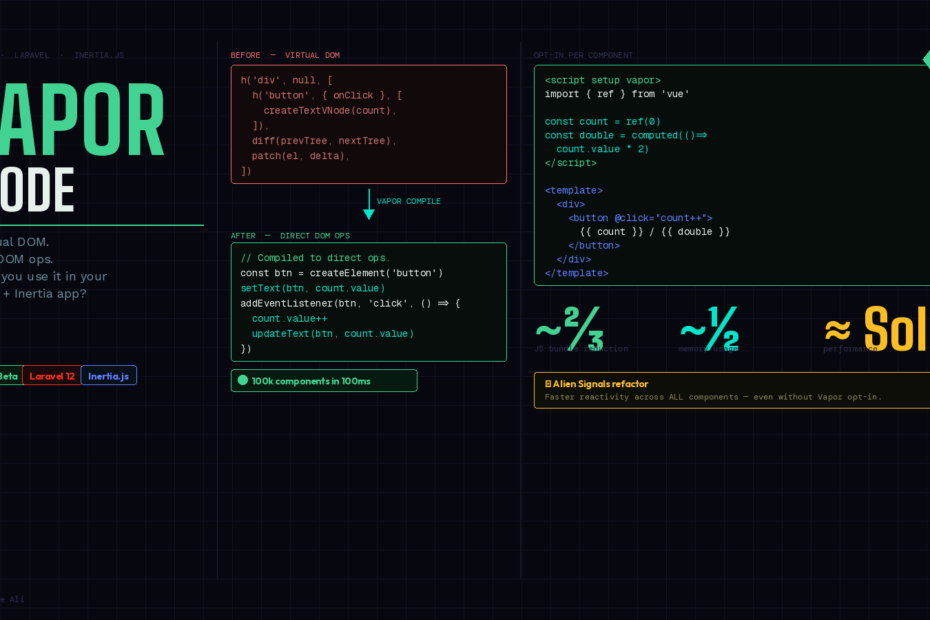
The virtual DOM has powered Vue since version 2. Vue 3.6 is ready to move on.
Vapor Mode is the most ambitious feature the Vue team has shipped in years — and if you’re running a Laravel + Inertia.js stack, you’re probably wondering if and when you should care.
The short answer: you should understand it now, experiment selectively today, and adopt it strategically in 2026. Here’s everything you need to make that decision confidently.
What Is Vapor Mode, Really?
Every Vue app you’ve ever built works the same way under the hood. When state changes, Vue creates a virtual DOM tree representing the new UI, diffs it against the previous tree, and patches only the parts of the real DOM that changed. It’s elegant. It’s fast. It works beautifully for most apps.
But virtual DOM diffing has an inherent cost. For every state update, Vue allocates VNode objects, traverses trees, and runs comparison logic — even when the compiler has already done the hard work of figuring out what could change.
Vapor Mode eliminates the virtual DOM entirely. Instead of diffing a virtual tree, it compiles your templates into direct DOM operations at build time. The result? Your components generate and update the real DOM directly, with no runtime tree-diffing overhead.
The numbers are striking: Vue 3.6 can mount 100,000 components in just 100 milliseconds — performance that places Vue in the same league as SolidJS.
How Evolution Got Us Here
To appreciate why Vapor Mode matters, it helps to trace Vue’s rendering history:
Vue 1 created real DOM nodes directly and established reactive bindings on them — simple, but limited.
Vue 2 introduced the virtual DOM, enabling server-side rendering and making complex UIs manageable, at the cost of some memory overhead.
Vue 3 added compiler intelligence — static hoisting, patch flags, tree-shaking — dramatically reducing wasted VDOM work. But the virtual DOM was still there, still allocating, still diffing.
Vapor Mode marks a step toward “let the compiler do the hard work.” It moves diffing into build time and gives you leaner, faster apps.
How to Opt In
Vapor Mode is opt-in per component. You don’t flip a global switch and rewrite your app. You add a single attribute to the components where you need extreme performance:
vue
<script setup vapor>
import { ref } from 'vue'

const count = ref(0)
</script>

<template>
  <button @click="count++">{{ count }}</button>
</template>
That vapor attribute on <script setup> tells the compiler to generate direct DOM operations instead of VNodes for this component. Everything else in your codebase stays exactly the same.
For new projects that want to go all-in on Vapor, there’s also createVaporApp:
js
import { createVaporApp } from 'vue/vapor'
import App from './App.vue'

createVaporApp(App).mount('#app')
This avoids pulling in the Virtual DOM runtime code and allows bundle baseline size to be drastically reduced.
The Inertia.js Question
Here’s where Laravel developers need to pay close attention.
Inertia.js works by rendering Vue page components server-side (or client-side via its adapter) and swapping them in response to navigation. The key question is: do your Inertia page components support Vapor Mode?
The answer right now is: partially, with caveats.
Vapor Mode only works for Single File Components using <script setup>. If your Inertia pages already use <script setup> — which is the default in any Laravel Breeze or Jetstream scaffold from the past two years — you’re in a good position to experiment.
However, Vapor Mode is currently considered unstable for full-page use. The Vue team’s official guidance is to use it for:
- Performance-critical sub-components within a page (a complex data table, a real-time dashboard widget, an autocomplete dropdown)
- Entirely new small apps built with
createVaporApp
For Inertia page-level components — your Dashboard.vue, Users/Index.vue, Orders/Show.vue — stick with standard VDOM for now. The compatibility surface is too large and Inertia’s page-swap mechanism hasn’t been validated for full Vapor operation.
A Practical Strategy for Your Laravel + Inertia App
Here’s how to think about adopting Vapor Mode without breaking your production app:
1. Identify your performance bottlenecks first
Vapor Mode isn’t a silver bullet you sprinkle everywhere. Identify the specific components where you’re actually feeling pain — large lists, heavy reactive forms, real-time data grids. Those are your candidates.
vue
<!-- resources/js/Components/DataGrid.vue -->
<script setup vapor>
import { ref, computed } from 'vue'

const props = defineProps({
  rows: Array,
  columns: Array,
})

const sortKey = ref(null)
const sorted = computed(() =>
  sortKey.value
    ? [...props.rows].sort((a, b) => a[sortKey.value] > b[sortKey.value] ? 1 : -1)
    : props.rows
)
</script>

<template>
  <table>
    <thead>
      <tr>
        <th v-for="col in columns" :key="col.key" @click="sortKey = col.key">
          {{ col.label }}
        </th>
      </tr>
    </thead>
    <tbody>
      <tr v-for="row in sorted" :key="row.id">
        <td v-for="col in columns" :key="col.key">{{ row[col.key] }}</td>
      </tr>
    </tbody>
  </table>
</template>
2. Mix Vapor and VDOM components freely
The integration strategy allows for a mixed component tree comprising both virtual DOM and Vapor components. Your Inertia page stays as a VDOM component, but it can render Vapor child components inside it — and they’ll get all the Vapor performance benefits. This is the recommended approach for 2026.
vue
<!-- resources/js/Pages/Dashboard.vue (standard VDOM Inertia page) -->
<script setup>
import DataGrid from '@/Components/DataGrid.vue'   // Vapor inside
import StatsWidget from '@/Components/Stats.vue'   // Vapor inside
import AppLayout from '@/Layouts/AppLayout.vue'

const props = defineProps({ stats: Object, rows: Array })
</script>

<template>
  <AppLayout>
    <StatsWidget :data="props.stats" />
    <DataGrid :rows="props.rows" :columns="columns" />
  </AppLayout>
</template>
3. Watch for the Suspense limitation
Suspense is not supported in Vapor-only mode, but you can render Vapor components inside a VDOM Suspense. If you use <Suspense> for async loading states in your Inertia pages — which is common in dashboard apps — make sure your Vapor components are children of a VDOM Suspense wrapper, not running in pure Vapor mode at the page level.
What About Alien Signals?
Vapor Mode isn’t the only performance story in Vue 3.6. Vue 3.6 includes a major refactor of its reactivity system based on alien signals, which significantly improves the reactivity system’s performance and memory usage. This means even your existing VDOM components get faster with a Vue 3.6 upgrade — no Vapor opt-in required.
For most Laravel + Inertia apps, the alien signals refactor alone is a compelling reason to upgrade to 3.6. You get meaningful performance improvements across your entire app without changing a single line of component code.
The Honest Assessment
Here’s a clear-eyed breakdown for different team sizes and app types:
Small Laravel + Inertia CRUD apps — Don’t bother with Vapor yet. The VDOM is plenty fast, and the instability risk isn’t worth it for simple page transitions and forms.
Medium SaaS apps with complex dashboards — Start experimenting. Identify your 2-3 heaviest components and add the vapor attribute. Benchmark before and after. Keep everything else as VDOM.
Large, performance-critical apps (fintech, analytics, real-time) — This is exactly the audience Vapor Mode was built for. Start a proper evaluation now so you’re ready to migrate key sub-trees once 3.6 hits stable.
New greenfield projects starting in 2026 — Consider createVaporApp for the core, with a clear plan for the Inertia integration layer.
When Is 3.6 Stable?
Vue 3.6 entered beta with Vapor Mode feature-complete in late 2025. A stable release is expected in early-to-mid 2026. The beta is production-testable for non-Vapor features today — the alien signals refactor alone makes it worth running in staging.
Wrapping Up
Vapor Mode isn’t a rewrite — it’s an upgrade path. Vue’s team has been meticulous about making it opt-in, backward-compatible, and mixable with existing VDOM components. That’s exactly the right approach for a framework with millions of production apps relying on it.
For your Laravel + Inertia setup, the playbook is simple: upgrade to 3.6 for alien signals, identify your performance bottlenecks, and start sprinkling vapor on the components that matter. Don’t wait for a full stable release to start learning — the API is already locked.
The virtual DOM served Vue brilliantly for a decade. Vapor Mode is what comes next.