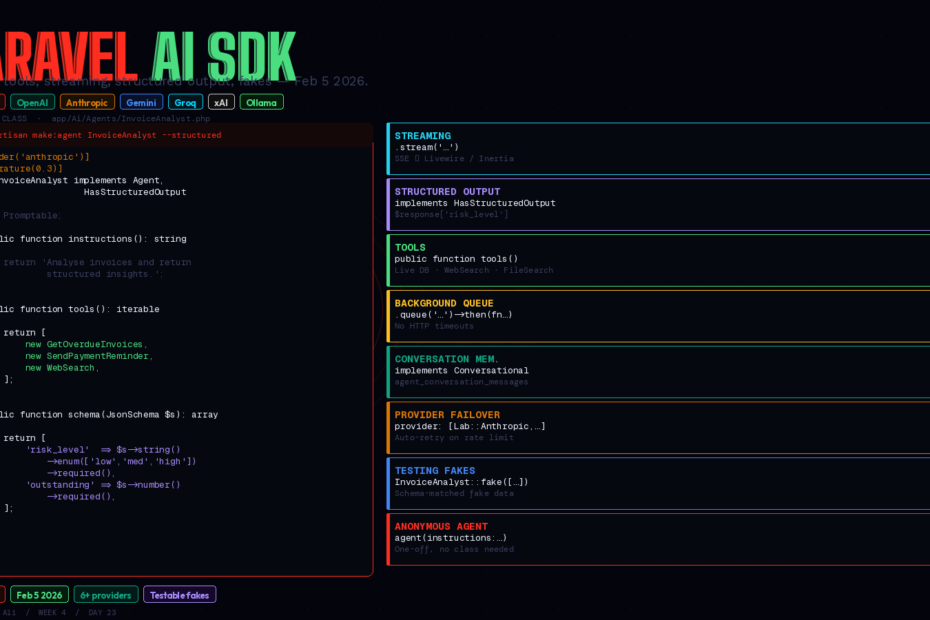
Released February 5, 2026. Six providers. One unified API. Testable fakes, conversation memory, background queuing, RAG, and multimodal — all inside the Laravel patterns you already know.
There’s a recurring arc in Laravel’s history. Something important exists as a community package. Laravel watches, learns from it, then ships a first-party version that integrates more tightly with the framework, has better testing support, and works with everything else out of the box.
Eloquent did it to Doctrine. Horizon did it to manual Redis queue workers. Sanctum did it to Passport’s complexity. Now laravel/ai has done it to scattered OpenAI client calls.
Released February 5, 2026 as part of the Laravel AI suite alongside Boost and the MCP library, the Laravel AI SDK is the unified, expressive, testable way to build AI features in Laravel applications. This is the complete guide: agents, tools, streaming, structured output, background queuing, conversation memory, provider failover, and real test coverage.
Before We Start: What Is the SDK, Exactly?
The Laravel AI SDK sits on top of Prism — the community package this series covered in Week 2. Taylor Otwell described the relationship the same way he’d describe query builder and Eloquent: Prism gives you the lower-level API calls, the SDK adds agents, structured output, conversation memory, testing helpers, and tighter Laravel integration on top.
If you’re using raw Prism or raw OpenAI client calls today, the SDK is the upgrade path. If you’re starting fresh, start with the SDK.
What it supports:
- Providers: OpenAI, Anthropic (Claude), Google Gemini, Groq, xAI, Ollama (local), and more
- Capabilities: Text generation, streaming, structured output, image generation, audio synthesis, transcription, embeddings, vector stores, RAG, reranking, file attachments
- Patterns: Agents, tools, conversation memory, middleware, background queuing, provider failover
Install
composer require laravel/ai
php artisan vendor:publish --provider="Laravel\Ai\AiServiceProvider"
php artisan migrate
The migration creates two tables: agent_conversations and agent_conversation_messages — the persistence layer for conversation memory. Set your provider credentials in .env:
OPENAI_API_KEY=sk-...
ANTHROPIC_API_KEY=sk-ant-...
GEMINI_API_KEY=AIza...
Configure default providers and models in config/ai.php. The SDK ships with sensible defaults.
The Agent: The Core Abstraction
Agents are the building block. Every AI interaction you want to be reusable, testable, and clearly-scoped lives in an agent class:
php artisan make:agent InvoiceAnalyst
This creates app/Ai/Agents/InvoiceAnalyst.php:
<?php

namespace App\Ai\Agents;

use Laravel\Ai\Contracts\Agent;
use Laravel\Ai\Promptable;
use Stringable;

class InvoiceAnalyst implements Agent
{
    use Promptable;

    public function instructions(): Stringable|string
    {
        return <<<INSTRUCTIONS
        You are an invoice analysis assistant. Analyse invoice data and
        provide clear, actionable insights about payment status, overdue amounts,
        and revenue trends. Always be concise and data-focused.
        INSTRUCTIONS;
    }
}
Use it anywhere:
$response = (new InvoiceAnalyst)->prompt('Summarise this month\'s invoice performance.');
return (string) $response;
That’s it. The Promptable trait handles all the provider communication. Switch providers by changing one line in your config — no code changes anywhere else.
Structured Output: Getting Back Parseable Data
Free-form text responses are fine for chat. For features that need to store results, trigger workflows, or display structured data, you need predictable output. Implement HasStructuredOutput:
php artisan make:agent InvoiceAnalyst --structured
<?php

namespace App\Ai\Agents;

use Illuminate\Contracts\JsonSchema\JsonSchema;
use Laravel\Ai\Contracts\Agent;
use Laravel\Ai\Contracts\HasStructuredOutput;
use Laravel\Ai\Promptable;
use Stringable;

class InvoiceAnalyst implements Agent, HasStructuredOutput
{
    use Promptable;

    public function instructions(): Stringable|string
    {
        return 'You are an invoice analysis assistant. Analyse invoice data and return structured insights.';
    }

    public function schema(JsonSchema $schema): array
    {
        return [
            'summary'            => $schema->string()->required(),
            'total_outstanding'  => $schema->number()->required(),
            'overdue_count'      => $schema->integer()->required(),
            'risk_level'         => $schema->string()
                                          ->enum(['low', 'medium', 'high'])
                                          ->required(),
            'recommended_action' => $schema->string()->required(),
        ];
    }
}
Access the response like an array:
$invoiceData = Invoice::with('client')
    ->where('status', 'sent')
    ->get()
    ->toJson();

$response = (new InvoiceAnalyst)->prompt(
    "Analyse these invoices and return structured insights:\n\n{$invoiceData}"
);

// Access structured fields directly
$riskLevel         = $response['risk_level'];          // 'high'
$totalOutstanding  = $response['total_outstanding'];   // 47500.00
$recommendedAction = $response['recommended_action'];  // 'Follow up immediately...'

// Store it
InvoiceReport::create([
    'summary'            => $response['summary'],
    'risk_level'         => $response['risk_level'],
    'total_outstanding'  => $response['total_outstanding'],
    'generated_at'       => now(),
]);
The SDK validates that the model’s response matches your schema. If it doesn’t, it retries automatically.
Tools: Giving Agents Real Capabilities
Tools are the bridge between the AI model and your application. The model decides when to call them; your PHP code executes.
<?php

namespace App\Ai\Tools;

use App\Models\Invoice;
use Illuminate\Contracts\JsonSchema\JsonSchema;
use Laravel\Ai\Contracts\Tool;

class GetOverdueInvoices implements Tool
{
    public function name(): string
    {
        return 'get_overdue_invoices';
    }

    public function description(): string
    {
        return 'Retrieves all overdue invoices for the current user, including client name, amount, and days overdue.';
    }

    public function schema(JsonSchema $schema): array
    {
        return [
            'days_overdue_min' => $schema->integer()
                ->description('Minimum days overdue to include (default 1)')
                ->default(1),
        ];
    }

    public function handle(int $days_overdue_min = 1): string
    {
        $invoices = Invoice::where('status', 'sent')
            ->where('due_date', '<', now()->subDays($days_overdue_min))
            ->with('client')
            ->get();

        return $invoices->map(fn ($inv) => [
            'client'      => $inv->client->name,
            'amount'      => $inv->amount,
            'days_overdue' => now()->diffInDays($inv->due_date),
        ])->toJson();
    }
}
Register tools on the agent:
class InvoiceAnalyst implements Agent
{
    use Promptable;

    public function instructions(): string
    {
        return 'You are an invoice analysis assistant with access to live invoice data.';
    }

    public function tools(): iterable
    {
        return [
            new GetOverdueInvoices,
            new GetRevenueByMonth,
            new SendPaymentReminder,
        ];
    }
}
Now when you ask “Which clients have invoices more than 30 days overdue?”, the model calls get_overdue_invoices with days_overdue_min: 30, gets the real data from your database, and answers accurately. No hallucinated client names. No guessed amounts. Live data.
Provider tools: WebSearch and FileSearch
The SDK ships with built-in provider tools you don’t have to write:
use Laravel\Ai\Tools\WebSearch;
use Laravel\Ai\Tools\FileSearch;

public function tools(): iterable
{
    return [
        new WebSearch,  // agent can search the web
        FileSearch::usingStore($this->vectorStoreId),  // agent can search your docs
    ];
}
WebSearch lets the agent pull current information. FileSearch connects to your vector store for RAG — more on that below.
Streaming: Responses That Feel Instant
Long AI responses feel slow when you wait for the full text. Streaming pushes tokens to the frontend as they arrive:
// In a controller — returns a streamed response
Route::get('/analyse', function () {
    return (new InvoiceAnalyst)->stream('Summarise this month in detail.');
});
Laravel returns a StreamedResponse. On the frontend with Livewire:
// Livewire component
public string $analysis = '';

public function analyse(): void
{
    $this->stream(
        to: 'analysis',
        content: (new InvoiceAnalyst)->stream('Summarise this month.')
    );
}
With Inertia.js, consume the stream via EventSource or fetch with ReadableStream. The SDK uses server-sent events, which Livewire and Inertia both handle natively.
Background Queuing: Don’t Make Users Wait
For heavy analysis or batch jobs, queue the agent instead of running inline:
(new InvoiceAnalyst)
    ->queue('Generate monthly report for all accounts.')
    ->then(function (AgentResponse $response) {
        MonthlyReport::create([
            'content'      => (string) $response,
            'generated_at' => now(),
        ]);

        // Notify the team
        Notification::send(User::admins()->get(), new MonthlyReportReady);
    })
    ->catch(function (Throwable $e) {
        Log::error('Monthly report failed', ['error' => $e->getMessage()]);
    });
The agent runs in a Laravel queue job. The then callback fires after completion. Your HTTP response returns immediately. Users see a “generating…” state instead of a spinner that might time out.
Conversation Memory: Multi-Turn Agents
Implement Conversational for agents that need to remember previous exchanges:
use Laravel\Ai\Contracts\Agent;
use Laravel\Ai\Contracts\Conversational;
use Laravel\Ai\Promptable;

class SupportAgent implements Agent, Conversational
{
    use Promptable;

    public function instructions(): string
    {
        return 'You are a helpful customer support agent with access to account history.';
    }
}
Then in your controller, pass the conversation ID and the authenticated user:
// First message — starts a new conversation
$response = (new SupportAgent)
    ->continue($conversationId, as: $user)
    ->prompt('What is the status of my last invoice?');

// Later message — agent has full context
$response = (new SupportAgent)
    ->continue($conversationId, as: $user)
    ->prompt('Can you send them a reminder?');
Conversation history is stored in agent_conversations and agent_conversation_messages. Each user’s conversation is isolated. The agent automatically loads previous messages as context for each new prompt.
Provider Failover
Don’t let one provider’s rate limit or outage take your feature down:
use Laravel\Ai\Enums\Lab;

// Pass an ordered array — falls back if primary fails
$response = (new InvoiceAnalyst)->prompt(
    'Analyse Q4 revenue.',
    provider: [Lab::Anthropic, Lab::OpenAI, Lab::Gemini],
);
The SDK tries each provider in order. Rate limit on Anthropic? Transparent failover to OpenAI. No changes to your agent code, no try/catch, no manual retry logic.
Testing: First-Class Fakes
This is what separates the Laravel AI SDK from raw HTTP client calls. Every agent has a fake() method:
use App\Ai\Agents\InvoiceAnalyst;

public function test_dashboard_shows_ai_analysis(): void
{
    InvoiceAnalyst::fake([
        'This month shows strong performance with 3 overdue invoices totalling $4,200.',
    ]);

    $response = $this->get('/dashboard');

    $response->assertSee('strong performance');
    InvoiceAnalyst::assertPrompted();
}
For structured output agents, fake() automatically generates valid fake data matching your schema — you don’t have to construct the array yourself:
public function test_report_is_stored_with_correct_risk_level(): void
{
    // Automatically generates fake data matching the schema
    InvoiceAnalyst::fake();

    $this->artisan('invoices:generate-report');

    $this->assertDatabaseHas('invoice_reports', [
        'risk_level' => fn ($value) => in_array($value, ['low', 'medium', 'high']),
    ]);
    InvoiceAnalyst::assertPrompted();
}
No real API calls in tests. No API credit burn. No flaky tests from rate limits. Structured fakes that match your schema automatically.
Anonymous Agents: One-Off Interactions
For quick interactions that don’t need a dedicated class:
use function Laravel\Ai\{agent};

$response = agent(
    instructions: 'You are a concise email copywriter.',
    tools: [],
)->prompt('Write a subject line for our Q4 launch email.');

return (string) $response;
With structured output:
$response = agent(
    schema: fn (JsonSchema $schema) => [
        'subject'    => $schema->string()->required(),
        'preview'    => $schema->string()->required(),
        'body_lines' => $schema->array()->items($schema->string())->required(),
    ],
)->prompt('Write a 3-line product launch email for our invoicing SaaS.');

$subject  = $response['subject'];
$bodyLines = $response['body_lines'];
Anonymous agents are great for utility operations — format this, summarise that, classify this input — where creating a full agent class would be over-engineering.
Agent Attributes: Configuration Without Boilerplate
Configure provider, model, and generation options as PHP attributes on the agent class:
use Laravel\Ai\Attributes\Provider;
use Laravel\Ai\Attributes\MaxTokens;
use Laravel\Ai\Attributes\Temperature;

#[Provider('anthropic')]
#[MaxTokens(4096)]
#[Temperature(0.3)]
class InvoiceAnalyst implements Agent
{
    // ...
}
These attributes override the defaults in config/ai.php for this specific agent. Low temperature for data-focused agents. Higher temperature for creative ones. Per-agent, per-request, as needed.
When to Use the SDK vs Prism vs Raw Client
The Laravel AI SDK is the right choice when:
- You’re building agents — reusable AI interactions with clear responsibilities
- You need conversation memory across requests
- You want testable fakes without mocking HTTP calls
- You need structured output stored in your database
- You want provider failover without writing retry logic
Use Prism (underlying the SDK) when you need lower-level control and don’t want the agent abstraction. Use raw OpenAI/Anthropic clients almost never — there’s no testing story and provider-switching is painful.
The SDK itself is still v0.x — it’s shipping fast. Agent orchestration (agents calling other agents) is on the roadmap but not available yet. RAG, vector stores, image generation, and audio are all stable today.
The Bigger Picture
What the Laravel AI SDK actually does is the same thing Laravel has always done: take something important, fragmented, and developer-hostile, and make it feel obvious.
Raw API calls for AI have the same problems raw database queries had before Eloquent: they work, but they’re scattered, untestable, tied to one vendor, and produce code that only the original author understands six months later.
The SDK gives AI interactions a home. Agents live in app/Ai/Agents. Tools live in app/Ai/Tools. Tests use fakes that match your schemas. Providers are configuration, not code. The architecture is predictable.
That’s the Laravel promise, applied to AI. And on February 5, 2026, it shipped.
Follow me for daily deep-dives on Laravel, PHP, Vue.js, and AI integrations. New article every day.