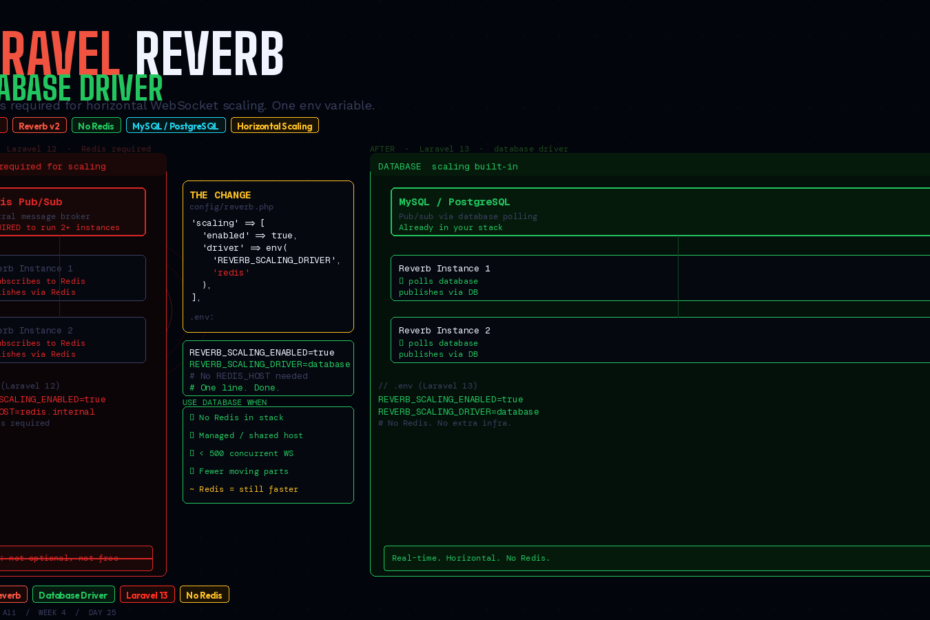
Horizontal WebSocket scaling without Redis. One config change. Your existing MySQL or PostgreSQL database handles it. Here’s everything you need to know.
There’s a tax on real-time features in Laravel.
You want live notifications. You want a presence indicator showing who’s currently viewing a document. You want a live feed that updates without the user refreshing. These are reasonable things to want. Laravel Reverb — the first-party WebSocket server shipped with Laravel 10 — makes building them straightforward.
But then someone says “we need to scale this.” And the bill arrives: Redis. Not as a nice-to-have — as a hard requirement. Previously, any Laravel Reverb deployment that needed to run more than one server instance required Redis for pub/sub coordination between those instances. No exceptions. No workarounds.
Laravel 13 removes that requirement. The new Reverb database driver uses your existing MySQL or PostgreSQL database for horizontal scaling coordination instead. If you’re already running a database — and you are — you now have everything you need to scale Reverb horizontally.
A Quick Primer: Why Horizontal Scaling Needed a Message Broker At All
First, why did this problem exist? Understanding it makes the solution more meaningful.
Reverb is a long-running WebSocket server process. When a user connects to your app and opens a WebSocket, that connection is maintained by a specific Reverb server process. The user’s browser is connected to that particular process for the duration of their session.
When your application broadcasts an event — say, “Invoice #4021 was paid” — it fires into Laravel’s broadcasting system, which sends a message to Reverb. Reverb then pushes that message to all connected clients who are subscribed to the relevant channel.
Now imagine you’re running two Reverb server instances behind a load balancer, because you have too many concurrent connections for one process. User A connects to instance 1. User B connects to instance 2. When the invoice is paid and the broadcast fires, it reaches Reverb — but which instance? If it reaches instance 1, instance 2’s connected clients never see it.
This is the pub/sub problem. You need a central message bus that all Reverb instances can publish to and subscribe from, so a message arriving at any instance gets distributed to clients on all instances.
In Reverb v1 (Laravel 10–12), the only supported message bus was Redis. Laravel 13 adds a second option: your application database.
The Before: Redis Horizontal Scaling (Laravel 12 and Earlier)
Here’s the Redis horizontal scaling setup from Laravel 12:
# .env — Redis scaling
REVERB_SCALING_ENABLED=true
# Reverb uses your default Redis connection for pub/sub
// config/reverb.php (Laravel 12)
'scaling' => [
    'enabled' => env('REVERB_SCALING_ENABLED', false),
    'channel' => 'reverb',
    // driver implicitly 'redis' — no other option existed
],
# Starting multiple Reverb instances behind a load balancer
php artisan reverb:start --host=0.0.0.0 --port=8080  # Instance 1
php artisan reverb:start --host=0.0.0.0 --port=8081  # Instance 2
# Both connect to the same Redis for pub/sub coordination
This works well. Redis pub/sub is fast, battle-tested, and handles large message volumes without breaking a sweat. The problem isn’t Redis being bad. The problem is that it’s an extra piece of infrastructure many smaller teams don’t have, don’t want to operate, and don’t actually need the throughput of.
The After: Database Scaling (Laravel 13)
Laravel 13 adds an explicit driver key to the scaling configuration:
// config/reverb.php (Laravel 13)
'scaling' => [
    'enabled' => env('REVERB_SCALING_ENABLED', false),
    'driver' => env('REVERB_SCALING_DRIVER', 'redis'), // 'redis' or 'database'
    'channel' => 'reverb',
],
To switch to database scaling:
# .env
REVERB_SCALING_ENABLED=true
REVERB_SCALING_DRIVER=database
That’s it. No additional packages. No migration to run — Reverb handles the scaling table automatically. No new service to provision. Reverb uses your existing database connection to coordinate pub/sub between instances.
Multiple Reverb instances can now run behind a load balancer using only your MySQL or PostgreSQL database for coordination:
# Same as before — start multiple instances
php artisan reverb:start --host=0.0.0.0 --port=8080
php artisan reverb:start --host=0.0.0.0 --port=8081
# Now coordinated through your database, not Redis
Full Setup: Laravel Reverb From Scratch in Laravel 13
If you’re starting fresh or adding Reverb to an existing Laravel 13 app:
1. Install
php artisan install:broadcasting
This installs and configures Reverb, publishes config/reverb.php, and wires up config/broadcasting.php. Answer yes when asked if you want to install Laravel Echo.
2. Environment configuration
# .env
BROADCAST_CONNECTION=reverb

REVERB_APP_ID=my-app-id
REVERB_APP_KEY=my-app-key
REVERB_APP_SECRET=my-app-secret
REVERB_HOST=localhost
REVERB_PORT=8080
REVERB_SCHEME=http

# For horizontal scaling with database driver (Laravel 13)
REVERB_SCALING_ENABLED=true
REVERB_SCALING_DRIVER=database
3. Broadcast an event
// app/Events/InvoicePaid.php
class InvoicePaid implements ShouldBroadcast
{
    use Dispatchable, InteractsWithSockets, SerializesModels;

    public function __construct(
        public readonly Invoice $invoice
    ) {}

    public function broadcastOn(): array
    {
        return [
            new PrivateChannel("invoices.{$this->invoice->user_id}"),
        ];
    }

    public function broadcastWith(): array
    {
        return [
            'invoice_id' => $this->invoice->id,
            'amount'     => $this->invoice->amount,
            'client'     => $this->invoice->client->name,
        ];
    }
}
Fire it:
// In your controller, job, or service
broadcast(new InvoicePaid($invoice))->toOthers();
4. Authorise private channels
// routes/channels.php
Broadcast::channel('invoices.{userId}', function (User $user, int $userId) {
    return $user->id === $userId;
});
5. Subscribe on the frontend
// resources/js/app.js — or Inertia page component
import Echo from 'laravel-echo'
import Pusher from 'pusher-js'

window.Pusher = Pusher
window.Echo = new Echo({
    broadcaster: 'reverb',
    key: import.meta.env.VITE_REVERB_APP_KEY,
    wsHost: import.meta.env.VITE_REVERB_HOST,
    wsPort: import.meta.env.VITE_REVERB_PORT,
    forceTLS: false,
    enabledTransports: ['ws', 'wss'],
})
// In a Vue component
onMounted(() => {
    window.Echo.private(`invoices.${authUserId}`)
        .listen('InvoicePaid', (event) => {
            notifications.value.push({
                message: `Invoice #${event.invoice_id} paid by ${event.client}`,
                amount:  event.amount,
            })
        })
})
6. Start Reverb
php artisan reverb:start
# or with hot reload in development:
php artisan reverb:start --debug
Channel Types: Private, Presence, and Public
Reverb supports all three Pusher-compatible channel types:
Public channels — anyone can subscribe:
// Event
public function broadcastOn(): array
{
    return [new Channel('announcements')];
}

// Frontend
Echo.channel('announcements').listen('SystemAlert', (event) => { … })
Private channels — authenticated users only, authorised via routes/channels.php:
Echo.private(`invoices.${userId}`).listen('InvoicePaid', (event) => { … })
Presence channels — private channels that also expose who’s currently subscribed. Perfect for “who’s viewing this document right now”:
// routes/channels.php
Broadcast::channel('document.{documentId}', function (User $user, int $documentId) {
    if ($user->can('view', Document::find($documentId))) {
        return ['id' => $user->id, 'name' => $user->name, 'avatar' => $user->avatar_url];
    }
});
// Frontend
Echo.join(`document.${documentId}`)
    .here((users) => { onlineUsers.value = users })
    .joining((user) => { onlineUsers.value.push(user) })
    .leaving((user) => {
        onlineUsers.value = onlineUsers.value.filter(u => u.id !== user.id)
    })
    .listen('DocumentUpdated', (event) => { applyUpdate(event.changes) })
Production Deployment
Nginx as WebSocket proxy
# nginx config — proxy WebSocket requests to Reverb
server {
    listen 443 ssl;
    server_name ws.yourdomain.com;

    location / {
        proxy_pass             http://0.0.0.0:8080;
        proxy_http_version     1.1;
        proxy_set_header       Upgrade $http_upgrade;
        proxy_set_header       Connection "Upgrade";
        proxy_set_header       Host $host;
        proxy_read_timeout     3600;
    }
}
Supervisor for process management
[program:reverb]
command=php /var/www/artisan reverb:start --host=0.0.0.0 --port=8080
directory=/var/www
autostart=true
autorestart=true
user=www-data
redirect_stderr=true
stdout_logfile=/var/log/reverb.log
Increasing open file limits
Each WebSocket connection uses a file descriptor. The default Linux limit (typically 1024) will throttle you long before Reverb’s capacity does:
# /etc/supervisor/conf.d/reverb.conf
[program:reverb]
minfds=10000 # Allow up to 10,000 file descriptors
The Honest Answer: When to Still Use Redis
The database driver is not Redis. Here’s the honest trade-off table:
| Scenario | Database Driver | Redis Driver |
|---|---|---|
| Side project or internal tool | ✅ Perfect | Overkill |
| SaaS with <500 concurrent WS | ✅ Fine | Fine too |
| Chat app with 1,000+ concurrent connections | ⚠️ Test carefully | ✅ Recommended |
| Already running Redis for queues/cache | N/A | ✅ Use it — it’s free |
| Managed hosting, no Redis available | ✅ Only option | ❌ Not available |
| High-frequency broadcast events (>50/sec) | ⚠️ Benchmark first | ✅ Handles it easily |
The database driver uses polling under the hood to check for new pub/sub messages. Redis uses native push semantics — a message arrives the instant it’s published. For low-to-moderate broadcast volumes, the latency difference is imperceptible. For high-frequency events or very large connection counts, Redis still has the edge.
The rule of thumb: if you’re already running Redis for your queue driver or cache, use it for Reverb scaling too. It costs nothing extra and is demonstrably faster. If Redis isn’t already in your stack, the database driver is the right call for most applications.
The Infrastructure Story
Reverb’s database driver is a quiet but meaningful change for how accessible real-time Laravel features are.
Before: adding live notifications to a Laravel app on a managed VPS or shared hosting with no Redis meant either Pusher (paid, external dependency) or a significant infrastructure lift. A lot of “we’ll add that later” happened here.
After: REVERB_SCALING_DRIVER=database. Your database is already there. It’s already backed up. Your team already understands it. One environment variable and your Laravel app has horizontally-scalable WebSockets.
Real-time features shouldn’t require a Redis operations credential to ship. With Laravel 13, they don’t.
Follow me for daily deep-dives on Laravel, PHP, Vue.js, and AI integrations. New article every day.