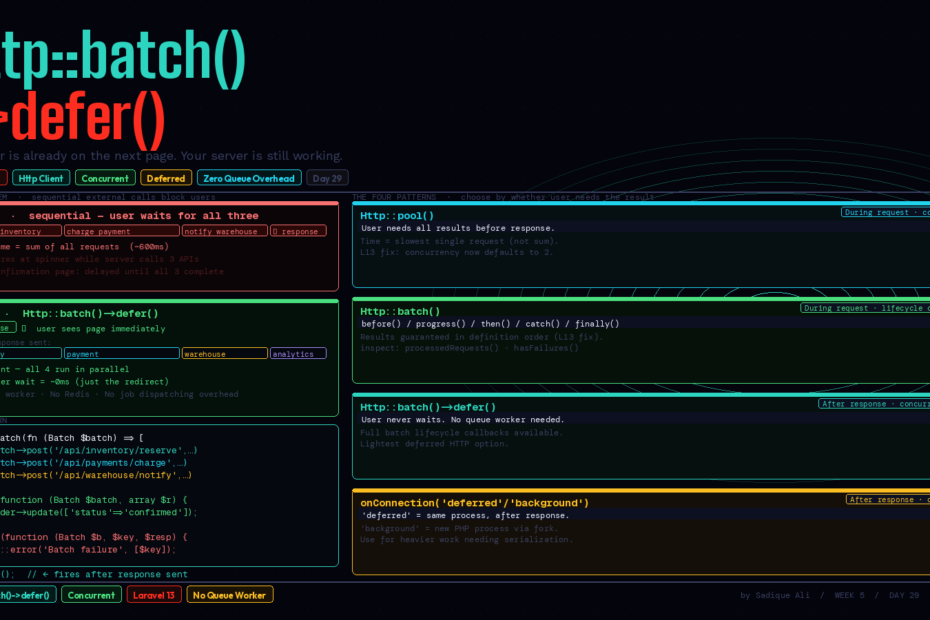
Http::batch()->defer() fires after the response is sent. Your user is already on the next page. Here’s every pattern — batch, pool, defer, concurrent queue — and when to reach for each one.
There’s a tax every web application pays when it calls external APIs.
You place an order. Your app needs to reserve inventory, charge a card, and notify a warehouse. Three HTTP calls. The user waits for all three before seeing the confirmation page. Even if all three succeed in 200ms each, that’s 200ms the user is staring at a spinner for work that has nothing to do with showing them a page.
Laravel has had tools to reduce this tax for a while — the HTTP client pool, concurrency, deferred functions. With the addition of Http::batch()->defer(), those tools are now both more powerful and more consistent. This is the complete guide to every concurrent and deferred HTTP pattern in Laravel, when each one is the right tool, and how they compose.
The Full Toolkit: Four Patterns
Before diving into defer(), it’s worth having the complete picture. There are four distinct patterns for handling HTTP requests that don’t need to block the user:
| Pattern | When it runs | Use when |
|---|---|---|
Http::pool() | During the request, concurrently | You need all results before responding |
Http::batch() | During the request, with lifecycle callbacks | You need results + progress/error handling |
Http::batch()->defer() | After the response is sent | User doesn’t need the results |
Concurrency::defer() | After the response is sent | Closures, not HTTP-specific |
Pattern 1: Http::pool() — Concurrent Requests, Results Required
Pool runs multiple HTTP requests concurrently during the request lifecycle. The user waits, but they wait for the slowest single request rather than the sum of all of them.
use Illuminate\Support\Facades\Http;

$responses = Http::pool(fn ($pool) => [
    $pool->as('user')->get('/api/users/42'),
    $pool->as('orders')->get('/api/orders?user=42'),
    $pool->as('notifications')->get('/api/notifications?user=42'),
]);

// All three ran concurrently — time = slowest single request
$user          = $responses['user']->json();
$orders        = $responses['orders']->json();
$notifications = $responses['notifications']->json();
Important fix in Laravel 13: Http::pool() previously left concurrency at null, meaning pooled requests ran serially despite the API suggesting otherwise — a silent footgun. Laravel 13 defaults concurrency to 2, so pool requests are actually concurrent out of the box.
Use pool when: you need all the response data to build your response, and the requests are genuinely independent of each other.
Pattern 2: Http::batch() — Concurrent Requests With Lifecycle Control
Batch is pool’s more expressive sibling. It runs requests concurrently but gives you callbacks for the full lifecycle: before the batch starts, on each success, on each failure, and when everything completes.
use Illuminate\Http\Client\Batch;
use Illuminate\Http\Client\Response;
use Illuminate\Http\Client\RequestException;
use Illuminate\Support\Facades\Http;

$results = Http::batch(fn (Batch $batch) => [
    $batch->as('inventory')->post('/api/inventory/reserve', ['sku' => $order->sku, 'qty' => 1]),
    $batch->as('payment')->post('/api/payments/charge', ['amount' => $order->total]),
    $batch->as('warehouse')->post('/api/warehouse/notify', ['order_id' => $order->id]),
])
->before(function (Batch $batch) {
    // Batch initialised — no requests fired yet
    Log::info("Processing order {$order->id}");
})
->progress(function (Batch $batch, string $key, Response $response) {
    // Each individual request completes — fires 3 times
    Log::info("Completed: {$key}", ['status' => $response->status()]);
})
->then(function (Batch $batch, array $results) use ($order) {
    // All requests completed successfully
    $order->update(['status' => 'confirmed']);
})
->catch(function (Batch $batch, string $key, Response|RequestException $response) {
    // One or more requests failed
    Log::error("Batch failure on: {$key}");
    $this->handleFailure($key, $response);
})
->finally(function (Batch $batch, array $results) {
    // Always runs — success or failure
    Log::info("Batch complete", [
        'processed' => $batch->processedRequests(),
        'failed'    => $batch->failedRequests,
    ]);
});
Batch state you can inspect:
$batch->totalRequests    // Total number of requests
$batch->pendingRequests  // Still waiting
$batch->failedRequests   // Failed count
$batch->processedRequests()  // Completed so far
$batch->finished()       // All done?
$batch->hasFailures()    // Any failures?
Also new in Laravel 13: batch results are now returned in the order the requests were defined, not the order responses arrived. This was a subtle footgun in earlier versions — if you defined inventory, payment, warehouse but payment responded first, the results array was in payment-first order. Now it’s always definition order.
Pattern 3: Http::batch()->defer() — The New Addition
This is the new one. Chain ->defer() onto your batch and Laravel executes the entire batch after the HTTP response has been sent to the user. The user is already on the confirmation page. Your server is still working.
public function placeOrder(OrderRequest $request): RedirectResponse
{
    $order = Order::create($request->validated());

    Http::batch(fn (Batch $batch) => [
        $batch->post('/api/inventory/reserve', ['sku' => $order->sku]),
        $batch->post('/api/payments/charge',   ['amount' => $order->total]),
        $batch->post('/api/warehouse/notify',  ['order_id' => $order->id]),
    ])
    ->then(function (Batch $batch, array $results) use ($order) {
        $order->update(['status' => 'confirmed']);
        Mail::to($order->user)->send(new OrderConfirmed($order));
    })
    ->catch(function (Batch $batch, string $key, $response) use ($order) {
        $order->update(['status' => 'failed']);
        Log::error("Post-response batch failure", ['order' => $order->id, 'key' => $key]);
    })
    ->defer();  // ← the one method that changes everything

    // Response sent immediately — user sees confirmation
    return redirect()->route('orders.confirmation', $order);
}
The user experience: click “Place Order” → instant redirect to confirmation. The inventory reservation, payment charge, and warehouse notification all happen in parallel after the redirect, without blocking the user for a single millisecond.
What defer() actually does
defer() follows the same pattern as Concurrency::defer(). When ->defer() is called, Laravel registers the batch to execute after terminate() is called on the application — which happens after the HTTP response has been sent and the framework has finished its response lifecycle.
This means:
- The user’s browser receives the response and can render the page
- The deferred batch runs in the same PHP process, after response
- No queue worker needed
- No Redis needed
- No job dispatching overhead
It’s lighter than a queued job and more powerful than a simple defer() closure because the batch runs concurrent HTTP requests with full lifecycle callback support.
When defer is the right choice
// ✅ Good use of defer — user doesn't need these results
Http::batch(fn ($b) => [
    $b->post('/analytics/track', ['event' => 'order.placed']),
    $b->post('/crm/sync', ['customer_id' => $user->id]),
    $b->post('/slack/notify', ['text' => "New order: #{$order->id}"]),
])->defer();

// ❌ Wrong use of defer — you need the result to build the response
Http::batch(fn ($b) => [
    $b->as('user')->get('/api/user/42'),
])->defer(); // result is never available to you
The key question: does anything in your response depend on the result of these HTTP calls? If yes, don’t defer. If no, defer.
Pattern 4: Concurrency::defer() — Closures After Response
For deferred work that isn’t HTTP requests, Concurrency::defer() accepts closures that run after the response is sent, concurrently:
use Illuminate\Support\Facades\Concurrency;

Concurrency::defer([
    fn () => Metrics::record('order.placed', $order->id),
    fn () => Cache::forget("user:{$user->id}:orders"),
    fn () => SearchIndex::update('orders', $order->id, $order->toArray()),
]);
These three closures run concurrently after the response — no HTTP client, no batch lifecycle, just arbitrary work.
Pattern 5: The deferred and background Queue Connections
For heavier work that needs to survive process death, Laravel now ships two special queue connections that mirror the defer pattern but with job serialization:
// 'deferred' — runs synchronously after the response, in the same process
RecordDelivery::dispatch($order)->onConnection('deferred');

// 'background' — spawns a new PHP process via Concurrency::defer()
RecordDelivery::dispatch($order)->onConnection('background');
deferred is for lightweight jobs that should run after the response without leaving the process. Same guarantee as Concurrency::defer(), but you get the full job class structure — retries, failure handling, logging.
background is for heavier jobs that need their own process. It serializes the job and spawns a new PHP process. More overhead, but better isolation and safer for long-running work.
Neither requires a queue worker or Redis. Both return the response to the user immediately.
Real-World: Multi-Service Checkout With Full Error Handling
Here’s a production-realistic example combining all the patterns:
public function checkout(CheckoutRequest $request): JsonResponse
{
    $order = DB::transaction(fn () => Order::create([
        'user_id' => $request->user()->id,
        'total'   => $request->total,
        'status'  => 'pending',
    ]));

    // Needs to complete before response — user needs confirmation number
    $confirmationResponse = Http::post('/api/payments/charge', [
        'order_id' => $order->id,
        'amount'   => $order->total,
        'card'     => $request->payment_token,
    ]);

    if ($confirmationResponse->failed()) {
        $order->update(['status' => 'payment_failed']);
        return response()->json(['error' => 'Payment declined'], 422);
    }

    $order->update([
        'status'              => 'paid',
        'confirmation_number' => $confirmationResponse->json('confirmation'),
    ]);

    // Doesn't block the response — fire and handle after
    Http::batch(fn (Batch $batch) => [
        $batch->as('inventory') ->post('/api/inventory/reserve',  ['sku' => $order->sku]),
        $batch->as('warehouse') ->post('/api/warehouse/queue',    ['order_id' => $order->id]),
        $batch->as('analytics') ->post('/api/analytics/purchase', ['order_id' => $order->id]),
        $batch->as('crm')       ->post('/api/crm/update',         ['user_id'  => $request->user()->id]),
    ])
    ->then(function (Batch $batch, array $results) use ($order) {
        $order->update(['fulfillment_status' => 'queued']);
        Mail::to($order->user)->send(new OrderConfirmed($order));
    })
    ->catch(function (Batch $batch, string $key, $response) use ($order) {
        Log::error("Post-checkout batch failure: {$key}", ['order_id' => $order->id]);
        // Alert ops, retry logic, etc.
    })
    ->defer();

    return response()->json([
        'order_id'     => $order->id,
        'confirmation' => $order->confirmation_number,
        'status'       => 'paid',
    ]);
}
Payment happens synchronously — the user needs the confirmation number. Everything else defers. Inventory, warehouse, analytics, CRM — all run concurrently after the JSON response is on its way to the client.
Testing Deferred Batches
The HTTP client’s fake and mock system works with deferred batches:
public function test_post_response_batch_fires_on_checkout(): void
{
    Http::fake([
        '/api/payments/*'   => Http::response(['confirmation' => 'ORD-123'], 200),
        '/api/inventory/*'  => Http::response([], 200),
        '/api/warehouse/*'  => Http::response([], 200),
        '/api/analytics/*'  => Http::response([], 200),
        '/api/crm/*'        => Http::response([], 200),
    ]);

    $this->postJson('/checkout', $this->validCheckoutPayload())
         ->assertOk()
         ->assertJsonPath('confirmation', 'ORD-123');

    // Deferred batch fires during test teardown
    Http::assertSent(fn ($request) => str_contains($request->url(), '/api/inventory/reserve'));
    Http::assertSent(fn ($request) => str_contains($request->url(), '/api/warehouse/queue'));
}
In tests, deferred batches run synchronously as part of the test lifecycle. Http::fake() intercepts them exactly as it would any other HTTP call. No special test infrastructure required.
The Hierarchy to Remember
When you’re deciding how to handle an external API call:
Does the user need the result to see their page?
├── YES → Http::pool() or Http::batch() (concurrent, during request)
└── NO  → Is it HTTP?
          ├── YES → Http::batch()->defer() (concurrent HTTP, after response)
          └── NO  → Is it lightweight?
                    ├── YES → Concurrency::defer() (closures, after response)
                    └── NO  → ->onConnection('deferred') or ->onConnection('background')
                               (job class, after response, with serialization)
Every step down this hierarchy costs less user-perceived latency and more complexity. Pick the simplest option that meets your requirements.
What This Changes
Http::batch()->defer() isn’t a revolutionary new capability. The pieces were all there — concurrent requests, deferred functions, background jobs. What it adds is consistency: the same ->defer() pattern that exists on Concurrency now exists on Http::batch, and it composes naturally with the batch lifecycle callbacks.
The result is that the clean way to do post-response HTTP work is now also the obvious way. No more “I could queue a job but it feels heavy for three API calls.” No more “I’ll use defer() but lose the lifecycle callbacks.” The full batch API — progress tracking, error handling, completion callbacks — all available for work that doesn’t slow your users down.
That’s the whole point.
Follow for weekly deep-dives on Laravel, PHP, Vue.js, and the agentic stack.