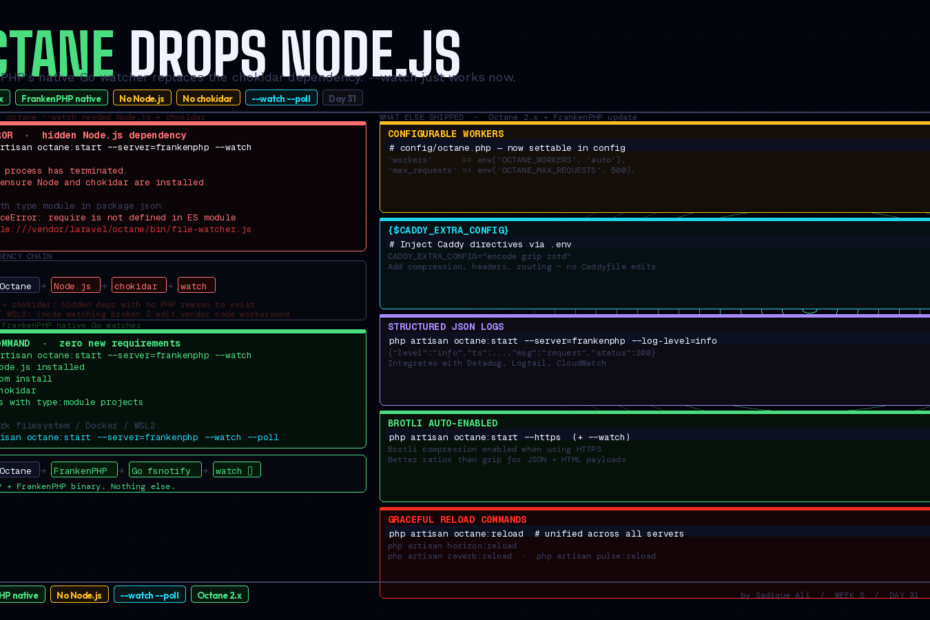
The --watch flag no longer needs Node.js or chokidar installed. FrankenPHP handles it natively in Go. Here’s what changed, why the old watcher was painful, and the full FrankenPHP + Octane setup for 2026.
If you’ve ever tried to use octane:start --watch and been greeted with this:
Watcher process has terminated. Please ensure Node and chokidar are installed.
You know exactly what this article is about.
Laravel Octane’s file watcher — the feature that automatically restarts worker processes when you save a file — previously required Node.js and the chokidar npm package to be installed on your machine. Not because Octane is a JavaScript project. Not because FrankenPHP or Swoole or RoadRunner needs Node. Just because the watcher itself was implemented as a Node.js script (vendor/laravel/octane/bin/file-watcher.js).
It was a hidden dependency that caught developers off-guard, produced cryptic errors with type: module projects, and added friction to containerised setups where Node wasn’t pre-installed.
Laravel Octane 2.x removes it entirely for FrankenPHP users. The file watcher is now built into FrankenPHP itself, written in Go, with zero Node.js dependency. This is the full story.
The Old Watcher: What It Was and Why It Was Awkward
The original Octane file watcher was a Node.js script that used the chokidar library — a popular Node.js file system watcher. When you ran octane:start --watch, Octane would spawn a Node.js child process running that script, which would watch your files and signal the Octane server to restart workers when changes were detected.
This worked fine when everything was in order. The problems emerged at the edges:
The obvious one: If you didn’t have Node.js installed, or had a version mismatch, the watcher failed immediately with the error above. A pure PHP developer working on a Laravel API with no frontend tooling might not have Node installed at all.
The type: module error: If your package.json contained "type": "module", Node.js treated the .js file as an ES module and threw a ReferenceError: require is not defined — because chokidar used CommonJS require(). This broke --watch for any project that had adopted ES modules in its frontend toolchain.
Docker and network filesystems: In containerised development (Docker, WSL2), inode-based file watching often doesn’t work across filesystem boundaries. The workaround was manually editing vendor/laravel/octane/bin/file-watcher.js to set usePolling: true — modifying vendor code, which gets overwritten on composer update.
Two systems to understand: Why does a PHP server need a Node process watching files? The friction of explaining this to new team members was real.
The New Watcher: FrankenPHP Native, No Node Required
FrankenPHP is written in Go. Go has excellent native file system watching capabilities via fsnotify. The new Octane integration uses FrankenPHP’s built-in watcher directly — no Node process, no chokidar, no package.json dependency.
The API is identical. Nothing changes in how you use it:
# Before (needed Node.js + chokidar)
php artisan octane:start --server=frankenphp --watch

# After (needs nothing except FrankenPHP binary)
php artisan octane:start --server=frankenphp --watch
Same flag. No Node required. The watcher process is now part of the FrankenPHP binary itself.
For network filesystems and Docker where inode-based watching doesn’t work across boundaries, the --poll flag activates polling mode:
# Network filesystem / Docker / WSL2 — use polling
php artisan octane:start --server=frankenphp --watch --poll
--poll uses interval-based filesystem checking rather than OS-level inode events. Slightly higher CPU overhead, but it works everywhere — Docker volumes, WSL2 mounts, NFS shares.
Full FrankenPHP + Octane Setup
For anyone setting up Octane with FrankenPHP for the first time, or upgrading from an older setup, here’s the complete 2026 workflow.
Install
composer require laravel/octane
php artisan octane:install
# Select: frankenphp
# Octane downloads the FrankenPHP binary automatically
Local development
# Standard — native inode watching
php artisan octane:start --server=frankenphp --watch

# Docker / WSL2 — polling watcher (no Node required for either)
php artisan octane:start --server=frankenphp --watch --poll

# Custom host/port
php artisan octane:start --server=frankenphp --host=0.0.0.0 --port=8000 --watch

# HTTPS + HTTP/2 + HTTP/3 (auto-generates certificates)
php artisan octane:start --server=frankenphp --https --watch

# Set worker count and max requests per worker
php artisan octane:start --server=frankenphp --workers=4 --max-requests=500 --watch
The --workers and --max-requests flags are new in Octane 2.x and can now also be set in config/octane.php rather than only via the command line:
// config/octane.php
return [
    'server'   => 'frankenphp',
    'workers'  => env('OCTANE_WORKERS', 'auto'),  // 'auto' = one per CPU core
    'max_requests' => env('OCTANE_MAX_REQUESTS', 500),
    // ...
];
Docker setup
# compose.yaml
services:
  frankenphp:
    build:
      context: .
      dockerfile: Dockerfile
    entrypoint: php artisan octane:frankenphp --workers=2 --max-requests=500
    ports:
      - "8000:8000"
    volumes:
      - .:/app
    environment:
      APP_ENV: local

# For development with hot-reload via polling:
  frankenphp-dev:
    build:
      context: .
    entrypoint: php artisan octane:frankenphp --workers=1 --max-requests=1 --watch --poll
    ports:
      - "8000:8000"
    volumes:
      - .:/app
Dockerfile
FROM dunglas/frankenphp

RUN install-php-extensions \
    pcntl \
    pdo_mysql \
    redis \
    opcache

COPY . /app

ENTRYPOINT ["php", "artisan", "octane:frankenphp"]
The Other Things That Shipped With This Octane Update
The Node.js removal was the headline, but several other improvements landed in the same Octane 2.x cycle:
Configurable workers and max-requests via config
Previously, --workers and --max-requests could only be passed as CLI flags. They’re now first-class config values:
// config/octane.php
'workers'      => env('OCTANE_WORKERS', 'auto'),
'max_requests' => env('OCTANE_MAX_REQUESTS', 500),
'auto' sets workers equal to the number of CPU cores. max_requests controls how many requests a worker handles before being recycled — important for preventing memory creep from state that accumulates across requests.
{$CADDY_EXTRA_CONFIG} in the Caddyfile
FrankenPHP’s server is configured by a Caddyfile. Octane now supports injecting additional Caddy configuration via an environment variable:
# .env
CADDY_EXTRA_CONFIG="encode gzip zstd"
# Caddyfile (auto-generated by Octane)
{
    {$CADDY_EXTRA_CONFIG}
}
This gives you control over Caddy middleware — compression, custom headers, rate limiting, proxying — without modifying the generated Caddyfile directly.
Structured JSON logs
Pass --log-level to activate FrankenPHP’s native logger with structured JSON output:
php artisan octane:start --server=frankenphp --log-level=info
Output:
{"level":"info","ts":1742400000,"msg":"starting server","addr":"0.0.0.0:8000"}
{"level":"info","ts":1742400001,"msg":"request","method":"GET","uri":"/","status":200,"duration":0.0012}
Structured JSON logs integrate directly with log aggregation platforms (Datadog, Logtail, CloudWatch). Tail them locally:
php artisan octane:start --server=frankenphp --log-level=debug 2>&1 | jq .
Brotli compression enabled automatically
FrankenPHP enables Brotli compression by default when the --https flag is used. Brotli offers better compression ratios than gzip for text-based responses — HTML, JSON, CSS, JavaScript. For API responses and Inertia page loads, this means smaller payloads with no application-level changes required.
Horizon, Pulse, Reverb, and Octane get reload commands
All four long-running Laravel processes now have a consistent reload command that gracefully restarts workers without dropping connections:
php artisan horizon:reload
php artisan pulse:reload
php artisan reverb:reload
php artisan octane:reload
Previously, graceful reloads required sending signals directly to the process (SIGUSR2 for some, custom signals for others). The unified reload command abstracts this — useful in deployment scripts where you need to reload all long-running processes after a composer install:
# deploy.sh
composer install --no-dev --optimize-autoloader
php artisan config:cache
php artisan route:cache
php artisan view:cache

# Gracefully reload all long-running processes
php artisan octane:reload
php artisan horizon:reload
php artisan reverb:reload
When to Use FrankenPHP vs Swoole vs RoadRunner
The removal of the Node.js dependency makes FrankenPHP the most frictionless Octane server for local development. But the choice matters at scale:
FrankenPHP — best for: new projects, teams without Swoole/Go expertise, apps that want HTTP/2 + HTTP/3 + automatic TLS without extra configuration, Docker-first deployments, standalone binary distribution.
Swoole/Open Swoole — best for: WebSocket applications (Swoole’s WebSocket support is more mature), teams already familiar with the Swoole ecosystem, applications that need Swoole-specific coroutine features.
RoadRunner — best for: teams that want Go-binary reliability without FrankenPHP’s Caddy dependency, microservice architectures where RoadRunner’s plugin system adds value.
For most Laravel applications in 2026, FrankenPHP is the right default. The Node.js removal reduces the “why does my PHP server need Node?” friction to zero, and the rest of the FrankenPHP feature set — automatic HTTPS, Brotli, HTTP/3, structured logs, standalone binary distribution — is genuinely excellent.
The Quiet Ones Always Matter
The Node.js watcher removal is not a feature. It’s the removal of a hidden dependency that shouldn’t have been there. Those changes rarely get celebrated, but they compound in value: fewer things to explain to new team members, fewer CI image maintenance headaches, fewer “please ensure Node and chokidar are installed” support conversations.
--watch on FrankenPHP now just works. That’s the whole story.
Follow for weekly deep-dives on Laravel, PHP, Vue.js, and the agentic stack.
wish you best and best