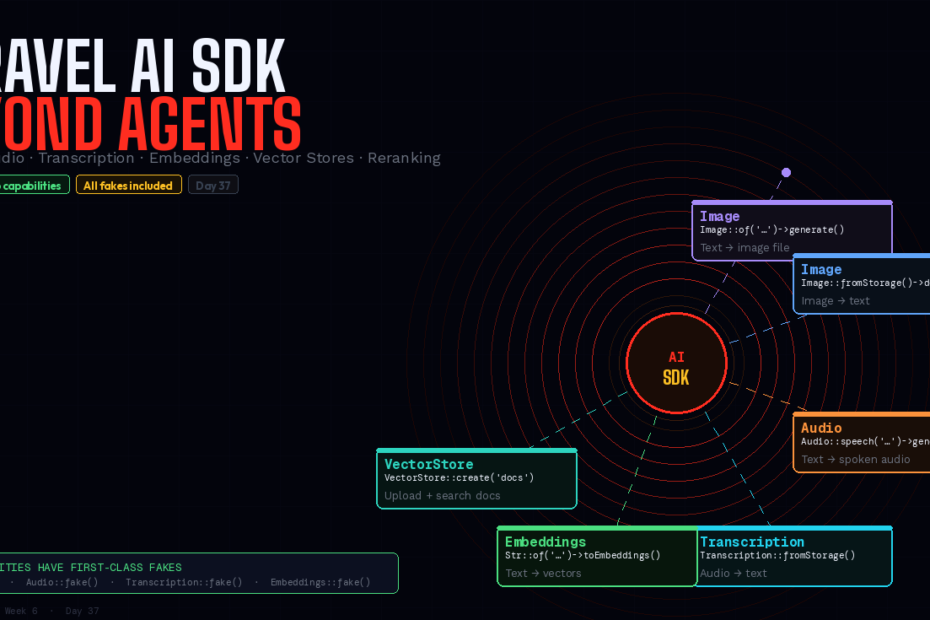
Covered agents, tools, and structured output. This is the rest. Five distinct multimodal capabilities, all under one package, all with fakes for your test suite. Here’s every API worth knowing.
When the Laravel AI SDK launched in February 2026, the coverage was almost entirely about agents. Make an agent. Add tools. Stream responses. Test with fakes. And fairly so — agents are the headline feature, the thing that makes the SDK feel genuinely different from previous Laravel AI packages.
But the agent API is only one of six distinct capability sets in the SDK. The other five — image generation, image understanding, audio synthesis, transcription, and embeddings — each do real work in real applications. None of them require an agent. All of them work with the same provider configuration, the same queue integration, and the same first-class test fakes.
The SDK Map
Before diving in, the complete capability overview:
| Capability | Class | What it does |
|---|---|---|
| Image generation | Image::of() | Text prompt → image file |
| Image understanding | Image::fromStorage()->describe() | Image → text description |
| Audio synthesis | Audio::speech() | Text → spoken audio file |
| Transcription | Transcription::fromStorage() | Audio file → text |
| Embeddings | Embeddings::for() / Str::toEmbeddings() | Text → numeric vectors |
| Vector stores | VectorStore | Upload + search documents |
| Reranking | Reranker::for() | Reorder results by semantic relevance |
1. Image Generation
Generate images from text prompts. The SDK supports OpenAI, Gemini, and xAI for image generation. You can even pass reference images as attachments to transform existing photos, and pick their format (for example, square, landscape, or portrait).
use Laravel\Ai\Image;

// Basic generation
$response = Image::of('A modern invoice dashboard with clean typography')
    ->generate();

$url  = $response->url;    // public URL (temporary, provider-hosted)
$b64  = $response->base64; // base64 string for direct storage
Save to your filesystem
use Illuminate\Support\Facades\Storage;

$response = Image::of('Product hero image: blue wireless headphones on white background')
    ->generate();

// Store permanently in your filesystem
Storage::disk('s3')->put(
    "products/{$product->id}/hero.png",
    base64_decode($response->base64)
);

$product->update(['hero_image' => "products/{$product->id}/hero.png"]);
Format and quality options
$response = Image::of('Square avatar for user profile')
    ->square()         // 1024×1024
    ->hd()             // high definition
    ->generate();

// Other format helpers
->landscape()    // wide format
->portrait()     // tall format
->standard()     // standard quality (faster, cheaper)
Reference image — transform an existing photo
use Laravel\Ai\Attachments\ImageAttachment;

$response = Image::of('Make this product photo have a white background')
    ->attach(ImageAttachment::fromStorage('products/raw/item-42.jpg'))
    ->generate();
Background queuing
For non-blocking generation:
Image::of('Monthly newsletter header: autumn leaves, warm tones')
    ->queue()
    ->then(function (ImageResponse $response) use ($newsletter) {
        Storage::put("newsletters/{$newsletter->id}/header.png",
            base64_decode($response->base64));

        $newsletter->update(['header_generated' => true]);
    });
Provider failover
use Laravel\Ai\Enums\Lab;

// Try Gemini first, fall back to xAI
$response = Image::of('A donut on the kitchen counter')
    ->generate(provider: [Lab::Gemini, Lab::xAI]);
Testing fakes
use Laravel\Ai\Image;

// In your test
Image::fake();

$this->post('/products/42/generate-hero');

Image::assertGenerated(fn ($prompt) =>
    str_contains($prompt, 'product hero')
);
2. Image Understanding
The SDK can also go the other direction — given an image, describe what’s in it. Useful for alt text generation, content moderation, data extraction from photos, and accessibility features.
use Laravel\Ai\Image;

// Describe an image from storage
$response = Image::fromStorage('uploads/invoices/scan-2026-03.jpg')
    ->describe('Extract all line items, amounts, and totals from this invoice scan.');

echo $response->text;
// "Invoice #4021 dated March 15, 2026.
//  Line items: Web Development Services — $4,200.00
//  Hosting & Infrastructure — $340.00
//  Total: $4,540.00"
// Generate alt text for uploaded images automatically
$response = Image::fromStorage($uploadedPath)
    ->describe('Describe this image concisely for use as HTML alt text. Maximum 125 characters.');

$media->update(['alt_text' => $response->text]);
// Content moderation
$response = Image::fromStorage($userUploadPath)
    ->describe('Does this image contain any inappropriate, offensive, or adult content? Answer yes or no only.');

if (str_contains(strtolower($response->text), 'yes')) {
    $this->flagForReview($userUploadPath);
}
3. Audio Synthesis (Text-to-Speech)
Convert text to spoken audio — for notifications, accessibility features, voice interfaces, or content narration:
use Laravel\Ai\Audio;

// Generate speech from text
$response = Audio::speech('Your invoice for March has been paid. Thank you for your business.')
    ->generate();

// Save to storage
Storage::put('notifications/invoice-paid-42.mp3', $response->audio);
Voice and format options
$response = Audio::speech('Welcome to your dashboard.')
    ->voice('nova')      // alloy, echo, fable, onyx, nova, shimmer
    ->mp3()              // mp3, opus, aac, flac, pcm
    ->generate();
Practical: notification audio
// Dispatch job to generate audio for a notification
class GenerateInvoiceNotificationAudio implements ShouldQueue
{
    public function __construct(
        public readonly Invoice $invoice,
        public readonly User $user
    ) {}

    public function handle(): void
    {
        $text = "Hi {$this->user->first_name}. "
              . "Your invoice of {$this->invoice->formatted_amount} "
              . "from {$this->invoice->client->name} has been paid. "
              . "Thank you for using our service.";

        $response = Audio::speech($text)->voice('nova')->generate();

        Storage::put(
            "notifications/user-{$this->user->id}/invoice-paid-{$this->invoice->id}.mp3",
            $response->audio
        );
    }
}
Queue + callbacks
Audio::speech($notificationText)
    ->voice('alloy')
    ->queue()
    ->then(function (AudioResponse $response) use ($notification) {
        Storage::put("audio/{$notification->id}.mp3", $response->audio);
        $notification->update(['audio_generated' => true]);
    });
Fake in tests
use Laravel\Ai\Audio;

Audio::fake();

$this->post('/invoices/42/generate-audio-notification');

Audio::assertSpeechGenerated(fn ($text) =>
    str_contains($text, 'has been paid')
);
4. Transcription
Convert audio files to text. The exact same pattern you’ve seen throughout the SDK — from storage, with queuing:
use Laravel\Ai\Transcription;

// Synchronous transcription
$response = Transcription::fromStorage('meetings/q1-review-2026.mp3')
    ->transcribe();

echo $response->text;
// "Good morning everyone. Let's start with the Q1 numbers..."

// Store the transcript
Meeting::create([
    'audio_path'  => 'meetings/q1-review-2026.mp3',
    'transcript'  => $response->text,
    'transcribed_at' => now(),
]);
Background transcription
Transcription::fromStorage('audio.mp3')->queue()->then(function (TranscriptionResponse $transcript) { ... }) — the queued path for long audio files:
Transcription::fromStorage("interviews/{$applicant->id}/recording.mp3")
    ->queue()
    ->then(function (TranscriptionResponse $response) use ($applicant) {
        $applicant->interview->update([
            'transcript'     => $response->text,
            'processed_at'   => now(),
        ]);

        // Now generate embeddings for semantic search
        GenerateInterviewEmbedding::dispatch($applicant->interview);
    });
Language hint for better accuracy
$response = Transcription::fromStorage('support-call-es.mp3')
    ->language('es')   // ISO 639-1 language code
    ->transcribe();
Fake in tests
use Laravel\Ai\Transcription;

Transcription::fake([
    'Hello, this is a test transcription of the audio file.',
]);

$this->post('/interviews/42/transcribe');

Transcription::assertTranscribed(fn ($path) =>
    str_contains($path, 'interviews/42')
);
5. Embeddings
Covered embeddings in detail for semantic search. But embeddings have uses beyond whereVectorSimilarTo():
Single string (fluent)
$embedding = Str::of('Your invoice has been paid')->toEmbeddings();
// Returns: [0.0023, -0.0045, 0.0187, ...] (1536 floats)
Batch (one API call for many strings)
use Laravel\Ai\Embeddings;

$response = Embeddings::for([
    'Invoice paid notification',
    'Account suspended warning',
    'New feature announcement',
    'Password reset request',
])->generate();

// $response->embeddings is an array of arrays
foreach ($response->embeddings as $i => $vector) {
    Notification::find($ids[$i])->update(['embedding' => $vector]);
}
Specify model and dimensions
$response = Embeddings::for(['Napa Valley has great wine.'])
    ->dimensions(1536)
    ->generate(Lab::OpenAI, 'text-embedding-3-small');
Caching embeddings
Embeddings for static content don’t change. Cache them:
$embedding = Cache::rememberForever(
    "embedding:" . md5($document->content),
    fn () => Str::of($document->content)->toEmbeddings()
);
Fake in tests
Embeddings::fake();  // auto-generates correct dimensions

// Or specify exact values
Embeddings::fake([
    [[0.1, 0.2, 0.3, /* ... */]],
]);

Embeddings::assertEmbedded(fn ($texts) =>
    in_array('Invoice paid notification', $texts)
);
6. Vector Stores
Vector stores let you upload documents (PDFs, text files) and perform semantic search against them — without needing your own pgvector setup. The provider manages the storage and search:
use Laravel\Ai\VectorStore;
use Laravel\Ai\Support\Document;

// Create a store
$store = VectorStore::create('product-documentation');

// Add documents
$store->add(Document::fromPath('/path/to/manual.pdf'), metadata: [
    'product'    => 'InvoiceApp',
    'version'    => '2.0',
    'department' => 'Support',
]);

// Add from storage
$store->add(Document::fromStorage('docs/api-reference.pdf'));
Use a vector store in an agent with FileSearch
use Laravel\Ai\Tools\FileSearch;

class SupportAgent implements Agent
{
    use Promptable;

    public function instructions(): string
    {
        return 'You are a product support agent. Answer questions using the documentation.';
    }

    public function tools(): iterable
    {
        return [
            FileSearch::usingStore($this->vectorStoreId),
        ];
    }
}

// Agent now has access to your docs as a tool
$response = (new SupportAgent)->prompt(
    'How do I export invoices to CSV?'
);
The One Config File
All capabilities share the same config/ai.php. Set defaults per capability:
// config/ai.php
'defaults' => [
    'text'         => [Lab::Anthropic, 'claude-sonnet-4-5'],
    'image'        => [Lab::OpenAI,    'gpt-image-1'],
    'audio'        => [Lab::OpenAI,    'tts-1'],
    'transcription'=> [Lab::OpenAI,    'whisper-1'],
    'embeddings'   => [Lab::OpenAI,    'text-embedding-3-small'],
],
Override per call when needed:
// Use a different model for high-quality generation
$response = Image::of('Executive headshot background')
    ->generate(Lab::OpenAI, 'gpt-image-1-hd');
The Test Fakes: The Underappreciated Part
Every single capability has a first-class fake. This is the part that separates the Laravel AI SDK from raw API clients:
// Your test setup
Image::fake();
Audio::fake();
Transcription::fake(['Hello, world.']);
Embeddings::fake();

// Now test your entire AI pipeline without a single real API call
$this->post('/documents/42/process');

// Assert what happened
Image::assertNotGenerated();
Audio::assertSpeechGenerated();
Transcription::assertTranscribed();
Embeddings::assertEmbedded();
Transcription::fake()->preventStrayTranscriptions() will throw an exception if your code attempts a transcription that wasn’t explicitly set up — the equivalent of Http::fake() in the HTTP client. Any transcription your code attempts that hasn’t been faked will throw, ensuring your tests cover every AI interaction explicitly.
No burning API credits in CI. No flaky tests from rate limits. No mocking HTTP calls manually. The fakes are first-class, documented, and consistent across every capability.
The Bigger Picture
One package handles text, images, audio, transcriptions, embeddings, reranking, vector stores, web search, and file search. That’s the promise — and it holds up.
The consistent pattern across all six capabilities is what makes the SDK worth using even for teams who only need two or three of them. Queue integration looks the same. Provider failover syntax is the same. Fake syntax is the same. Config is in one file. Once you know how agents work, images feel obvious. Once you know how images work, transcription is three lines.
That consistency is worth something. It means the next time a feature request arrives that needs AI — “can we transcribe support calls?”, “can we generate hero images for blog posts?”, “can we add semantic search to the product catalogue?” — the answer is not a new package evaluation. It’s a capability you already have.
Follow for weekly deep-dives on Laravel, PHP, Vue.js, and the agentic stack.