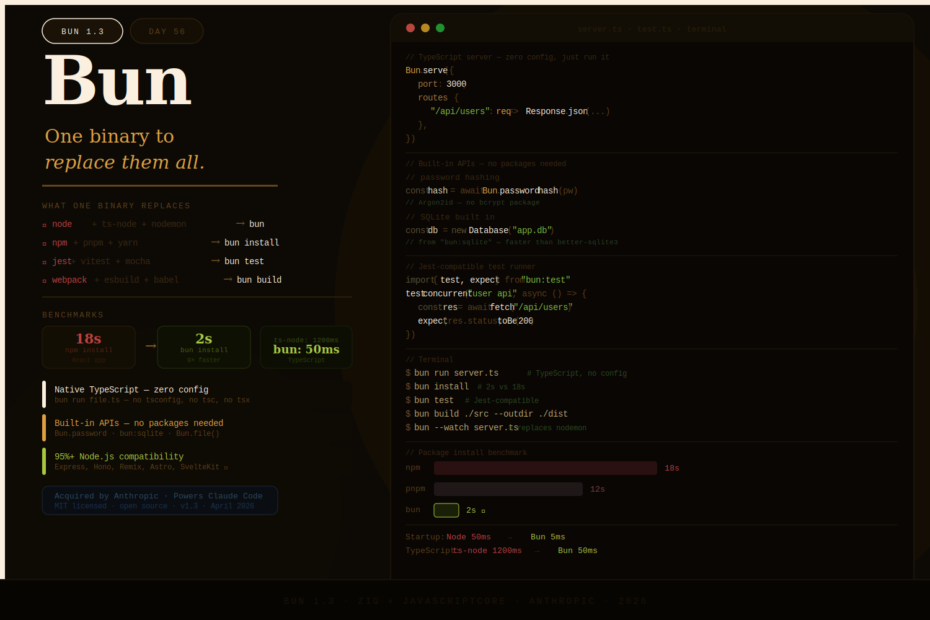
npm takes 18 seconds. Bun takes 2. ts-node takes 1200ms. Bun takes 50ms. Bun isn’t trying to replace Node.js — it’s trying to replace the 15 tools you need alongside it.
Jarred Sumner, Bun’s creator, has been consistent about the mission since day one:
“We did not build Bun to replace Node.js. We built it to replace the 15 tools you need alongside Node.js. The runtime speed is a bonus — the real win is that a single binary replaces npm, webpack, babel, jest, ts-node, and nodemon.”
In 2026, that vision has landed. Bun reached v1.3 with production-grade Node.js compatibility, got acquired by Anthropic (who now use it to power Claude Code), and has quietly become the default recommendation for new JavaScript projects.
Here’s the complete picture.
What Bun Actually Is
Bun is a single executable that ships four things at once:
- Runtime — runs JavaScript and TypeScript natively (no build step)
- Package manager — installs from npm registry, compatible with
package.json - Bundler — bundles JS, TS, JSX, CSS modules with tree-shaking
- Test runner — Jest-compatible API, runs tests concurrently
One install. One binary. Everything you need.
# Install
curl -fsSL https://bun.com/install | bash

# Run TypeScript directly — no tsconfig, no tsc, no ts-node
bun run server.ts

# Install packages — 6-35x faster than npm
bun install

# Run tests — Jest-compatible
bun test

# Bundle for production
bun build ./src/index.ts --outdir ./dist --target browser

# Execute a package without installing
bunx create-next-app my-app
The Performance Numbers (Benchmarks That Actually Matter)
Bun’s performance reputation is built on benchmarks, but it’s worth separating the real wins from the marketing.
Package Installation — The Clear Winner
This is where Bun’s advantage is largest and most consistently felt:
| Operation | npm | pnpm | Bun |
|---|---|---|---|
| Install React app | 18s | 12s | 2s |
| 1,847 deps (cold) | 28 min | — | 47s |
| Cached reinstall | 8s | 4s | 0.3s |
The mechanism: Bun uses parallel downloads, a binary lockfile (bun.lockb instead of package-lock.json), and a global cache that hard-links files instead of copying them. A developer cloning a project and running bun install is genuinely a different experience from npm install.
HTTP Throughput — Real but Context-Dependent
Hello World (raw):
  Bun:    106,000 req/s
  Node:    44,000 req/s
  Deno:    52,000 req/s

Hono framework:
  Bun:     99,000 req/s
  Node:    41,000 req/s

Real application (database, business logic):
  Bun:    ~12,000 req/s
  Node:   ~12,000 req/s
The honest take: Bun’s HTTP advantage is real in synthetic benchmarks (2.4×) but mostly disappears in production applications where I/O and business logic dominate. The real value isn’t raw throughput — it’s everything else.
TypeScript Transpilation — Where You Feel It Every Day
Transpile a 100-file TypeScript project:
  bun run script.ts:    50ms  (native, zero config)
  tsx script.ts:       200ms
  ts-node script.ts: 1,200ms
No tsconfig.json required. No build step. No separate TypeScript compiler. bun run file.ts just works.
Startup Time
Startup time (Hello World server):
  Bun:   ~5ms
  Node:  ~50ms
  Deno:  ~20ms
4–10× faster startup matters enormously for serverless functions, CLI tools, and any workload that spawns many short-lived processes.
TypeScript Without Configuration
This is Bun’s single most impactful quality-of-life improvement for TypeScript developers. There is no TypeScript setup process:
// server.ts — just run it
import { Bun } from "bun"

const server = Bun.serve({
    port: 3000,
    fetch(req) {
        const url = new URL(req.url)

        if (url.pathname === "/api/users") {
            return Response.json({ users: ["Alice", "Bob"] })
        }

        return new Response("Not Found", { status: 404 })
    },
})

console.log(`Server running at http://localhost:${server.port}`)
bun run server.ts
# Server running at http://localhost:3000
No tsconfig.json. No tsc. No ts-node. No tsx. No nodemon. Bun handles all of it.
JSX also works natively:
bun run components/Button.tsx # JSX with React, no babel, no webpack
The Built-In APIs
Bun ships a set of first-party APIs that are significantly faster than Node.js equivalents for common operations.
File I/O
// Reading — Bun.file() is a lazy file handle
const file = Bun.file("data.json")
const data = await file.json()  // parse JSON directly

// Writing
await Bun.write("output.json", JSON.stringify(data, null, 2))

// Streaming
const stream = Bun.file("large-video.mp4").stream()
HTTP Server
const server = Bun.serve({
    port: 8080,
    routes: {
        "/": new Response("Home"),
        "/api/health": () => Response.json({ status: "ok" }),
        "/api/users/:id": (req, params) => {
            return Response.json({ userId: params.id })
        },
    },
    // WebSocket support built in
    websocket: {
        message(ws, message) {
            ws.send(`Echo: ${message}`)
        },
        open(ws) {
            console.log("WebSocket connected")
        },
    },
    development: {
        console: true,  // stream browser logs to terminal
        hmr: true,      // hot module reload
    },
})
Password Hashing
// Argon2id and bcrypt built in — no bcrypt package needed
const hash = await Bun.password.hash("my-password")
const isValid = await Bun.password.verify("my-password", hash)
// => true
SQLite
import { Database } from "bun:sqlite"

// Faster than better-sqlite3, zero native dependencies
const db = new Database("app.db")
const stmt = db.prepare("SELECT * FROM users WHERE id = ?")
const user = stmt.get(1)
Test Runner
import { test, expect, describe, beforeAll } from "bun:test"

describe("User API", () => {
    beforeAll(async () => {
        await setupTestDatabase()
    })

    test("returns 200 for valid user", async () => {
        const res = await fetch("http://localhost:3000/api/users/1")
        expect(res.status).toBe(200)
    })

    // Tests run concurrently by default — much faster than Jest
    test.concurrent("handles concurrent requests", async () => {
        const responses = await Promise.all(
            Array.from({ length: 100 }, () =>
                fetch("http://localhost:3000/api/health")
            )
        )
        responses.forEach(res => expect(res.status).toBe(200))
    })
})
bun test
# Runs all *.test.ts files concurrently
# Jest-compatible — existing Jest tests work without modification
Bun as a Drop-In npm Replacement
Even if you stay on Node.js for production, Bun’s package manager alone is worth using:
# In any existing Node.js project
bun install          # Reads package.json, installs to node_modules
bun add express      # Adds a dependency
bun remove lodash    # Removes a dependency
bun update           # Updates all packages
bunx eslint .        # Runs a package without global install
The node_modules folder is standard — the output is identical to npm install. You can use bun install for speed and node for running code if you want a gradual transition.
Node.js Compatibility in 2026
Bun covers approximately 95%+ of the Node.js API surface. The most important modules work:
// All of these work in Bun
import fs from "node:fs"
import path from "node:path"
import crypto from "node:crypto"
import http from "node:http"
import stream from "node:stream"
import { EventEmitter } from "node:events"
import { Worker } from "node:worker_threads"
Framework compatibility in 2026:
| Framework | Bun support |
|---|---|
| Express | ✅ Full |
| Fastify | ✅ Full |
| Hono | ✅ Native (designed for Bun) |
| Elysia | ✅ Native (Bun-first) |
| Next.js | ⚠️ Partial (use bun install, run with node) |
| Remix | ✅ Full |
| Astro | ✅ Full |
| SvelteKit | ✅ Full |
The main gaps: native C++ addons, some Node.js-specific internals. If your project avoids those, the compatibility is effectively complete.
When to Use Bun, Node.js, or Both
Use Bun as your primary runtime if:
- Starting a new project
- Building APIs, CLIs, scripts, or microservices
- Your team is TypeScript-heavy and wants zero build config
- Serverless or edge functions where startup time matters
- You want a single tool instead of npm + jest + ts-node + nodemon
Stay on Node.js if:
- You maintain a large, established codebase with complex native dependencies
- Enterprise compliance requirements mandate a foundation-governed runtime
- You need 100% guarantee of every npm package working
- You’re migrating and can’t afford any compatibility surprises
Use Bun for tooling, Node for runtime (hybrid):
- Run
bun installfor package management (free speed win, zero risk) - Run
bun testfor testing (Jest-compatible, faster) - Run
nodefor production until you’ve validated Bun compatibility
This hybrid approach is the lowest-risk path to getting most of Bun’s benefits.
Getting Started
# Install Bun
curl -fsSL https://bun.com/install | bash  # macOS / Linux
powershell -c "irm bun.sh/install.ps1 | iex"  # Windows

# Verify
bun --version  # 1.3.x

# New project
mkdir my-api && cd my-api
bun init  # creates package.json, index.ts, tsconfig (optional)

# Start a server
cat > index.ts << 'EOF'
Bun.serve({
    port: 3000,
    fetch(req) {
        return new Response("Hello from Bun!")
    },
})
console.log("Listening on http://localhost:3000")
EOF

bun run index.ts
# Listening on http://localhost:3000
Final Thoughts
The case for Bun in 2026 isn’t “it’s faster than Node.js.” It’s “it eliminates an entire category of configuration and tooling overhead that every JavaScript project carries.”
The typical JavaScript project in 2025 needed: node, npm or pnpm, typescript, ts-node or tsx, jest or vitest, nodemon or concurrently, and often webpack or esbuild for bundling. That’s six to eight separate tools, each with its own config files and version constraints.
Bun collapses that into one binary with one install command. TypeScript works. Tests work. Bundling works. File watching works. For most new projects, the setup overhead drops from an hour to under a minute.
For new TypeScript projects in 2026, Bun is the default recommendation. For existing Node.js applications, bun install is a free performance win worth taking today.