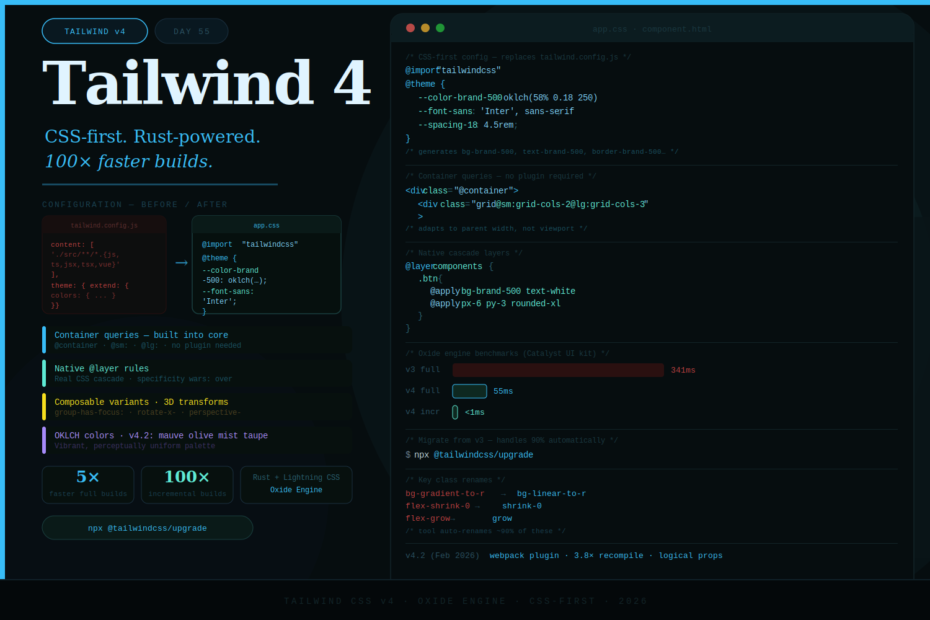
No more tailwind.config.js. No more @tailwind directives. No more PostCSS setup. Tailwind v4 is CSS-first, Rust-powered, and 100× faster on incremental builds — and it changes how you configure everything.
When Tailwind CSS v4 shipped in early 2025, it wasn’t an incremental update. It was a ground-up rewrite of the framework — new engine, new configuration model, new approach to CSS. By 2026 with v4.2 out (February 2026), the ecosystem has caught up and there’s no reason not to be on it.
The headline: full builds are up to 5× faster, incremental builds are over 100× faster (measured in microseconds), and configuration has moved entirely out of JavaScript and into CSS itself.
Here’s everything you need to know.
What’s New: The Big Picture
Tailwind v4 makes five fundamental changes:
- Oxide engine — rebuilt in Rust for native speed
- CSS-first configuration —
@themereplacestailwind.config.js - Automatic content detection — no more
contentpaths to configure - Built-in container queries — no plugin needed
- Native cascade layers — real
@layerrules, finally
Let’s dig into each one.
1. The Oxide Engine — Rust-Powered Builds
Tailwind v4 ships a brand new engine called Oxide, built with Rust at its core and Lightning CSS as its integrated processor. The result is dramatically faster builds at every scale.
Benchmark comparison (Tailwind’s own Catalyst UI kit):
| Tailwind v3 | Tailwind v4 | |
|---|---|---|
| Full build | 341ms | 55ms |
| Incremental build | ~50ms | <1ms |
| Full website rebuild | 960ms | 105ms |
Incremental builds — the ones that happen on every file save during development — went from tens of milliseconds to microseconds. Hot reload is now effectively instant regardless of project size.
What powers this: a custom CSS parser designed for Tailwind’s data structures, Rust for the most expensive parallelizable operations, and Lightning CSS handling vendor prefixing and modern syntax transforms. PostCSS is no longer required at all.
2. CSS-First Configuration — Goodbye tailwind.config.js
This is the biggest change you’ll feel day-to-day. In Tailwind v4, your entire theme lives in a CSS file using @theme directives. No more JavaScript config.
Installation — one line of CSS:
/* app.css — replaces @tailwind base/components/utilities */
@import "tailwindcss";
That’s it. No tailwind.config.js to create, no content paths to configure, no PostCSS config to wire up.
Defining your theme in CSS:
@import "tailwindcss";

@theme {
  /* Colors — automatically generates bg-*, text-*, border-*, etc. */
  --color-brand-50: oklch(97% 0.02 250);
  --color-brand-500: oklch(58% 0.18 250);
  --color-brand-900: oklch(28% 0.10 250);

  /* Typography */
  --font-sans: 'Inter', sans-serif;
  --font-mono: 'JetBrains Mono', monospace;

  /* Spacing */
  --spacing-18: 4.5rem;
  --spacing-88: 22rem;

  /* Border radius */
  --radius-4xl: 2rem;

  /* Breakpoints */
  --breakpoint-3xl: 120rem;
}
Every variable you define in @theme automatically generates the full suite of utility classes. Define --color-brand-500 and you instantly get bg-brand-500, text-brand-500, border-brand-500, ring-brand-500, shadow-brand-500 — all with opacity modifier support.
OKLCH colors by default:
Tailwind v4 uses OKLCH as its default color format. OKLCH produces more vibrant, perceptually uniform colors than RGB — the colors you see in the browser are more consistent across the spectrum, particularly at high saturation.
@theme {
  /* OKLCH: lightness% chroma hue */
  --color-violet-500: oklch(58% 0.22 280);  /* vivid violet */
  --color-teal-500: oklch(62% 0.12 185);    /* deep teal */

  /* You can still use hex, rgb, hsl — all work fine */
  --color-accent: #6366f1;
}
CSS variables are now first-class:
Since all theme values are CSS custom properties, you can use them anywhere — not just in Tailwind classes:
.custom-component {
  background: var(--color-brand-500);
  border-radius: var(--radius-4xl);
  font-family: var(--font-sans);
}
3. Automatic Content Detection — Zero Configuration
In Tailwind v3, you had to manually configure the content array to tell Tailwind where your templates lived. In v4, this is entirely automatic.
v3 — you had to specify every path:
// tailwind.config.js
module.exports = {
  content: [
    './src/**/*.{html,js,ts,jsx,tsx,vue,svelte}',
    './pages/**/*.{html,js,ts,jsx,tsx}',
    './components/**/*.{html,js,ts,jsx,tsx}',
  ],
}
v4 — nothing to configure:
@import "tailwindcss";
/* That's it. Tailwind finds all your templates automatically. */
Tailwind v4 uses file system scanning that discovers all template files from your project root, respecting .gitignore and standard exclusions. No maintenance burden as your project structure evolves.
4. Container Queries — Built Right In
One of the most requested features. Tailwind v4 includes container query support in core — no @tailwindcss/container-queries plugin required.
Container queries let components respond to their parent’s size rather than the viewport. This makes components genuinely reusable across different layout contexts.
Usage:
<!-- Mark a container with @container -->
<div class="@container">
  <div class="grid grid-cols-1 @sm:grid-cols-2 @lg:grid-cols-3">
    <!-- Columns adapt to the container, not the viewport -->
    <div class="p-4">Card 1</div>
    <div class="p-4">Card 2</div>
    <div class="p-4">Card 3</div>
  </div>
</div>
<!-- Named containers -->
<div class="@container/sidebar">
  <nav class="flex-col @sidebar/md:flex-row">
    <!-- Nav changes layout based on the sidebar container's width -->
  </nav>
</div>
Container query range variants are also supported:
<div class="@container">
  <!-- Min-width range -->
  <p class="@[300px]:text-lg @[600px]:text-2xl">Scales with container</p>

  <!-- Max-width: hide below certain container size -->
  <p class="@max-md:hidden">Only visible in large containers</p>
</div>
5. Native Cascade Layers — Proper Specificity Control
Tailwind v4 uses real CSS @layer rules for theme, base, components, and utilities. This means Tailwind’s utility classes correctly slot into the CSS cascade — no more fighting specificity with !important or complex selector gymnastics.
/* Tailwind v4 emits this structure under the hood */
@layer theme { /* CSS custom properties */ }
@layer base { /* Base element styles */ }
@layer components { /* Component classes */ }
@layer utilities { /* Utility classes */ }
You can now write custom CSS that explicitly sits above or below Tailwind’s layers:
@import "tailwindcss";

/* This always beats Tailwind utilities without !important */
@layer components {
  .btn-primary {
    @apply bg-brand-500 text-white px-6 py-3 rounded-xl font-semibold;
    @apply hover:bg-brand-600 focus-visible:ring-2 focus-visible:ring-brand-500;
  }
}
New Utilities in v4
3D Transform Utilities
Full 3D transforms — previously requiring custom CSS or arbitrary values:
<div class="rotate-x-12 rotate-y-6 perspective-1000">
  <div class="translate-z-8 scale-z-110">3D card effect</div>
</div>
Composable Variants
Combine variants freely without plugins:
<!-- group-has-[.active]:opacity-100 — if group has .active child, full opacity -->
<div class="group">
  <span class="active">Child</span>
  <div class="opacity-0 group-has-[.active]:opacity-100">
    Visible when group has .active child
  </div>
</div>

<!-- Combine arbitrary variants -->
<div class="[@media(hover:hover)]:opacity-100 [@media(hover:none)]:opacity-75">
  Adapts to hover capability
</div>
@starting-style Support
Animate elements from their initial render — no more JavaScript needed for enter animations:
@import "tailwindcss";

@layer utilities {
  .fade-in {
    transition: opacity 0.3s ease;
    @starting-style {
      opacity: 0;
    }
  }
}
Installing Tailwind v4
With Vite (recommended):
npm install tailwindcss @tailwindcss/vite
// vite.config.js
import tailwindcss from '@tailwindcss/vite'

export default {
  plugins: [tailwindcss()],
}
/* app.css */
@import "tailwindcss";
With webpack (new in v4.2):
npm install tailwindcss @tailwindcss/webpack
// webpack.config.js
const TailwindCSSWebpackPlugin = require('@tailwindcss/webpack')

module.exports = {
  plugins: [new TailwindCSSWebpackPlugin()],
}
With PostCSS (still supported):
npm install tailwindcss @tailwindcss/postcss
// postcss.config.js
module.exports = {
  plugins: {
    '@tailwindcss/postcss': {},
  },
}
Migrating from v3
The automated upgrade tool handles around 90% of the mechanical changes:
npx @tailwindcss/upgrade
This tool:
- Converts your
tailwind.config.jsto@themeCSS - Renames deprecated class aliases
- Updates your CSS entry point
- Migrates dark mode configuration
Key class renames to know:
| v3 | v4 |
|---|---|
bg-gradient-to-r | bg-linear-to-r |
flex-shrink-0 | shrink-0 |
flex-grow | grow |
overflow-ellipsis | text-ellipsis |
decoration-slice | box-decoration-slice |
Dark mode configuration changed:
/* v4 — dark mode in CSS, not JS config */
@import "tailwindcss";

/* Class-based dark mode (was darkMode: 'class' in config) */
@variant dark (&:where(.dark, .dark *));

/* Or media-based (default) */
@variant dark (@media (prefers-color-scheme: dark));
Custom plugins need updating:
v3 plugins using addUtilities() and theme() functions need to be migrated to the CSS-based plugin API. Most major ecosystem plugins (Headless UI, Radix, shadcn/ui) released v4-compatible versions in Q1 2026.
Browser requirements: Tailwind v4 targets Safari 16.4+, Chrome 111+, Firefox 128+. If you need to support older browsers, stay on v3.
What’s New in v4.2 (February 2026)
The latest minor release shipped three notable additions:
webpack plugin — first-class webpack support now matches Vite’s integration simplicity (no manual PostCSS configuration needed).
Four new color palettes — mauve, olive, mist, and taupe added to the default theme. Muted, neutral-leaning tones that reflect 2026 design trends.
Expanded logical property utilities — pbs-*, pbe-*, mbs-*, mbe-*, border-bs, border-be and more for block-direction spacing, plus inline-size and block-size utilities. Crucial for RTL and vertical writing mode support.
3.8× faster recompilation — measured by the Next.js team on their largest application.
Final Thoughts
Tailwind CSS v4 is the framework growing into what it always wanted to be. The JavaScript config file was always a workaround — a way to generate CSS using a tool that wasn’t CSS. The @theme directive finally puts configuration where it belongs: in the cascade.
The performance gains are real and immediate. Projects that spent 8-12 seconds on Tailwind compilation during CI are now completing in under 2 seconds. Incremental builds during development are effectively instant.
And the new capabilities — container queries in core, composable variants, 3D transforms, native cascade layers — make patterns that required plugins or custom CSS into standard utility usage.
If you’re on v3 and haven’t upgraded yet: run npx @tailwindcss/upgrade on a branch this week. The tool does most of the work. The upgrade is worth it.
CSS just got its config back, and it’s faster than ever.