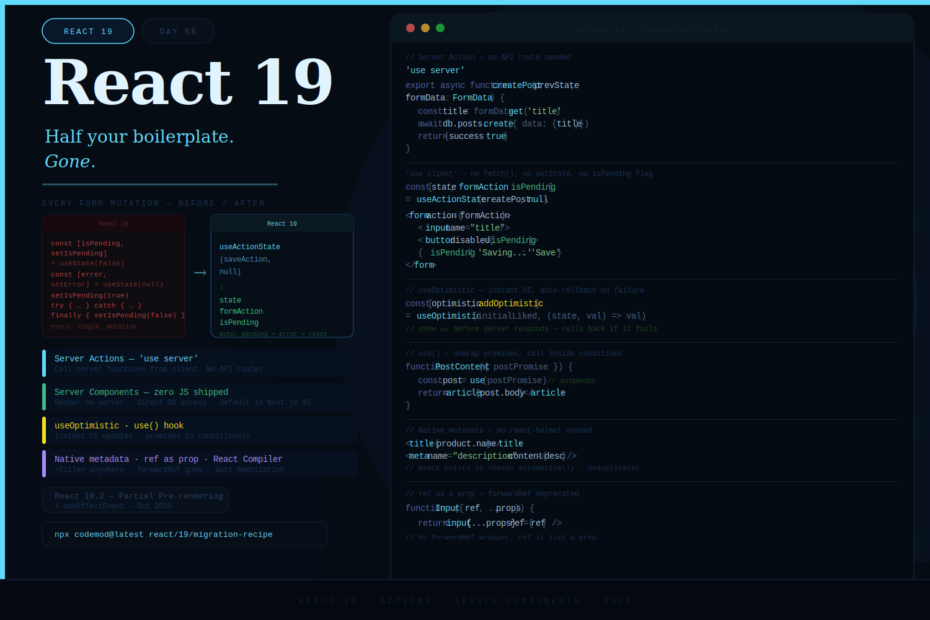
No more useEffect for data fetching. No more forwardRef wrappers. No more manual isLoading state. React 19 makes the right way the simple way.
React 19 shipped in December 2024 and by 2026 it’s the version everyone should be on. It stabilizes features that were experimental in React 18 — Server Components, Server Actions, the concurrent model — and introduces new APIs that eliminate entire categories of boilerplate that React developers have written for years.
The version number is 19, but this release feels like a different React. Let’s walk through everything that changed.
Actions: The End of Manual Loading State
Before React 19, handling a form submission looked like this:
// React 18 — manual state management for every mutation
function UpdateNameForm() {
    const [name, setName] = useState('')
    const [isPending, setIsPending] = useState(false)
    const [error, setError] = useState(null)

    async function handleSubmit(e: React.FormEvent) {
        e.preventDefault()
        setIsPending(true)
        setError(null)
        try {
            await updateName(name)
        } catch (err) {
            setError(err.message)
        } finally {
            setIsPending(false)
        }
    }

    return (
        <form onSubmit={handleSubmit}>
            <input value={name} onChange={e => setName(e.target.value)} />
            <button disabled={isPending}>
                {isPending ? 'Saving...' : 'Save'}
            </button>
            {error && <p className="error">{error}</p>}
        </form>
    )
}
Every single mutation you write needs this pattern. React 19 eliminates it with Actions:
// React 19 — useActionState handles pending, error, and response automatically
import { useActionState } from 'react'

async function updateNameAction(prevState: any, formData: FormData) {
    const name = formData.get('name') as string
    try {
        await updateName(name)
        return { success: true, message: 'Name updated!' }
    } catch (err) {
        return { success: false, message: err.message }
    }
}

function UpdateNameForm() {
    const [state, formAction, isPending] = useActionState(updateNameAction, null)

    return (
        <form action={formAction}>
            <input name="name" />
            <button type="submit" disabled={isPending}>
                {isPending ? 'Saving...' : 'Save'}
            </button>
            {state?.message && (
                <p className={state.success ? 'success' : 'error'}>
                    {state.message}
                </p>
            )}
        </form>
    )
}
useActionState gives you three things:
state— the return value of the last action call (or the initial state)formAction— pass this toaction={}on your formisPending— true while the action is running
No e.preventDefault(). No setIsPending. No try/catch for state updates. React handles it.
Server Actions: Eliminating API Routes
Server Actions take Actions one step further — they let client components call async functions that run on the server. No custom API endpoint. No fetch('/api/whatever'). Just a function call.
// actions.ts
'use server'

import { db } from '@/db'
import { revalidatePath } from 'next/cache'

export async function createPost(prevState: any, formData: FormData) {
    const title = formData.get('title') as string
    const body = formData.get('body') as string

    try {
        await db.posts.create({ data: { title, body } })
        revalidatePath('/posts')
        return { success: true }
    } catch (err) {
        return { success: false, error: 'Failed to create post' }
    }
}
// CreatePostForm.tsx
'use client'
import { useActionState } from 'react'
import { createPost } from './actions'

export function CreatePostForm() {
    const [state, formAction, isPending] = useActionState(createPost, null)

    return (
        <form action={formAction}>
            <input name="title" placeholder="Post title" required />
            <textarea name="body" placeholder="Post content" required />
            <button type="submit" disabled={isPending}>
                {isPending ? 'Publishing...' : 'Publish'}
            </button>
            {state?.error && <p className="error">{state.error}</p>}
        </form>
    )
}
The 'use server' directive tells your bundler to keep this function on the server and expose a POST endpoint that your client calls automatically. You never write that endpoint — React does it for you under the hood.
Server Components: Zero-KB Components
Server Components run entirely on the server and send only HTML to the client. No JavaScript is shipped for the component itself.
// UserDashboard.tsx — this is a Server Component (no 'use client')
// It runs on the server, has direct DB access, ships zero JS to client
import { db } from '@/db'
import { getSession } from '@/auth'
import { UserStats } from './UserStats'   // Client Component
import { RecentActivity } from './RecentActivity' // Server Component

export default async function UserDashboard() {
    const session = await getSession()
    const user = await db.users.findUnique({
        where: { id: session.userId },
        include: { posts: true, comments: true }
    })

    return (
        <div>
            <h1>Welcome, {user.name}</h1>
            {/* Server Component — rendered on server */}
            <RecentActivity posts={user.posts} />
            {/* Client Component — ships JS for interactivity */}
            <UserStats userId={user.id} />
        </div>
    )
}
The key mental model: server components fetch and render, client components add interactivity. In Next.js 15, all components are Server Components by default — you opt into client rendering with 'use client'.
useOptimistic — Instant UI Updates
For mutations where users expect instant feedback (likes, saves, toggles), useOptimistic lets you show the expected final state before the server responds:
import { useOptimistic, useActionState } from 'react'
import { toggleLike } from './actions'

function LikeButton({ postId, initialLiked, initialCount }: Props) {
    const [optimisticState, addOptimistic] = useOptimistic(
        { liked: initialLiked, count: initialCount },
        (state, newLiked: boolean) => ({
            liked: newLiked,
            count: newLiked ? state.count + 1 : state.count - 1,
        })
    )

    async function handleToggle() {
        const newLiked = !optimisticState.liked
        // Update UI instantly
        addOptimistic(newLiked)
        // Then sync with server
        await toggleLike(postId, newLiked)
    }

    return (
        <button onClick={handleToggle}>
            {optimisticState.liked ? '❤️' : '🤍'} {optimisticState.count}
        </button>
    )
}
If the server action fails, the optimistic state is rolled back automatically. Users get instant feedback; the server ensures consistency.
use() — Read Promises and Context Mid-Render
The new use() function lets you unwrap a Promise or read Context inside a component — and unlike hooks, it can be called inside loops, conditions, and early returns:
import { use, Suspense } from 'react'

// Read a promise — suspends until resolved
function PostContent({ postPromise }: { postPromise: Promise<Post> }) {
    const post = use(postPromise)  // suspends here until the promise resolves
    return <article>{post.body}</article>
}

// Parent passes the promise, wraps in Suspense
export default function PostPage({ params }: { params: { id: string } }) {
    const postPromise = fetchPost(params.id)  // starts fetch immediately

    return (
        <Suspense fallback={<PostSkeleton />}>
            <PostContent postPromise={postPromise} />
        </Suspense>
    )
}
// Read context conditionally — impossible before React 19
function Component({ showTheme }: { showTheme: boolean }) {
    if (showTheme) {
        const theme = use(ThemeContext)  // called inside a condition ✓
        return <div className={theme.className}>...</div>
    }
    return <div>...</div>
}
Native Document Metadata
No more react-helmet or next/head for managing <title>, <meta>, and <link> tags. React 19 lifts these natively from anywhere in your component tree:
// Before — external packages needed
import Head from 'next/head'

function ProductPage({ product }) {
    return (
        <>
            <Head>
                <title>{product.name}</title>
                <meta name="description" content={product.description} />
            </Head>
            <main>...</main>
        </>
    )
}

// After — native React 19
function ProductPage({ product }) {
    return (
        <main>
            <title>{product.name}</title>
            <meta name="description" content={product.description} />
            <link rel="canonical" href={`/products/${product.slug}`} />
            {/* React hoists these to <head> automatically */}
            <h1>{product.name}</h1>
        </main>
    )
}
React deduplicates metadata when multiple components render the same tags (e.g., both a layout and a page set <title>), with the deepest component winning.
Asset Loading with Priority Hints
Control when stylesheets, fonts, and scripts load — declaratively, from your components:
import { preinit, preload, prefetchDNS } from 'react-dom'

function HeavyPage() {
    // Preload the font before it's needed
    preload('/fonts/inter.woff2', { as: 'font', type: 'font/woff2' })

    // Preinit a stylesheet — loads and applies immediately
    preinit('/styles/page-specific.css', { as: 'style' })

    // Prefetch DNS for a third-party domain
    prefetchDNS('https://analytics.example.com')

    return <div>...</div>
}
These are hints to the browser, not React itself — they result in <link rel="preload"> and similar tags being injected into <head> automatically.
ref as a Prop — No More forwardRef
One of the most welcome quality-of-life changes. In React 19, function components can accept ref as a regular prop — forwardRef is no longer needed:
// React 18 — forwardRef required for ref passing
const Input = forwardRef<HTMLInputElement, InputProps>((props, ref) => (
    <input {...props} ref={ref} />
))
Input.displayName = 'Input'

// React 19 — ref is just a prop
function Input({ ref, ...props }: InputProps & { ref?: React.Ref<HTMLInputElement> }) {
    return <input {...props} ref={ref} />
}
Existing forwardRef wrappers continue to work — this is not a breaking change — but you can migrate incrementally. New components can skip forwardRef entirely.
Better Hydration Error Messages
Before React 19, hydration mismatches produced errors like:
Error: Hydration failed because the initial UI does not match what was rendered on the server.
Helpful, right? React 19 now shows a diff:
Hydration failed because the server-rendered HTML didn't match the client.
As a result this tree will be regenerated on the client. This can happen if a
SSR-ed Client Component used:
- A server/client branch `if (typeof window !== 'undefined')`.
- Variable input such as `Date.now()` or `Math.random()` which changes each time it's called.

Server:  <p class="text-green-500">
Client:  <p class="text-red-500">
This alone saves real debugging time.
React Compiler — Automatic Memoization (Experimental)
The React Compiler (previously “React Forget”) is available in React 19 as an experimental opt-in. It analyzes your components at build time and automatically adds useMemo, useCallback, and React.memo where they’re needed — without you writing them.
npm install babel-plugin-react-compiler
// babel.config.js
module.exports = {
    plugins: ['babel-plugin-react-compiler']
}
Before and after are identical source code — the compiler handles the optimization. For most applications, this eliminates 90% of manual memoization work.
What’s New in React 19.2
React 19.2 (October 2025) adds several notable features:
Partial Pre-rendering — pre-render the static shell of your app to a CDN, then stream in dynamic content:
import { prerender } from 'react-dom/static'

const { prelude, postponed } = await prerender(<App />, {
    bootstrapScripts: ['/client.js']
})
// Serve prelude immediately from CDN
// Resume with postponed data on first request
useEffectEvent — a hook for values that are “events” conceptually — read in an Effect without being listed as a dependency:
function ChatRoom({ roomId, onMessage }) {
    // onMessage changes every render but shouldn't restart the effect
    const onMsg = useEffectEvent(onMessage)

    useEffect(() => {
        const connection = createConnection(roomId)
        connection.on('message', onMsg)  // stable reference, no stale closures
        return () => connection.disconnect()
    }, [roomId]) // onMsg is NOT in the dependency array
}
Migrating from React 18
The upgrade is straightforward for most apps. The main breaking changes:
ReactDOM.render removed — use createRoot:
// Remove
ReactDOM.render(<App />, document.getElementById('root'))

// Use
const root = createRoot(document.getElementById('root')!)
root.render(<App />)
forwardRef is deprecated (not removed) — migrate incrementally.
context.Consumer is deprecated — use use(Context) instead:
// Old
<ThemeContext.Consumer>
    {theme => <div className={theme.className}>...</div>}
</ThemeContext.Consumer>

// New
const theme = use(ThemeContext)
Run the official codemods first:
npx codemod@latest react/19/migration-recipe
Final Thoughts
React 19 is the release where the React team collected years of hard-won lessons about what developers actually write every day, and fixed it. Server Components mean less JavaScript on the client by default. Actions mean no more manual loading state for every mutation. use() means more flexibility in where you can read async data. useOptimistic means users don’t wait for the server. Native metadata means one less package.
The result is React code that is shorter, more readable, and less error-prone — not because the framework got simpler, but because the framework got smarter about handling the parts that were always the same.
If you’re still on React 18, the migration is smooth and the codemods handle most of the mechanical changes. The new patterns are worth learning.